

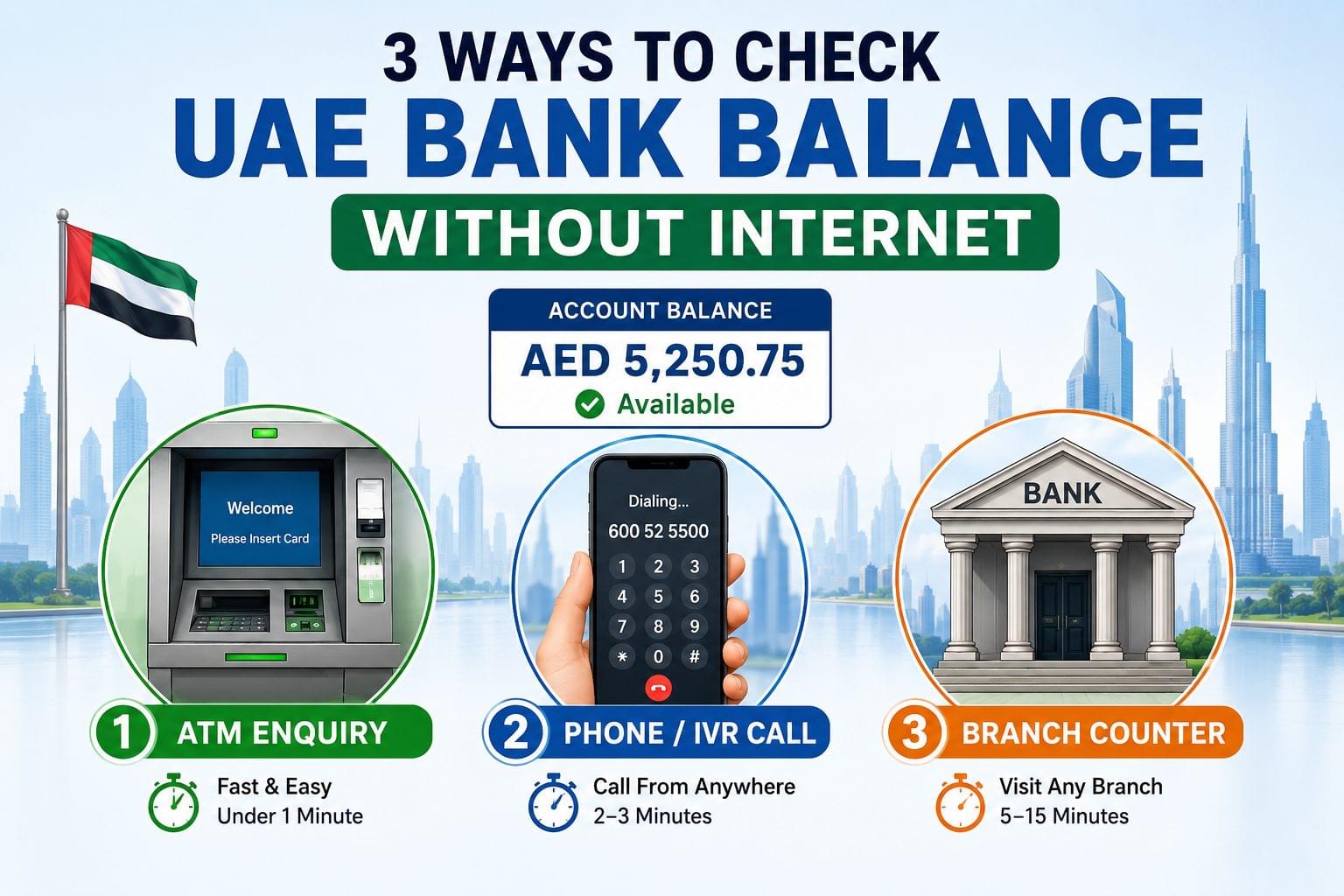
There are 3 offline methods to check a UAE bank balance without internet: ATM enquiry, phone/IVR call, and branch counter visit. Each method works without Wi-Fi, mobile data, or a banking app. Most account holders complete an offline balance check in under 5 minutes.
What Counts as an Offline Balance Check?
An offline balance check is a method that verifies account balance without mobile data, Wi-Fi, or an internet connection. SMS balance alerts, ATM machines, IVR phone lines, and branch counters all qualify. Online banking portals and mobile apps like Payit or Mashreq Neo do not qualify, since both require an active data connection.
Offline methods matter for three groups of account holders: travelers with no active SIM card, residents in low-coverage areas, and users with a lost or malfunctioning smartphone. Each group needs a reliable balance check that does not depend on connectivity, and each group typically prefers a different one of the three offline methods below.
Offline Methods at a Glance
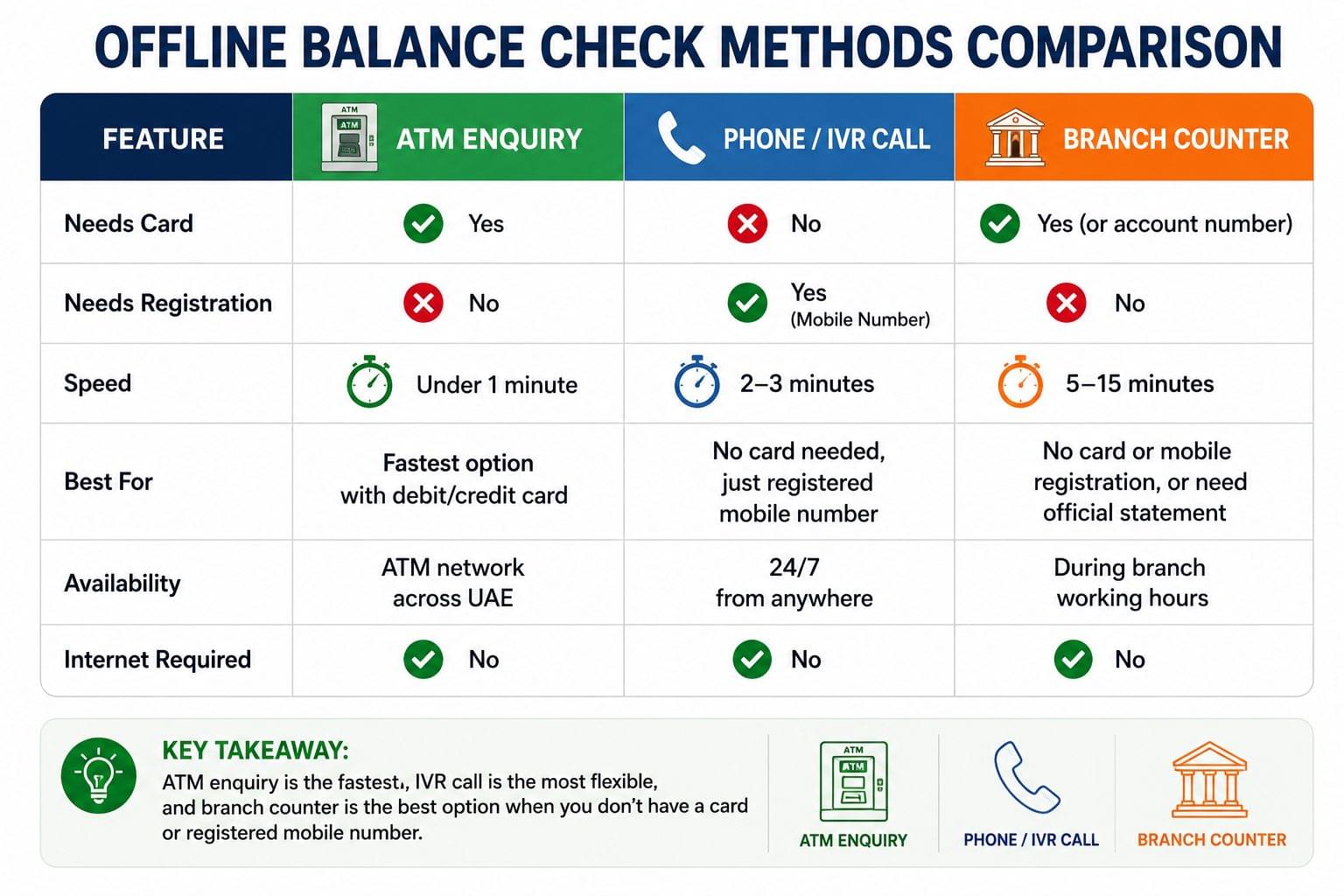
| Method | Needs Card | Needs Registration | Speed |
| ATM Enquiry | Yes | No | Under 1 minute |
| Phone / IVR Call | No | Yes (mobile number) | 2–3 minutes |
| Branch Counter | Yes (or account number) | No | 5–15 minutes |
ATM enquiry is the fastest offline method, requiring only a debit or credit card and a PIN. Phone enquiry is the most flexible method, since it works without a physical card. Branch counter enquiry is the slowest method, but it is the only option for account holders without a card, a registered mobile number, or nearby ATM access.
Check Bank Balance via ATM (No Internet Required)
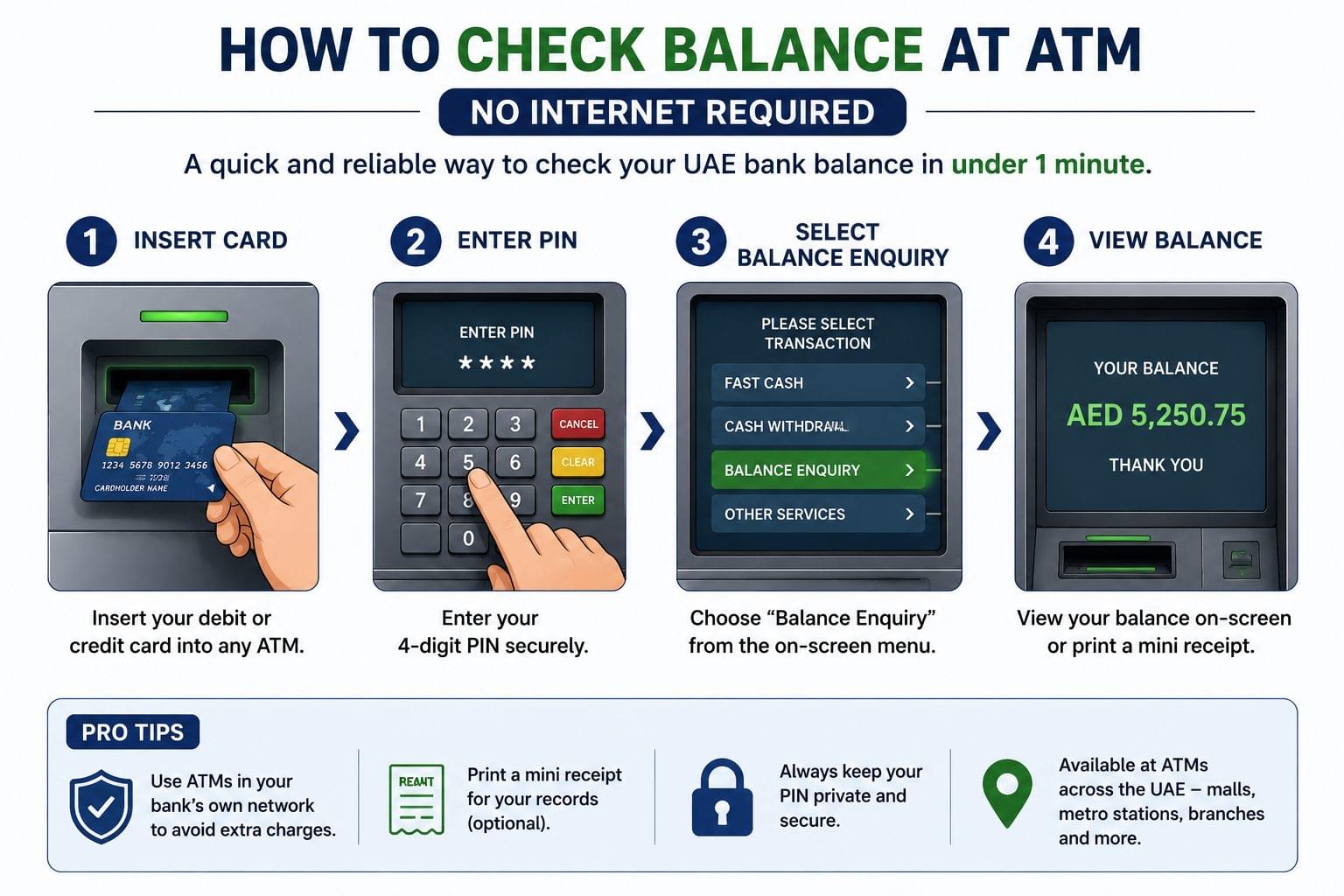
ATM balance enquiry works through the bank’s card network, not through internet or mobile data. This makes it the most reliable offline method across all UAE banks, including FAB bank balance check, Emirates NBD balance check, and Mashreq balance check.
Step-by-Step: ATM Balance Enquiry
To check bank balance via ATM, follow these 4 steps:
- Insert the debit or credit card into any ATM
- Enter the 4-digit PIN
- Select “Balance Enquiry” from the menu
- View the balance on-screen or print a mini receipt
The transaction connects directly to the card network, so the balance shown is real-time rather than delayed. Balance enquiry at a partner-network ATM, outside the account holder’s own bank, sometimes carries a small fee. Account holders can confirm exact fee terms directly with their bank before using a partner ATM.
ATM Balance Check for FAB, Emirates NBD, Mashreq, ADCB, DIB
ATM balance enquiry follows the same 4-step process across major UAE banks, including FAB, Emirates NBD, and ADCB. Card networks differ slightly by bank:
- FAB operates the largest ATM network in the UAE, with machines available at malls, metro stations, and standalone branches
- Emirates NBD ATMs display balance in AED by default, with an option to switch display currency at select machines
- Mashreq ATMs show available balance and current balance separately, which helps identify pending transactions
- ADCB ATMs follow the standard 4-step flow, with balance enquiry available at TouchPoints self-service kiosks as well as standard ATMs
- DIB ATMs follow the same 4-step flow, with Sharia-compliant account labels shown on-screen
Check Bank Balance via Phone (IVR / Call Centre)
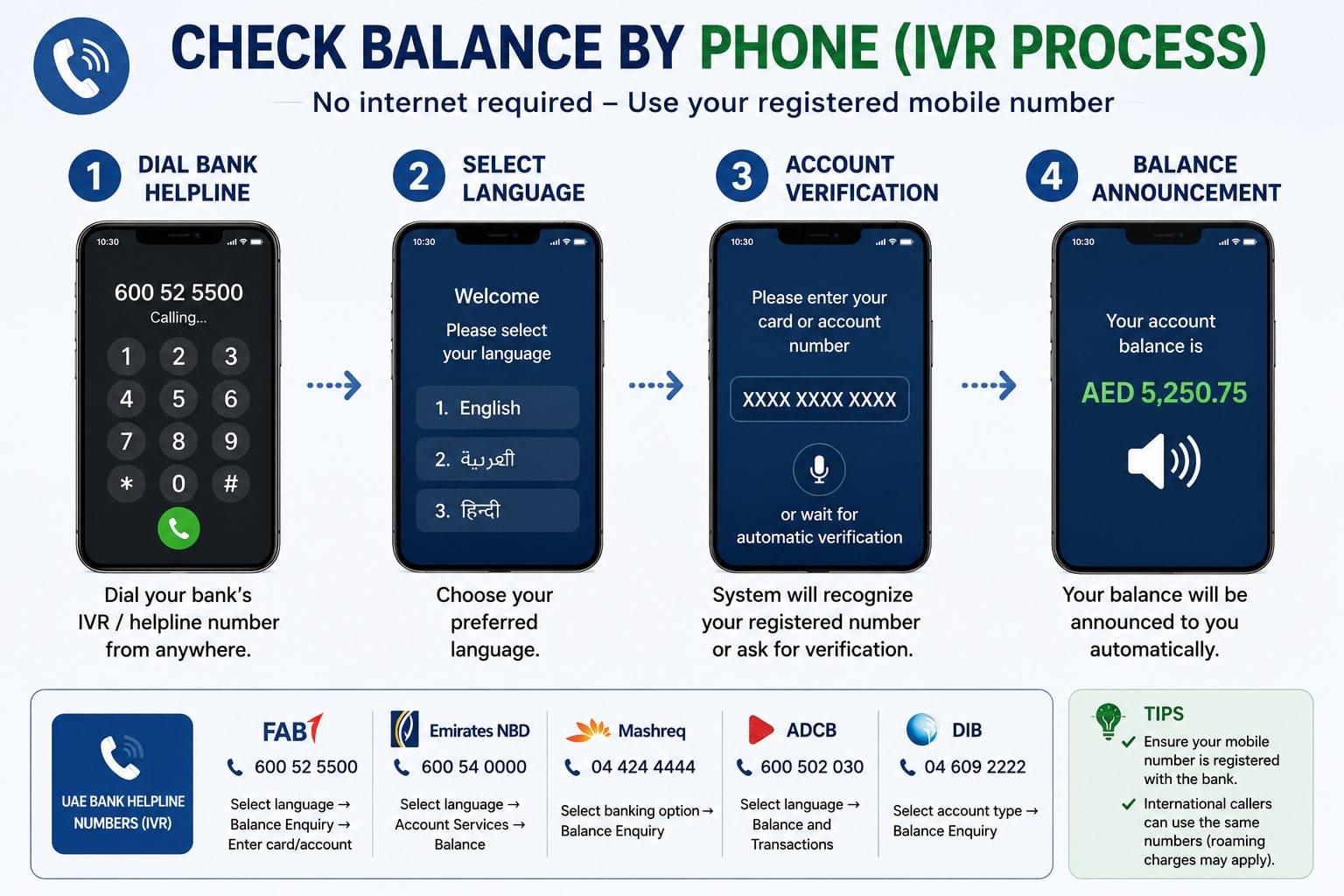
Phone balance check works through an automated IVR (Interactive Voice Response) system. The mobile number must be registered with the bank in advance for the system to recognize the caller automatically.
Bank Helpline Numbers for Balance Enquiry
| Bank | IVR Number | Menu Path |
| FAB | 600 52 5500 | Select language → Balance Enquiry → Enter card/account number |
| Emirates NBD | 600 54 0000 | Select language → Account Services → Balance |
| Mashreq | 04 424 4444 | Select banking option → Balance Enquiry |
| ADCB | 600 502 030 | Select language → Balance and Transactions |
| DIB | 04 609 2222 | Select account type → Balance Enquiry |
To check balance by phone, callers dial the bank’s helpline, select a language, and follow the IVR menu to “Balance Enquiry.” The system recognizes the caller’s registered mobile number automatically in most cases. Callers using an unregistered number, or a number linked to a different account, need additional identity verification, such as a card number or Emirates ID digits.
International callers can use the same helpline numbers from outside the UAE over a standard voice call. Outgoing international calls to UAE landlines typically carry roaming charges from the caller’s home carrier, though the call itself works without mobile data unlike app-based balance checks, which fail entirely without a data connection.
Check Bank Balance at a Branch Counter
Branch counter enquiry works through a bank teller and requires no internet connection. This method suits account holders without a card, a registered phone number, or nearby ATM access.
To check balance at a branch counter, account holders visit any branch of their bank during working hours and request a balance enquiry from a teller. The teller verifies identity, then provides the balance verbally or via a printed statement.
What to Bring for a Counter Balance Enquiry
Branch counter enquiry requires 2 documents:
- Emirates ID (physical card, not a photo or scan)
- Debit/credit card or account number
Tellers can usually verify identity using Emirates ID and account number alone, without a physical card present. Some banks charge a nominal fee for a printed statement, though a verbal balance confirmation is typically free.
Balance Update Timing Across Offline Methods
ATM and phone/IVR balance enquiry both show the real-time balance, since both methods connect directly to the bank’s core system through the card or telecom network. Branch counter balance is also real-time, read directly by the teller from the same core system.
Balance updates after a deposit or transfer typically appear within minutes across all three offline methods. A transaction made at another bank, such as an incoming transfer, can take longer to reflect, depending on the sending bank’s processing time rather than the balance-check method itself.
Offline vs Online: Which Method Is Faster?
ATM enquiry and app-based balance checks are comparably fast, both completing in under a minute. Phone and branch counter methods take longer, since both involve an identity-verification step that app and ATM methods skip.
Offline methods remain necessary despite the extra time, since they work in situations where online methods fail entirely: no active data plan, international roaming restrictions, or a lost or damaged device.
Security Tips for Offline Balance Checks
Offline balance check security follows 3 core rules:
- Never share a card PIN with anyone, including bank staff over the phone
- Use official bank helpline numbers only, confirmed directly from the bank’s balance check guide or physical card
- Avoid reading account details aloud in public places during a phone balance enquiry
Banks never request a full PIN or CVV over an IVR call or at a branch counter. A request for either signals a scam, if it happens outside an official in-person teller transaction at a verified branch.
Language Support
FAB, Emirates NBD, Mashreq, ADCB, and DIB all offer English and Arabic language options at the IVR menu and ATM screen level. Callers select a language at the start of the IVR call, before reaching the balance enquiry menu. ATM screens default to English in most locations, with an on-screen option to switch to Arabic.
Common Issues When Checking Balance Offline
ATM Says “Service Unavailable”
An ATM showing “Service Unavailable” during balance enquiry indicates a temporary network issue between the ATM and the card network, not an account problem. Account holders can try a different ATM from the same bank, or wait several minutes before retrying the same machine.
IVR Doesn’t Recognize Registered Number
An IVR system failing to recognize a registered mobile number usually means one of two things. The number on file does not match the calling number, or the account was recently updated with a new number that has not synced across systems yet. Callers experiencing this issue can provide manual identity verification through the IVR menu, using a card number or Emirates ID digits instead of relying on automatic number recognition.
Frequently Asked Questions
Can I check my UAE bank balance from abroad without an internet connection? Yes — calling the bank’s IVR helpline works from abroad over a standard voice call, subject to the caller’s own roaming rates.
Does ATM balance enquiry cost money? ATM balance enquiry at the account holder’s own bank is free. Enquiry at a different bank’s ATM sometimes carries a small fee, typically AED 2 to AED 5.
What if I don’t have my card for a branch visit? Branch tellers can verify identity using Emirates ID and account number alone, without a physical card, in most cases.
Is SMS a valid offline balance check method? SMS balance alerts notify account holders after a transaction, but do not provide an on-demand balance check. SMS works without internet, though it is not a substitute for ATM, IVR, or counter enquiry.
How often is ATM balance updated? ATM balance reflects the account in real time, since it connects directly to the bank’s core system through the card network.
Can I check balance via IVR if my number changed recently? A recently changed mobile number may not yet be synced with the IVR system. Callers can complete manual identity verification with a card number or Emirates ID in this case.
Do UAE bank ATMs support Arabic? Most UAE bank ATMs display balance in English by default, with an Arabic option available on-screen.