

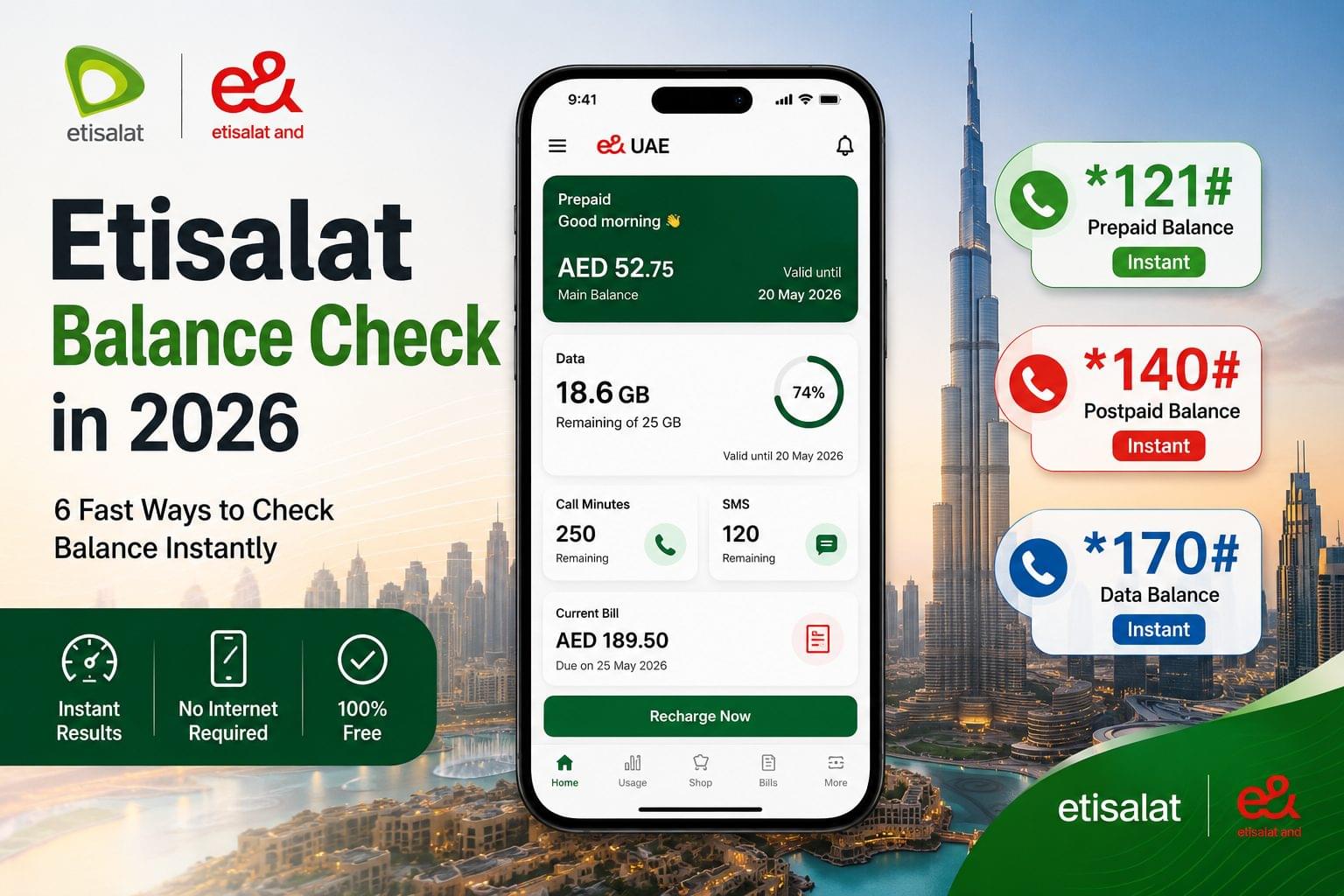
Check Etisalat prepaid balance by dialing *121# from your phone. Check postpaid balance by dialing *140#. Both codes display balance within 3 seconds. Data balance checking uses *170#. All methods are free. No internet connection is required for USSD codes.
Etisalat balance check is the process of verifying remaining credit, data allowances, call minutes, SMS quota, or current bill amount on an Etisalat mobile account. The Emirates Telecommunications Group (e&) operates the UAE’s largest telecom network with 155.4 million subscribers globally across 15 countries.
Regular balance monitoring prevents service interruptions, tracks data consumption patterns, and identifies unauthorized usage before bills arrive.
Etisalat Balance Check Methods Comparison
| Method | Speed | Internet | Account Type | Best For |
| *121# (USSD) | Under 3 seconds | No | Prepaid | Quick daily checks |
| *140# (USSD) | Under 3 seconds | No | Postpaid | Bill verification |
| *170# (USSD) | Under 3 seconds | No | Both | Data-only checks |
| e& UAE App | 5-10 seconds | Yes | Both | Detailed analysis |
| SMS Commands | 10-30 seconds | No | Both | Text record keeping |
| Customer Service 101 | 2-5 minutes | No | Both | Problem resolution |
Check Etisalat Balance via USSD Code
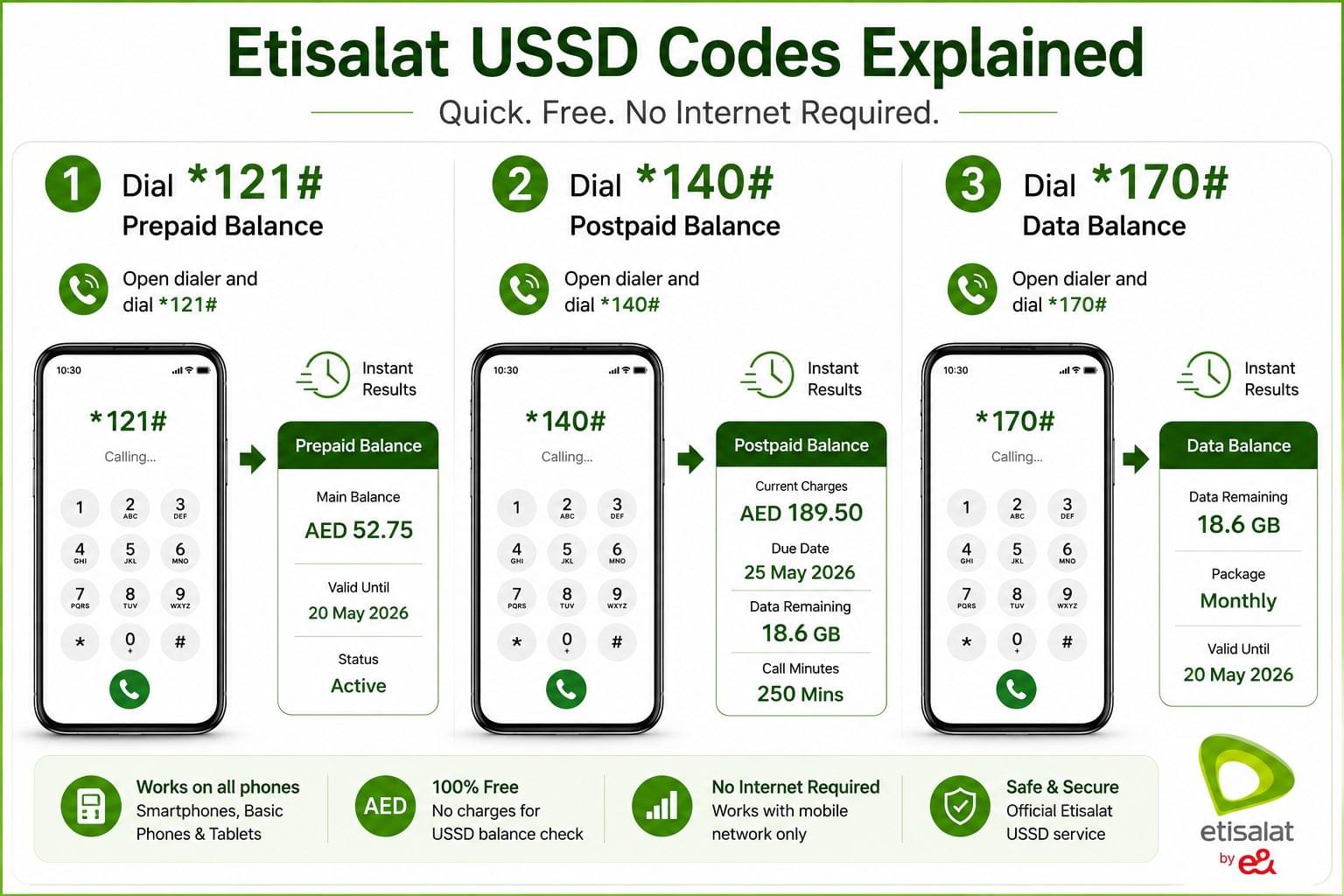
Dial *121# for prepaid or *140# for postpaid to check Etisalat balance instantly via USSD code.
USSD codes work without internet on basic phones, smartphones, and tablets with SIM cards. Results appear within 3 seconds of dialing.
Prepaid Balance Check (121# Code)
Steps for prepaid Wasel customers:
- Open phone dialer
- Enter *121# exactly
- Press call button
- Read balance on screen
- Note validity expiration date
The screen displays three items: credit amount in AED, validity period remaining, and active package status.
Balance validity by recharge amount:
- AED 5-30 recharge = 7-30 days validity
- AED 50-75 recharge = 60 days validity
- AED 100-150 recharge = 90-120 days validity
- AED 200+ recharge = 180-365 days validity
Unused balance forfeits after expiry. Recharge any amount before expiration to extend validity.
Postpaid Balance Check (140# Code)
Steps for postpaid customers:
- Open phone dialer
- Enter *140# exactly
- Press call button
- View current bill amount
- Note payment due date
The screen displays five items: current month charges, outstanding amounts from previous months, payment due date, remaining data allowance, and remaining call minutes.
Data Balance Check (170# Code)
Check data allowance only:
- Open phone dialer
- Enter *170# exactly
- Press call button
- Read remaining data in MB or GB
- Note package expiry date
Data packages have separate validity periods: daily packages last 24 hours, weekly packages last 7 days, monthly packages last 30 days.
Check Etisalat Balance via e& UAE App
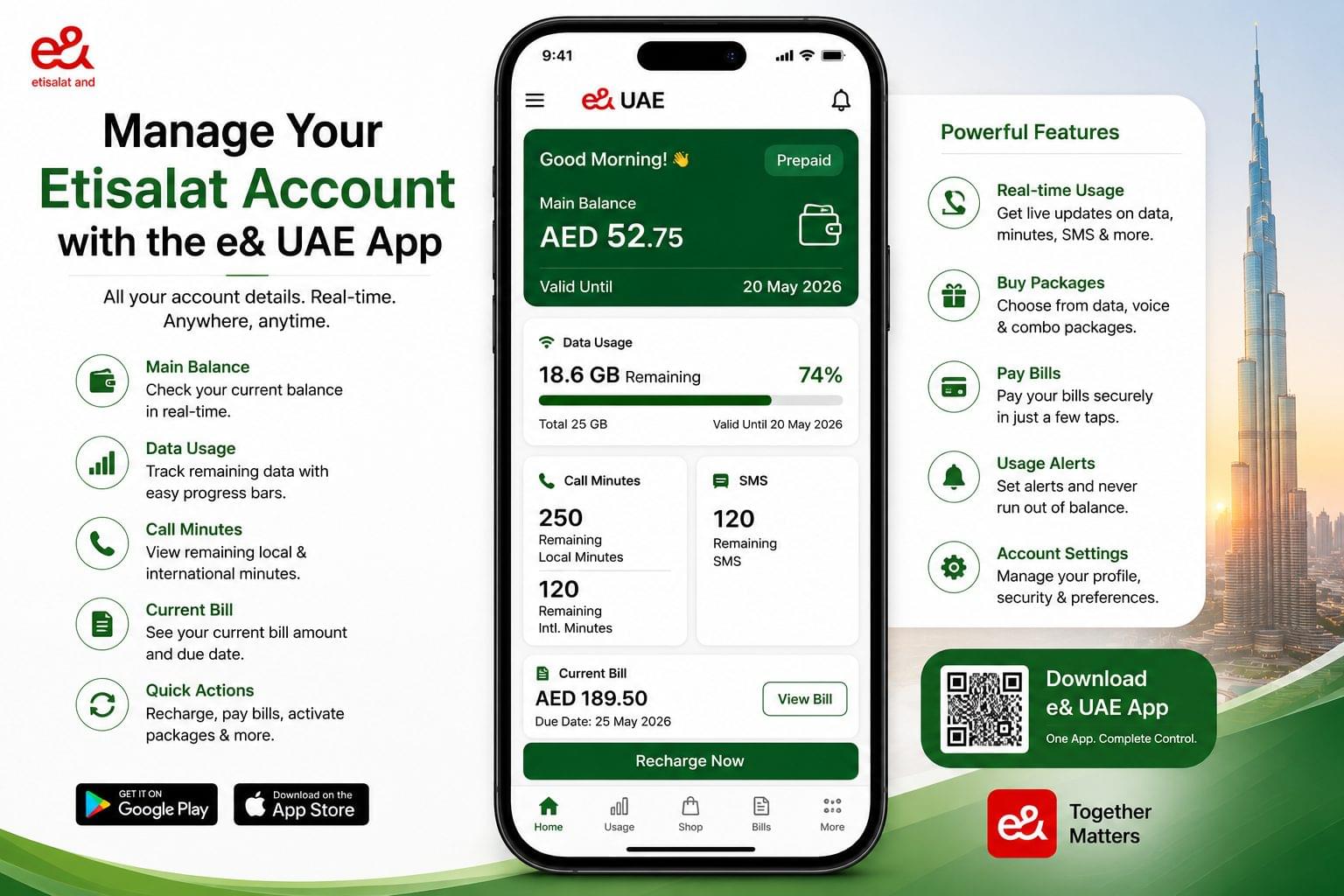
The e& UAE app displays real-time balance, data usage graphs, call minute tracking, SMS quota, and bill amounts with detailed breakdowns.
The application operates on Android devices through Google Play Store, iOS devices through Apple App Store, and Huawei devices through AppGallery.
Download and Installation
Download steps:
- Open device app store
- Search “e& UAE” in store
- Select official Emirates Telecommunications Group app
- Tap Install button
- Open app from home screen
Installation requires 150-200 MB storage space. The app needs Android 8.0 or iOS 13.0 minimum.
Three Login Methods Available
Method 1 – Mobile number with OTP: Enter Etisalat mobile number, tap Continue, receive SMS code within 30 seconds, enter verification code, create password, access dashboard.
Method 2 – UAE PASS: Select UAE PASS option, scan QR code, approve login on UAE PASS app, access dashboard automatically.
Method 3 – Existing credentials: Enter registered mobile number, enter saved password, tap Login button, access dashboard.
Dashboard Display
Prepaid dashboard shows: Main balance displays current credit in AED. Data usage shows remaining GB with percentage bar. Validity countdown shows days remaining. Recent activity lists last 5 transactions including recharges, calls, and data usage.
Postpaid dashboard shows: Current bill displays amount due. Payment due date shows countdown. Data usage shows GB consumed versus limit. Call minutes shows local and international minutes remaining. Additional charges section lists roaming, premium SMS, and add-ons.
The app enables six management functions: balance recharge, bill payment, package activation, usage alerts setup, service cancellation, and account settings modification.
Check Etisalat Balance via SMS Commands
Send keyword BAL to shortcode 1010 to receive balance via SMS within 30 seconds.
SMS commands work on basic phones, feature phones, and smartphones without internet.
Prepaid SMS Commands
Main credit check: Type BAL in capital letters, send to 1010, receive reply within 60 seconds.
Response contains three elements: current balance in AED, validity expiration date, and active package name.
Data balance check: Type DATA in capital letters, send to 1010, read response message.
Response shows remaining data in MB or GB, package type (daily/weekly/monthly), and expiry date.
Postpaid SMS Commands
Bill amount check: Type BAL in capital letters, send to 170, read bill amount in reply.
International minutes check: Type USAGE in capital letters, send to 1012, read remaining minutes.
Additional commands: Type BC to 1012 for credit balance, ICP to 1012 for internet calling plan, NP to 1012 for portability status.
All SMS commands are free. Responses arrive within 10-60 seconds.
Check Etisalat Balance via Online Portal
Visit www.etisalat.ae and login to My Account to view complete balance details, billing history, usage reports, and transaction records.
The portal operates 24/7 on Chrome, Firefox, Safari, and Edge browsers.
Login Process
Two login methods available:
UAE PASS login: Select UAE PASS icon, scan QR code, approve on UAE PASS app, access dashboard.
Mobile number login: Enter registered mobile number, enter password, complete CAPTCHA if shown, click Login.
Dashboard Features
Balance summary shows main balance or current bill. Quick actions provide recharge, payment, and package buttons. Usage section displays data consumption, call usage, and SMS usage. Bills section shows current bill with itemized charges and previous 12 months bills for download.
Download bills as PDF files. Export usage data to CSV format. Print transaction receipts directly.
Check Etisalat Balance via Customer Service
Call 101 from Etisalat number for automated balance inquiry, live representative assistance, and detailed charge explanations toll-free 24/7.
Automated Balance Check
From Etisalat number: Dial 101, select language (Press 1 for Arabic or Press 2 for English), listen to menu, select balance inquiry, listen to announcement.
From non-Etisalat number: Dial +971 4 390 0101. Standard calling rates apply.
Live Representative Assistance
Representatives provide: detailed charge explanations, USSD troubleshooting, clarification on deductions, package recommendations, and billing dispute investigation.
Representatives resolve five common issues: balance not updating after recharge, unauthorized charges investigation, service activation failures, auto-renewal problems, and payment processing errors.
Check Etisalat Balance While Roaming
Use e& UAE app connected to WiFi for free international balance checking without roaming charges.
Free Method
Connect to hotel WiFi or public hotspot, open e& UAE app, login with credentials, view balance. No roaming charges apply.
Paid Method
Dial +9714004121 from Etisalat number abroad. International calling rates apply (AED 2-10 per minute).
Recommended preparation: Download e& app before departure, enable notifications, save +9714004121 in contacts, enable UAE PASS for secure login.
USSD codes (*121#, *140#, *170#) may not function on international networks. SMS commands often fail while roaming. e& app via WiFi is the recommended method.
Understanding Etisalat Balance Types
Etisalat accounts contain five balance categories: main balance, data balance, call minutes balance, SMS balance, and bill balance.
Main Balance (Prepaid Credit)
Main balance is primary credit measured in AED used for calls, SMS, and data when packages expire.
After expiry, unused balance forfeits completely. Number remains active for incoming calls only for 90 days. Permanent deactivation occurs after 90 days without recharge.
Data Balance
Data balance is internet allowance measured in MB or GB operating separately from main credit.
Three package types exist: daily packages (24-hour validity), weekly packages (7-day validity), and monthly packages (30-day validity).
Some packages deduct charges automatically from main balance. Disable auto-renewal in e& app or dial *170# menu.
Call Minutes, SMS, and Bill Balance
Call minutes balance: Remaining local calling minutes in active packages. Postpaid resets monthly. Prepaid expires with package.
SMS balance: Remaining text messages allocated in package. Local and international SMS count separately.
Bill balance: Total amount due for postpaid including services, extras, VAT, and outstanding amounts. Payment due date is fixed monthly.
Common Etisalat Balance Check Problems
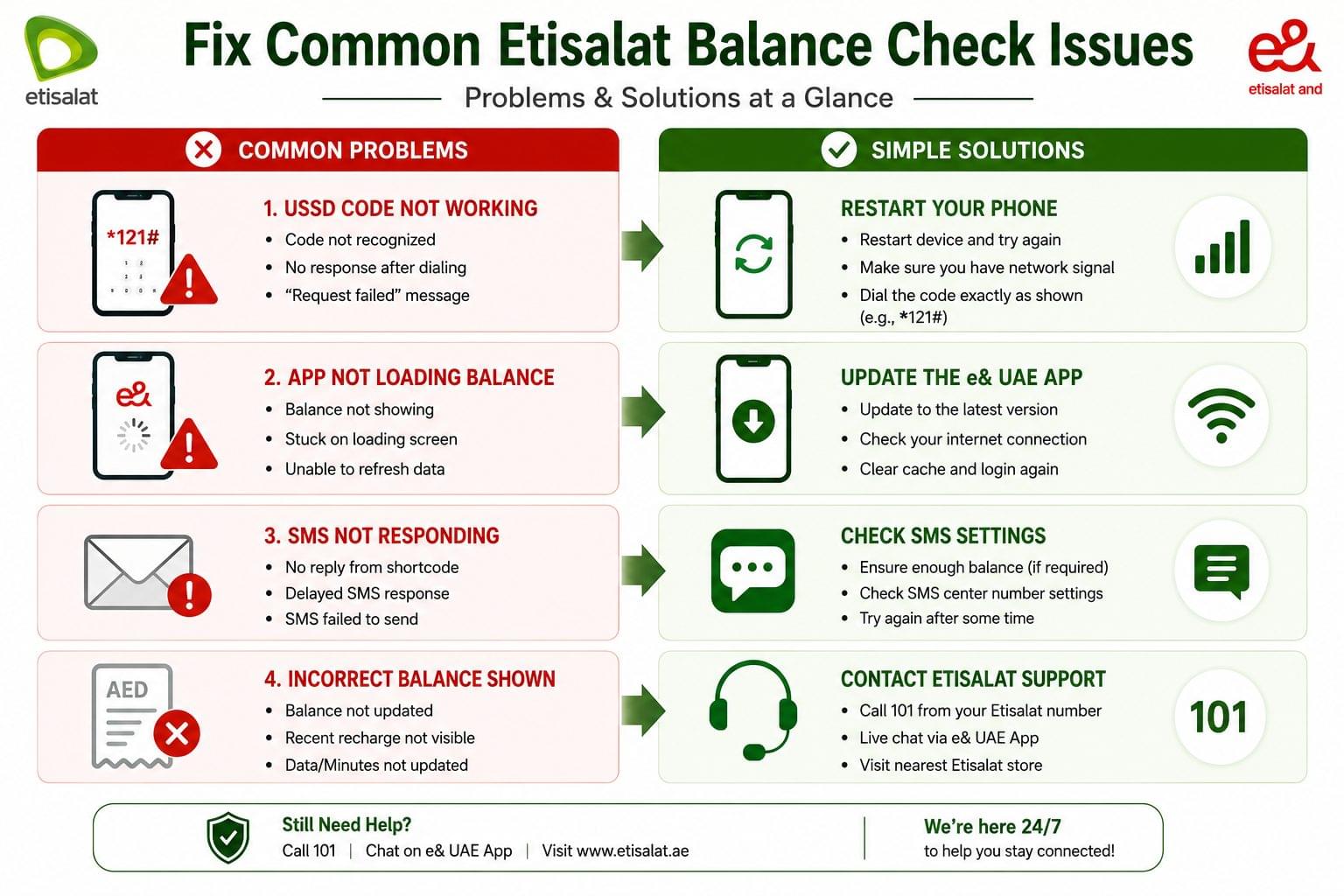
Four common problems affect Etisalat balance checking: USSD codes failing, app not displaying data, incorrect balances showing, and SMS commands not responding.
Problem 1: USSD Code Not Working
Solutions: Verify signal bars show 3 or more. Restart phone to reset connection. Enable USSD in phone Settings under Network menu. Ensure asterisk (*) at start and pound (#) at end. Confirm calling from Etisalat SIM on dual-SIM devices.
Problem 2: e& App Not Showing Balance
Solutions: Check mobile data or WiFi is active. Update app from store. Clear app cache in phone Settings. Pull down dashboard to refresh. Uninstall and reinstall if problems persist.
Problem 3: Incorrect Balance Showing
Solutions: Wait 5-10 minutes after recharge for processing. Dial 1359# to verify correct number. Restart device completely. Contact 101 if balance remains incorrect after 30 minutes.
Problem 4: SMS Commands Not Responding
Solutions: Type keywords in capital letters (BAL not bal). Send to exact shortcode (1010, 170, or 1012). Verify SMS service is active. Ensure 3 or more signal bars. Prepaid needs minimum AED 0.25 balance for SMS.
Complete Etisalat USSD Codes Reference
| Code | Purpose | Account Type |
| *121# | Check main balance and validity | Prepaid |
| *140# | Check current bill and benefits | Postpaid |
| *170# | Check data balance | Both |
| *101# | Check all allowances menu | Both |
| *142# | Check remaining credit limit | Postpaid |
| 1359# | Check your Etisalat number | Both |
| 13530# | Check validity period | Prepaid |
| *050# | Check deal of the day | Prepaid |
Etisalat vs Du Comparison
| Feature | Etisalat | Du |
| Prepaid code | *121# | *135# then option 1 |
| Postpaid code | *140# | *135# then option 2 |
| Data code | *170# | *135# then option 3 |
| Customer service | 101 | 155 |
| SMS check | BAL to 1010 | BAL to 1355 |
Etisalat advantages: More dedicated USSD codes, simpler structure, wider international roaming coverage.
Du advantages: Unified menu system through *135#, competitive pricing, faster customer service.
When to Contact Customer Service
Contact 101 immediately for five critical situations: balance errors despite multiple checks, unexpected charges without explanation, all checking methods failing simultaneously, unusual account activity, or billing disputes requiring investigation.
Additional support channels: Visit Customer Happiness Centers (8 AM-8 PM), use live chat on www.etisalat.ae (8 AM-midnight), email through portal (24-48 hour response), or contact @etisalat on Twitter.
Frequently Asked Questions
What is the fastest code to check Etisalat balance?
Dial *121# for prepaid or *140# for postpaid. Both display balance within 3 seconds without internet.
How do I check balance without internet?
Use three methods: dial *121# or *140#, send SMS “BAL” to 1010, or call 101. All work offline.
Does checking balance cost money?
No. All methods are completely free including USSD codes, SMS, app, portal, and 101 calls.
**What is the difference between 121# and 140#? *121# is for prepaid showing credit and validity. *140# is for postpaid showing bill amount and due date.
Why is my balance not updating after recharge?
Updates require 5-10 minutes processing. Restart device and check using *121#. Contact 101 if not updated within 30 minutes.
How can I get alerts for low balance?
Open e& app, navigate to Settings, select Notifications, enable Balance Alerts, set threshold amount like AED 20.
What does balance validity mean?
Balance validity is the expiration date for prepaid credit. Validity ranges from 7 to 365 days based on recharge amount.
Can I check balance while traveling abroad?
Yes. Use e& app via WiFi for free checking or dial +9714004121 (international rates apply).
What happens if my prepaid balance expires?
Unused balance forfeits completely. Number stays active for incoming calls for 90 days. Recharge within 90 days restores services.