

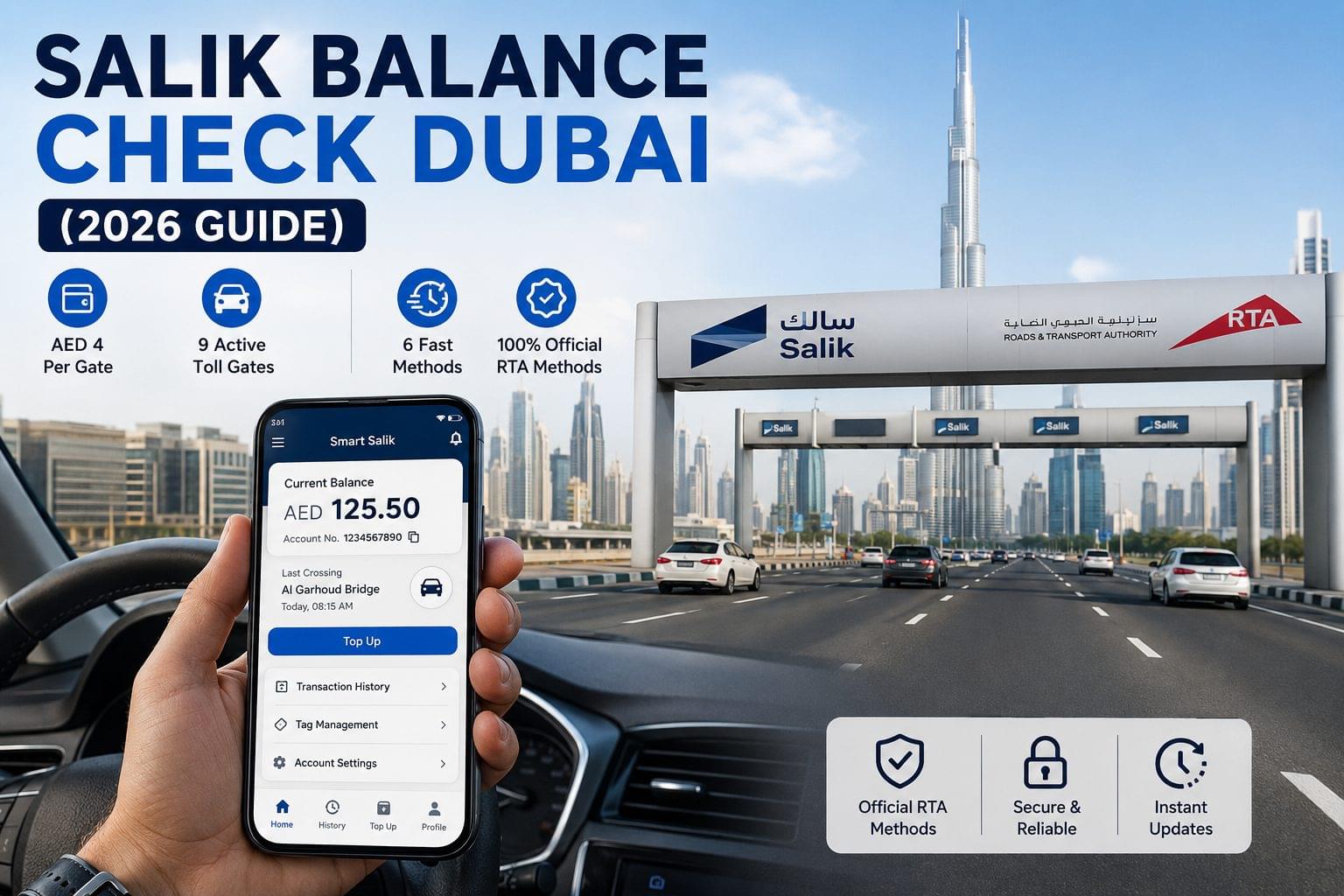
6 methods exist to check a Salik balance in Dubai: the Smart Salik app, salik.ae online portal, SMS to 5959, USSD code *121*4*1#, phone call to 800-72545, and an RTA Customer Happiness Centre. All 6 methods are free to use, with the exception of standard SMS charges applied by Etisalat (e&) and du when using the SMS route.
Salik is Dubai’s electronic road toll system, operated by RTA (Roads and Transport Authority), that deducts AED 4 per gate crossing from a prepaid account via an RFID tag mounted on the vehicle’s windscreen. A Salik account requires a minimum balance of AED 10 to keep the tag active at toll gates, and a minimum balance of AED 50 to activate a new Salik tag. According to RTA Dubai, the AED 4 toll rate per gate has remained unchanged since Salik launched in 2007.
Salik operates across 9 active toll gates in Dubai, including Al Garhoud Bridge, Al Maktoum Bridge, Sheikh Zayed Road (Safa Park and Al Seer), Airport Tunnel, Meryal Tunnel, Al Shindagha Tunnel, Business Bay Crossing, and Darb Al Ahmar Gate.
For a full overview of balance checking across UAE banks, telecom providers, transit cards, and toll systems, visit the UAE balance check guide.
What Is Salik?
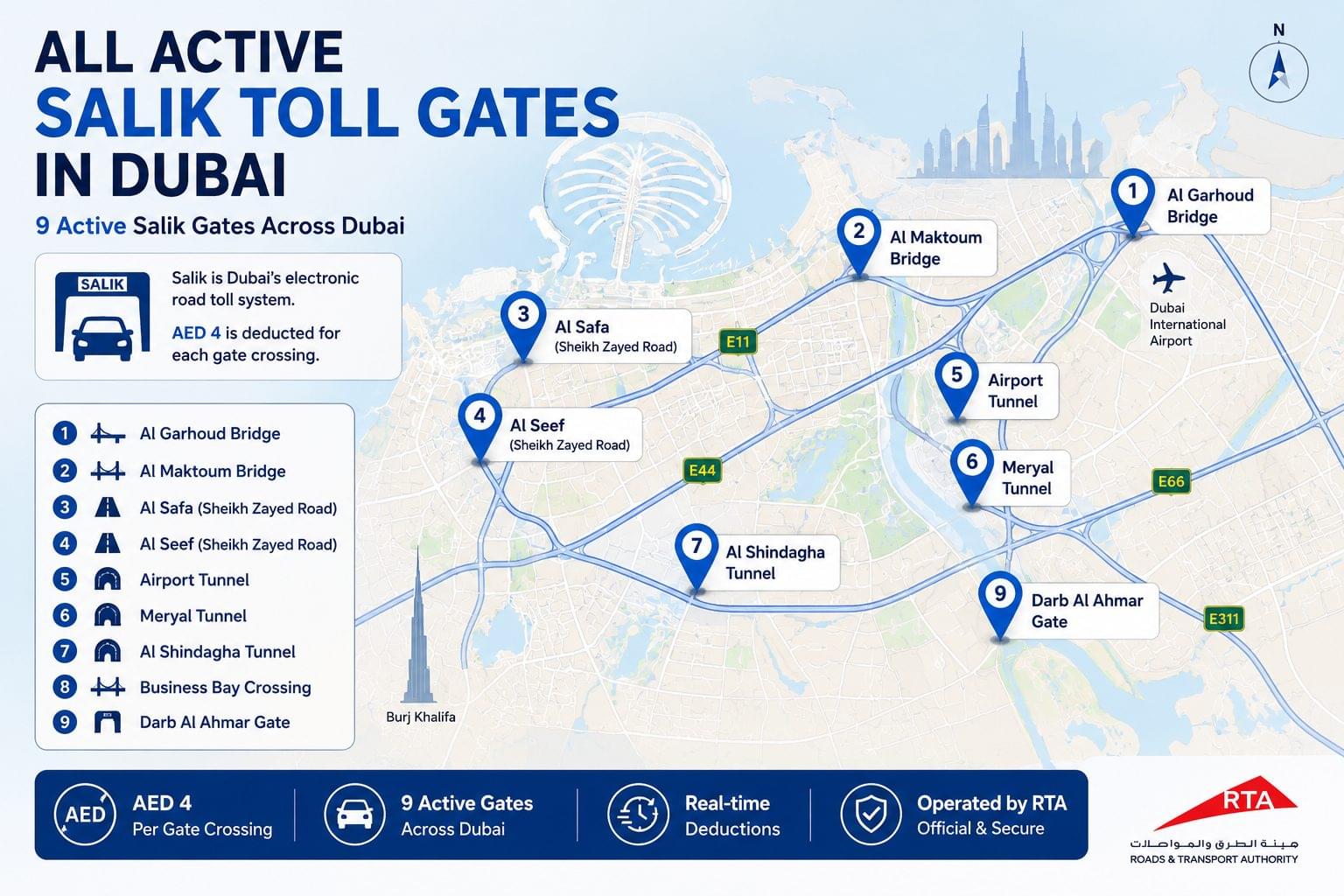
Salik is Dubai’s electronic road toll system, operated by RTA (Roads and Transport Authority), that charges AED 4 per gate crossing using an RFID tag mounted on a vehicle’s windscreen. Salik operates across 9 active toll gates in Dubai, including Al Garhoud Bridge, Al Maktoum Bridge, Sheikh Zayed Road (Safa Park and Al Seer), Airport Tunnel, Meryal Tunnel, Al Shindagha Tunnel, Business Bay Crossing, and Darb Al Ahmar Gate.
Salik accounts are prepaid. Every gate crossing deducts AED 4 from the registered account balance in real time. A Salik account requires a minimum balance of AED 10 to keep the tag active at toll gates, and a minimum balance of AED 50 to activate a new Salik tag. According to RTA Dubai, the AED 4 toll rate per gate has remained unchanged since Salik launched in 2007.
Salik Balance Check Methods at a Glance
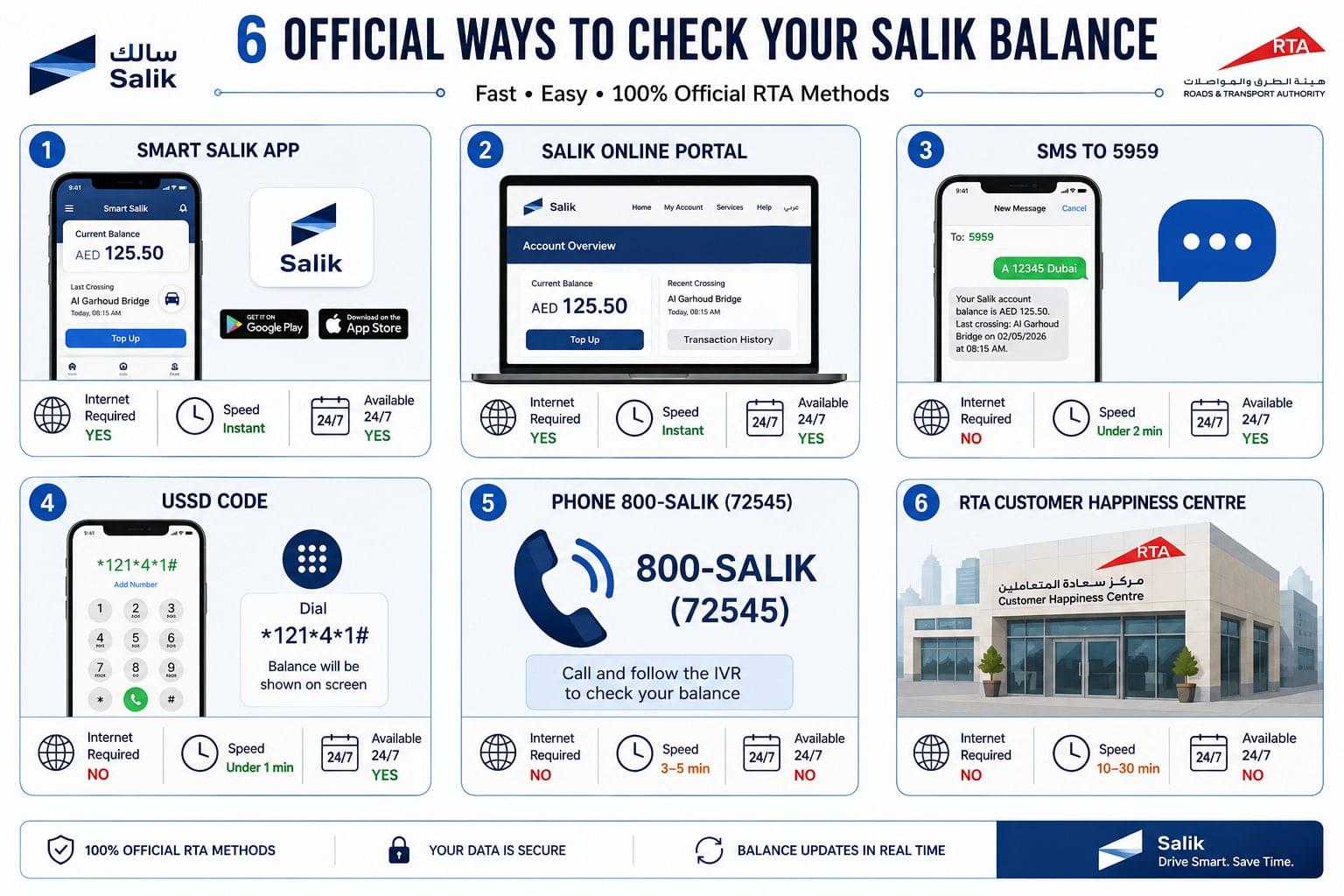
6 verified methods exist to check a Salik balance in Dubai, covering online portals, mobile apps, SMS, USSD codes, phone calls, and RTA service centres.
| Method | Speed | Requires Internet | Requires Registration | Available 24/7 |
| Smart Salik App | Instant | Yes | Yes | Yes |
| Salik Online Portal | Instant | Yes | Yes | Yes |
| SMS to 5959 | Under 2 minutes | No | No | Yes |
| USSD Code | Under 1 minute | No | No | Yes |
| Phone 800-SALIK (72545) | 3–5 minutes | No | No | No (business hours) |
| RTA Customer Service Centre | 10–30 minutes | No | Yes | No (business hours) |
How to Check Salik Balance via Smart Salik App
To check a Salik balance via the Smart Salik app, open the app on a registered device and the current account balance displays on the home dashboard after login.
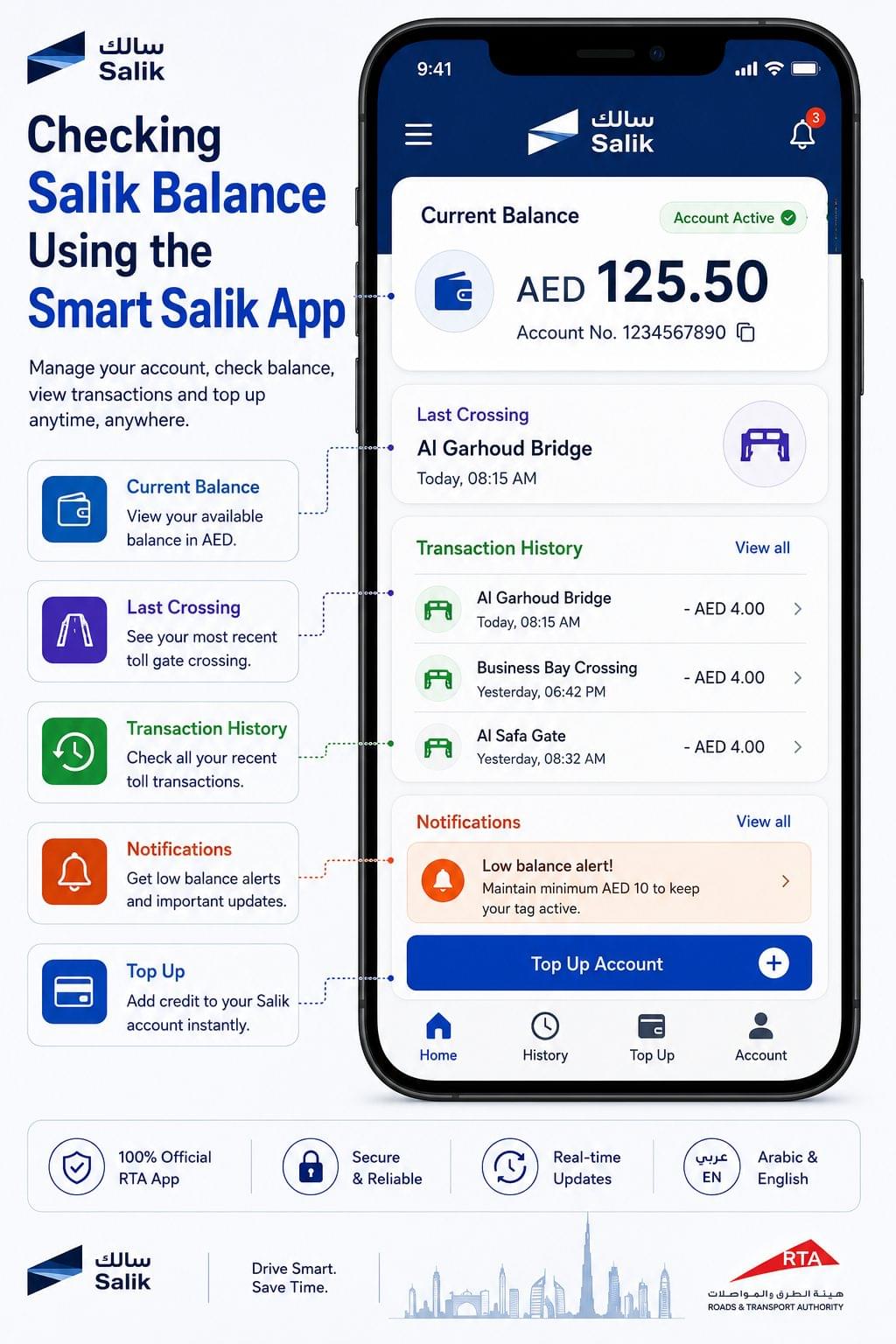
The Smart Salik app is the official RTA mobile application for Salik account management, available on Google Play and the Apple App Store.
Step-by-step: Salik balance check via Smart Salik app
- Download the Smart Salik app from Google Play or the Apple App Store.
- Log in using the registered Emirates ID number or Salik account number.
- Enter the account password on the login screen.
- View the current Salik balance on the home dashboard it displays automatically after login.
- Tap “Transaction History” to review individual gate crossings and deduction amounts.
What the Smart Salik app shows:
- Current account balance in AED
- Date and time of the most recent gate crossing
- Gate name for each transaction (e.g. Al Garhoud Bridge, Business Bay Crossing)
- AED 4 deduction per crossing confirmed per transaction
- Low-balance notification threshold settings
The Smart Salik app supports both Arabic and English. The balance updates within 5 minutes of a gate crossing.
How to Check Salik Balance Online via the Official Portal
To check a Salik balance online, visit salik.ae, log in with the registered account credentials, and the current balance appears on the account dashboard.
The official Salik online portal at salik.ae provides full account management, including balance display, top-up, transaction history, and tag management. Account login requires the registered mobile number or Emirates ID linked to the Salik account.
Step-by-step: Salik balance check online
- Open a browser and navigate to salik.ae.
- Click “My Account” or “Login” in the top navigation.
- Enter the registered mobile number or account number in the login field.
- Enter the account password.
- Click “Login” to access the account dashboard.
- View the current Salik balance on the dashboard home page it displays immediately after login.
- Click “Transaction History” to view a dated list of gate crossings and deductions.
Information available on the Salik online portal:
- Current account balance
- Account number and tag ID
- Full transaction history with gate names, dates, and times
- Top-up history and amounts
- Tag activation and status information
The Salik online portal supports Arabic and English. Balance data updates in real time following each gate crossing.
How to Check Salik Balance via SMS
To check a Salik balance via SMS, send the vehicle plate number to 5959 from any UAE mobile number, and an automated reply returns the current balance within 2 minutes.
The SMS balance check method requires no internet connection and functions on any UAE mobile network, including Etisalat (e&) and du prepaid and postpaid SIMs.
Step-by-step: Salik balance check via SMS
- Open the SMS messaging app on any UAE mobile phone.
- Create a new message addressed to 5959.
- In the message body, type the vehicle plate number (e.g. A 12345 Dubai).
- Send the message.
- Receive an automated SMS reply from RTA within 2 minutes containing the current Salik balance in AED.
SMS format example:
- Send to: 5959
- Message: A 12345 Dubai
- Reply: “Your Salik account balance is AED [amount]. Last crossing: [gate name] on [date] at [time].”
The SMS service is available 24 hours a day, 7 days a week. Standard SMS rates from the mobile operator apply.
How to Check Salik Balance via USSD Code
To check a Salik balance via USSD, dial the Salik USSD code from a UAE registered mobile number and follow the automated menu to retrieve the account balance without an internet connection.
The USSD balance check method provides near-instant balance retrieval and works on basic mobile phones without a data plan.
Step-by-step: Salik balance check via USSD
- Open the phone dialler on any UAE mobile device.
- Dial *121*4*1# (RTA Salik USSD service code).
- Press the call button to initiate the USSD session.
- Select the “Salik Balance” option from the automated menu.
- Enter the Salik account number or vehicle plate number when prompted.
- View the current balance displayed on screen within 30 seconds.
USSD sessions do not consume mobile data. The service is available 24 hours a day, 7 days a week on Etisalat (e&) and du networks.
Drivers who prefer not to use apps or SMS to check their balance without internet can also follow the UAE bank balance check without internet guide for offline methods across other UAE financial accounts.
How to Check Salik Balance by Phone
To check a Salik balance by phone, call the Salik customer care line at 800-SALIK (800-72545) and follow the IVR prompts to retrieve the account balance using the registered account number or vehicle plate number.
The phone balance check method connects to RTA-trained agents for troubleshooting, dispute resolution, and balance verification in a single call.
Step-by-step: Salik balance check by phone
- Dial 800-72545 (800-SALIK) from any UAE mobile or landline.
- Select language preference (Arabic or English) from the IVR menu.
- Select “Account Balance” or “Salik Services” from the main menu.
- Enter the Salik account number, vehicle plate number, or registered Emirates ID when prompted by the IVR system.
- Listen as the IVR announces the current account balance in AED.
- Press 0 to connect with a live agent for additional assistance, if needed.
Salik phone service hours:
- Automated IVR: 24 hours, 7 days a week
- Live agents: Sunday to Thursday, 7:30 AM to 3:30 PM (UAE time)
The 800-SALIK line is a toll-free number. No call charges apply from UAE fixed or mobile numbers.
How to Check Salik Balance at an RTA Service Centre
To check a Salik balance at an RTA service centre, visit any RTA Customer Happiness Centre in Dubai with the vehicle registration card and Emirates ID, and a service agent retrieves the balance in person.
RTA operates 14 Customer Happiness Centres across Dubai, located in Deira, Bur Dubai, Al Barsha, Al Quoz, Muhaisnah, Jebel Ali, Hatta, and additional districts. In-person balance verification also covers tag replacement, account reactivation, and dispute resolution for disputed crossings.
Step-by-step: Salik balance check at RTA service centre
- Locate the nearest RTA Customer Happiness Centre at rta.ae/en/services/customer-happiness-centres.
- Bring the original vehicle registration card (Mulkiya) and Emirates ID.
- Take a queue number at the service centre entrance.
- Present the vehicle registration card to the service agent.
- View the Salik account balance retrieved and displayed by the agent on a service screen.
- Request a printed account statement, if required.
RTA Customer Happiness Centre operating hours:
- Sunday to Thursday: 7:30 AM to 3:30 PM
- Closed Friday, Saturday, and public holidays
Which Salik Balance Check Method Is Fastest?
The SMS method to 5959 is the only channel that returns balance data in a natural language reply without login, making it the most accessible option for first-time Salik users and drivers without a smartphone.
| Method | Best For | Limitation |
| Smart Salik App | Daily balance monitoring with transaction history | Requires smartphone and internet |
| Online Portal (salik.ae) | Full account management and top-up | Requires internet and login credentials |
| SMS to 5959 | Quick check without internet or login | Reply takes up to 2 minutes |
| USSD Code | No data, no app required | Menu navigation required |
| Phone 800-72545 | Dispute resolution and live support | Live agents only on weekdays |
| RTA Service Centre | In-person support and tag issues | Travel required; limited hours |
Salik Balance Not Updating? Common Fixes
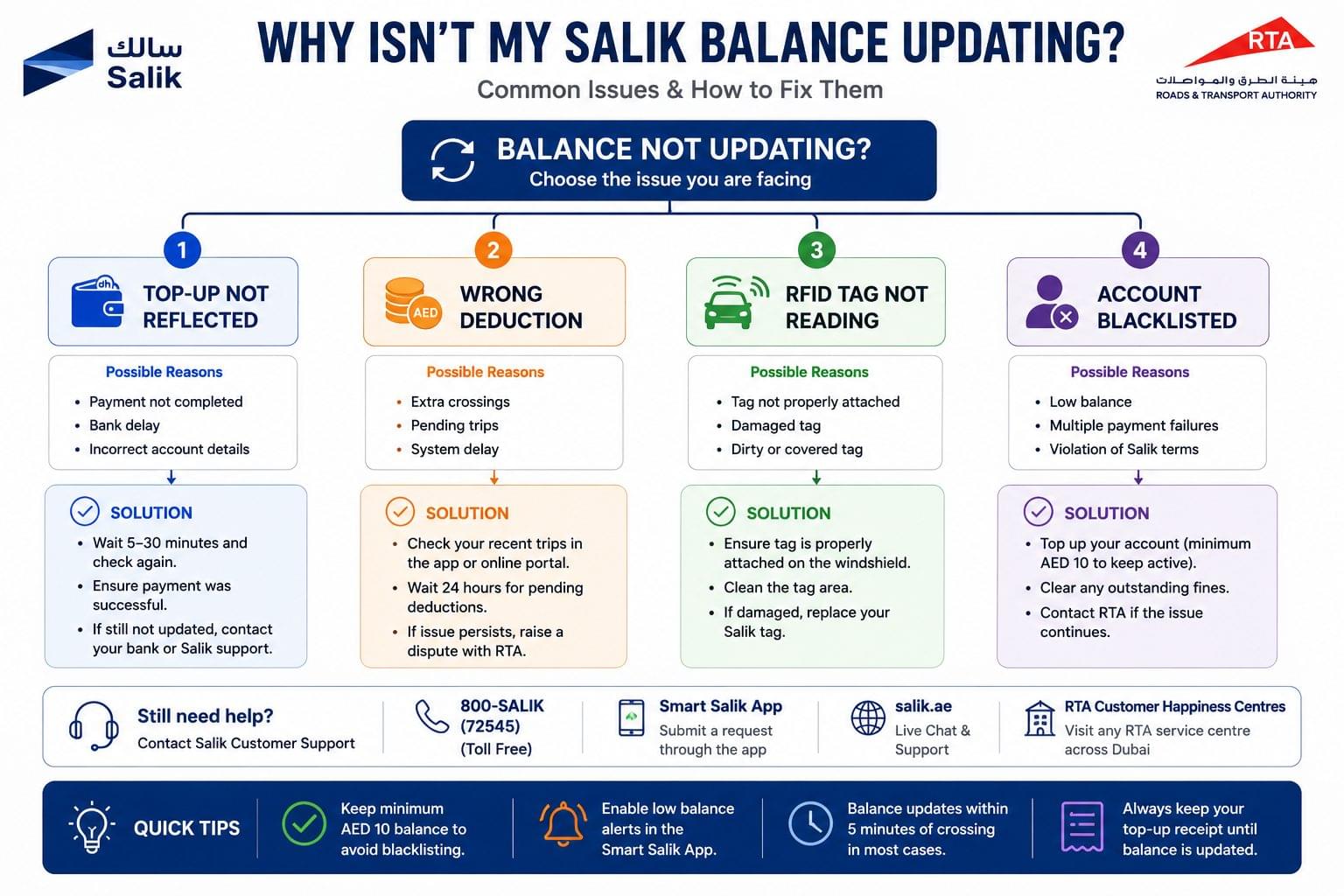
A Salik balance fails to update due to 4 distinct causes, each with a specific resolution: failed top-up processing, unrecognised gate deductions, tag read failures, and account blacklisting.
Why Is the Salik Balance Not Updated After a Top-Up?
A Salik balance updates within 15 minutes of a successful top-up via the Smart Salik app, salik.ae, or an RTA service centre. A balance that does not update after 15 minutes indicates one of 3 causes: a failed payment transaction, a system processing delay, or a mismatch between the top-up account and the registered tag ID. Verify the top-up confirmation SMS from RTA. Contact 800-72545 with the transaction reference number, if no confirmation SMS was received within 5 minutes of payment.
Why Is a Salik Balance Deducted Without Passing a Toll Gate?
A Salik balance deduction without a corresponding gate crossing results from 3 scenarios: a vehicle travelling under a toll gantry on an adjacent non-tolled lane, an RFID read error from a damaged or incorrectly mounted tag, or a delayed ANPR charge from a previous crossing processed late. Dispute any unrecognised crossing within 30 days of the transaction date by calling 800-72545 or visiting an RTA Customer Happiness Centre with the vehicle registration card and a copy of the Salik transaction history.
Why Is the Salik Tag Not Reading at the Gate?
A Salik tag that fails to read at a gate generates an automatic number plate recognition (ANPR) capture of the vehicle, and the AED 4 toll is deducted from the account within 24 hours. A tag reading failure results from 3 causes: incorrect tag placement on the windscreen (the tag mounts behind the rear-view mirror, centred, with the antenna facing outward), a low or zero account balance causing tag blacklisting, or a damaged RFID chip. Replace a damaged Salik tag at any RTA Customer Happiness Centre. The replacement tag fee is AED 36.75.
Why Is the Salik Account Blacklisted?
A Salik account is blacklisted when the balance falls below AED 10. A blacklisted account still records gate crossings via ANPR, and the deficit accumulates as a negative balance. The vehicle is barred from vehicle registration renewal (Mulkiya) until the negative balance plus an AED 100 penalty fee is settled. Top up via the Smart Salik app, salik.ae, or an RTA service centre to reactivate the tag immediately.
Salik Top-Up Methods
4 top-up methods exist for Salik accounts, including the Smart Salik app, salik.ae portal, RTA Customer Happiness Centres, and authorised retail outlets such as Enoc, Eppco, and Carrefour.
- Smart Salik app Top up using a debit or credit card saved in the app; balance updates within 5 minutes.
- salik.ae online portal Top up using a Visa, Mastercard, or Amex card; minimum top-up amount is AED 100.
- RTA Customer Happiness Centre Top up via cash or card at any of the 14 RTA centres across Dubai.
- Authorised retail outlets Top up via Enoc and Eppco petrol stations, Carrefour hypermarkets, and selected exchange houses across Dubai.
The minimum top-up amount via all channels is AED 100. The maximum account balance permitted is AED 2,000.
Frequently Asked Questions About Salik Balance Check
What is the minimum Salik balance to avoid blacklisting? The minimum Salik balance to avoid blacklisting is AED 10. A balance below AED 10 triggers automatic blacklisting of the Salik tag. Gate crossings are still recorded via ANPR while blacklisted, and the deficit accumulates as a negative balance charged to the account.
How do I check my Salik balance without the app? Check a Salik balance without the app by sending the vehicle plate number via SMS to 5959, by dialling the USSD code *121*4*1#, or by calling 800-72545. All 3 methods work without the Smart Salik app and without an internet connection. For other offline balance check methods across UAE accounts, see the UAE bank balance check without internet guide.
Does checking Salik balance cost anything? Checking a Salik balance costs nothing via the Smart Salik app, salik.ae, USSD, or the 800-72545 phone line. Standard SMS charges from the mobile operator apply when using the SMS method to 5959.
How often does the Salik balance update after a gate crossing? The Salik balance updates within 5 minutes of a gate crossing on the Smart Salik app and salik.ae. The SMS method reflects the balance within 2 minutes of sending the request. The AED 4 deduction posts to the account in real time at the gate.
Can a Salik balance be checked from outside the UAE? A Salik balance is checked from outside the UAE via the Smart Salik app and the salik.ae online portal. Both platforms are accessible internationally. The SMS method to 5959 and the USSD code *121*4*1# function only on UAE mobile networks.
What happens if a Salik balance reaches zero? A Salik balance that reaches zero results in automatic tag blacklisting. Gate crossings are still recorded via ANPR and the deficit accumulates. The vehicle registration cannot be renewed until the negative balance and an AED 100 penalty fee are settled in full.
How is a Salik account number found? A Salik account number is found on the original Salik registration confirmation SMS sent by RTA at the time of tag activation, on the salik.ae online portal under “My Account,” or by calling 800-72545 with the vehicle plate number and Emirates ID.
Is the Salik balance transferable between vehicles? The Salik balance is not transferable between vehicles. Each Salik tag and account is registered to one specific vehicle plate number. A vehicle owner with multiple vehicles maintains separate Salik accounts with separate balances for each registered vehicle.
What is the Salik toll charge per gate crossing in 2026? The Salik toll charge per gate crossing is AED 4 in 2026. The AED 4 rate applies uniformly across all 9 active Salik toll gates in Dubai, including Al Garhoud Bridge, Sheikh Zayed Road, Airport Tunnel, Meryal Tunnel, Al Shindagha Tunnel, and Business Bay Crossing. No peak or off-peak pricing variations apply.
How long does a Salik top-up take to reflect in the account? A Salik top-up reflects in the account within 15 minutes via the Smart Salik app and salik.ae. Top-ups made at RTA Customer Happiness Centres reflect immediately. A top-up confirmation SMS from RTA confirms successful processing.