

Checking prepaid card balances in the UAE presents 3 common frustrations for cardholders: long wait times on customer service calls, unclear portal access instructions, and delayed balance updates after salary credits. PPC Magnati prepaid card inquiry solves these issues through a dedicated online portal and 4 additional instant checking methods available 24 hours daily.
PPC Magnati is a prepaid card balance inquiry system operated by Magnati, a First Abu Dhabi Bank (FAB) subsidiary. The system serves 2.5 million UAE cardholders across 3 prepaid card types: FAB Ratibi salary cards, Magnati gift cards, and travel prepaid cards. Balance checks require 2 authentication details: the last 4 card digits and the Card ID number. This guide covers all 5 balance checking methods with exact steps, timing expectations, and troubleshooting solutions for common access issues.
What is PPC Magnati Prepaid Card?
PPC Magnati is a prepaid card balance inquiry portal operated by Magnati, a subsidiary of First Abu Dhabi Bank (FAB). The portal provides balance checking services for 3 major prepaid card types in the UAE: FAB Ratibi salary cards, Magnati gift cards, and travel prepaid cards. UAE residents holding prepaid cards issued by FAB or Magnati use this portal to verify their current balance, view transaction history, and monitor card activity.
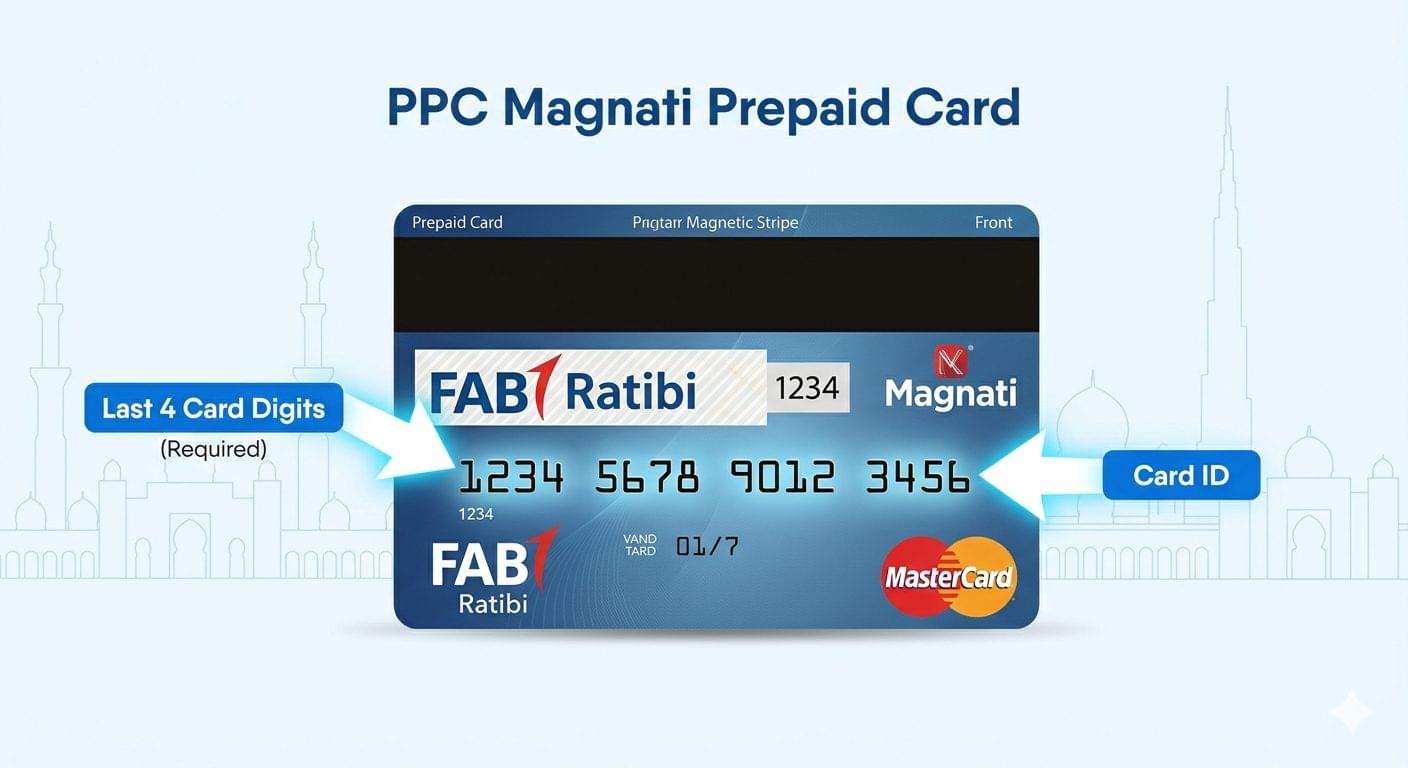
The PPC inquiry system serves approximately 2.5 million active prepaid cardholders across the UAE. FAB Ratibi cardholders represent the largest user segment, with employees earning AED 5,000 or less per month receiving salaries through the Wages Protection System (WPS) on these cards. The portal operates 24 hours daily and requires 2 specific card details for authentication: the last 4 digits of the card number and the Card ID printed on the card surface.
PPC Magnati Balance Check Methods at a Glance
| Method | Time Required | Requires Internet | Requires Registration | Steps |
| Online Portal | 2 minutes | Yes | No | 3 |
| Payit Mobile App | 3 minutes | Yes | Yes (one-time) | 5 |
| SMS | 1 minute | No | Yes (card linking) | 2 |
| Phone Call (IVR) | 4 minutes | No | No | 6 |
| ATM | 3 minutes | No | No | 4 |
Check PPC Magnati Balance Online via Official Portal
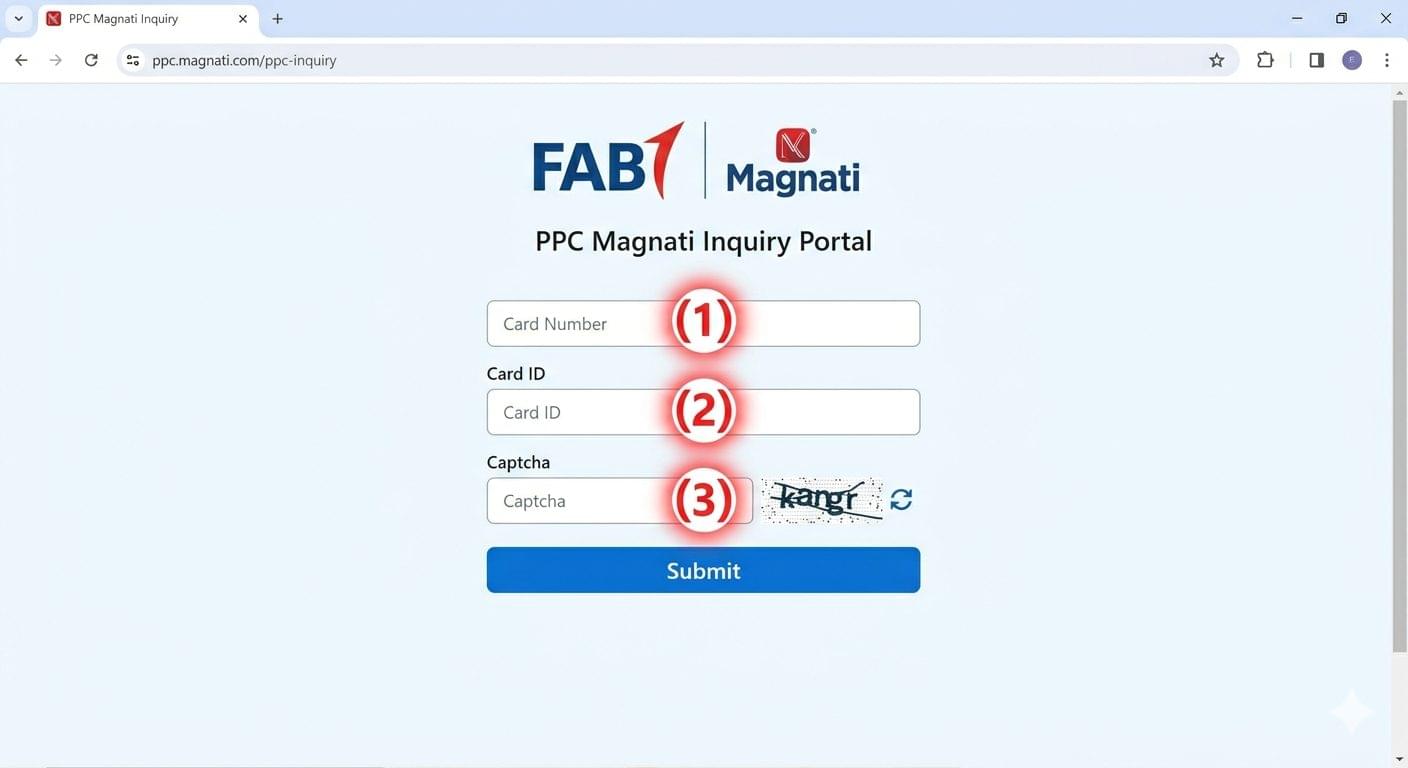
Access the PPC Magnati balance inquiry portal at ppc.magnati.com/ppc-inquiry to view your prepaid card balance instantly. The online portal provides the fastest and most detailed balance information, displaying current balance, last 10 transactions, and card expiry date.
Step-by-Step: PPC Magnati Online Balance Check
Follow these 3 steps to check your PPC Magnati prepaid card balance online:
- Open the official portal Navigate to ppc.magnati.com/ppc-inquiry in any web browser on desktop or mobile device
- Enter card details Input the last 4 digits of your prepaid card number and the Card ID (16-digit number printed on card front below the magnetic stripe)
- View balance information Click “Submit” to display current available balance, pending transactions, and last successful card usage date
What Information the Portal Shows
The PPC Magnati online inquiry portal displays 5 key pieces of information after successful login:
- Current available balance in AED
- Last 10 transaction records with date, merchant name, and amount
- Card status (active, blocked, or expired)
- Card expiry date
- Last successful balance inquiry date and time
The portal updates balance information every 15 minutes, with transactions typically appearing within 2 hours of card usage. Balance checks via the online portal do not incur any service charges.
Check PPC Magnati Balance via Payit Mobile App
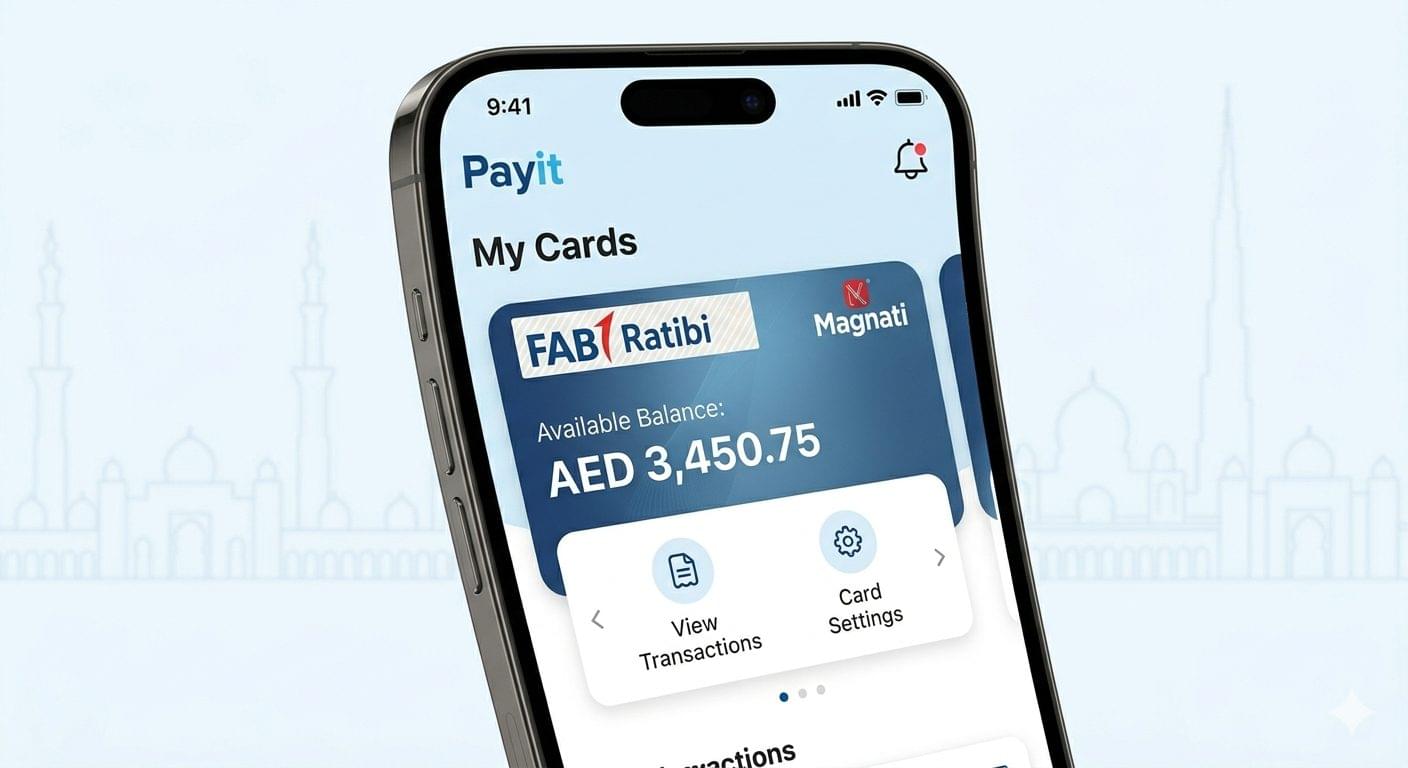
Use the Payit digital wallet application to check PPC Magnati prepaid card balances, manage multiple cards, and enable instant balance notifications. Payit is FAB’s official mobile wallet available on Google Play Store and Apple App Store.
How to Register Your Card on Payit
Complete these 5 steps to link your PPC Magnati prepaid card to the Payit app:
- Download Payit app Install from Google Play Store (Android) or App Store (iOS)
- Create Payit account Register using UAE mobile number and Emirates ID
- Navigate to card section Open the app menu and select “My Cards”
- Add prepaid card Tap “Add New Card” and select “FAB Prepaid Card”
- Enter card details Input complete card number, Card ID, and card expiry date for verification
Card linking takes approximately 24 hours for security verification. Receive SMS confirmation when the card activation completes successfully.
Checking Balance Through Payit
Access your PPC Magnati balance in the Payit app by following these 2 steps:
- Open Payit app Launch the application and log in with your registered credentials
- View card balance Tap on your linked prepaid card to display current balance, transaction history, and spending analytics
The Payit app provides real-time balance updates without the 2-hour transaction delay present in the web portal. Enable push notifications to receive instant alerts for every transaction, low balance warnings (below AED 50), and salary credit confirmations.
Check PPC Magnati Balance via SMS
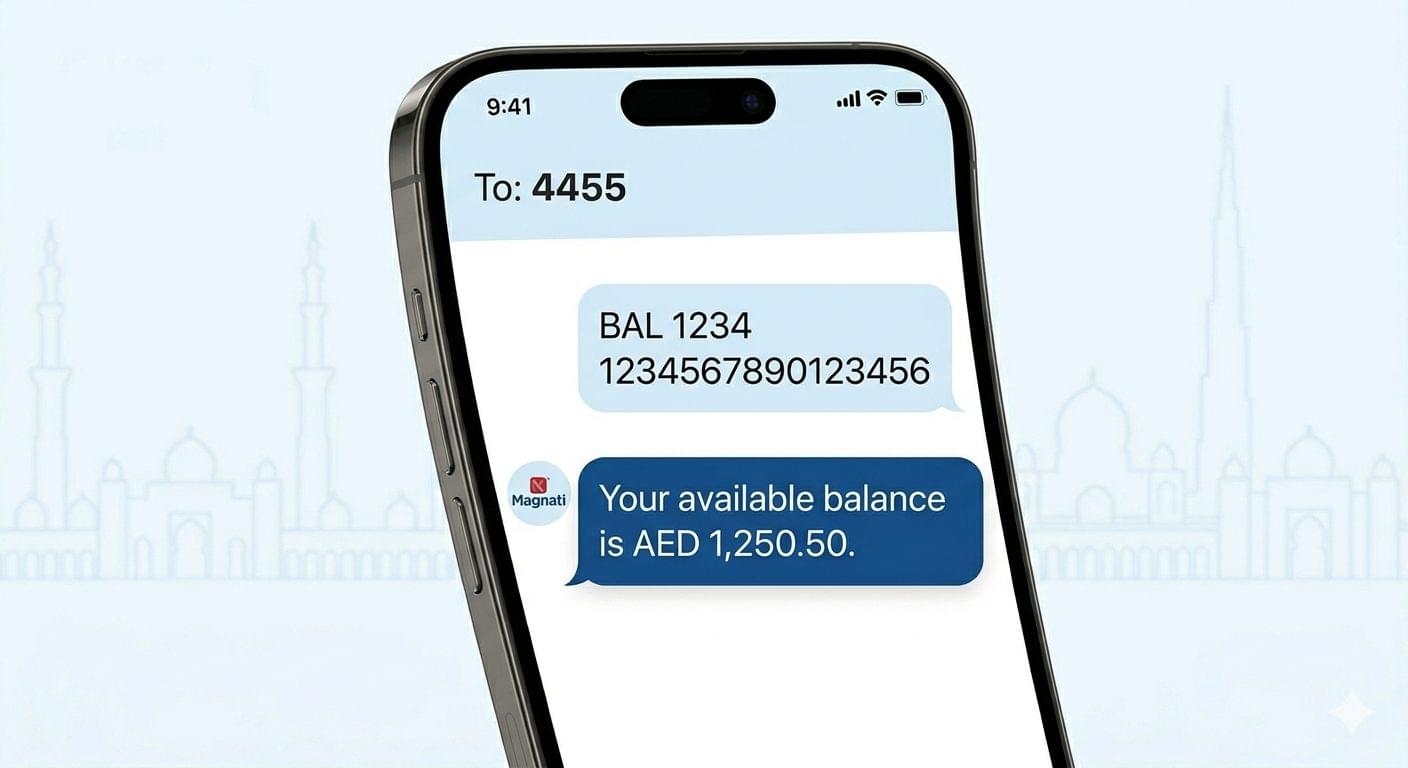
Send SMS commands to FAB’s balance inquiry service to receive instant balance information without internet access. SMS balance checking works for all Magnati prepaid cards linked to a UAE mobile number.
SMS Balance Check Setup
Register your prepaid card for SMS services through these 2 methods:
Method 1: Portal Registration
- Visit ppc.magnati.com/ppc-inquiry
- Navigate to “SMS Services” section
- Enter mobile number, last 4 card digits, and Card ID
- Receive activation SMS within 5 minutes
Method 2: Customer Service Registration
- Call FAB customer service at 600 52 5500
- Request SMS balance inquiry activation
- Provide card details and mobile number for verification
- Receive confirmation SMS after registration
SMS Command for Balance Inquiry
Send balance inquiry SMS using this exact format:
- SMS Text: BAL [Last 4 digits of card] [Card ID]
- Example: BAL 1234 1234567890123456
- Send to: 4455 (FAB SMS service number)
Receive balance information within 30 seconds showing current available balance in AED. Each SMS inquiry costs AED 0.30 charged to your mobile account, not deducted from card balance.
Check PPC Magnati Balance by Phone (IVR System)
Call the FAB Interactive Voice Response (IVR) system to check your PPC Magnati prepaid card balance through automated voice prompts. Phone balance checking operates 24 hours and supports Arabic and English languages.
Step-by-Step: Phone Balance Inquiry
Follow these 6 steps to check balance via phone:
- Dial FAB customer service Call 600 52 5500 from any UAE phone line
- Select language Press 1 for English or 2 for Arabic
- Choose prepaid card services Press 3 for prepaid card inquiries
- Select balance check Press 1 to check card balance
- Enter card details Input last 4 card digits followed by # key, then enter Card ID followed by # key
- Listen to balance The IVR system announces current available balance in AED
Phone inquiries take approximately 4 minutes to complete. The FAB call center charges standard phone rates based on the caller’s telecom provider. International callers can use +971 2 311 4444 to access the same IVR system.
Check PPC Magnati Balance at ATM
Insert your PPC Magnati prepaid card at any FAB ATM or National Bank of Abu Dhabi (NBAD) ATM to check balance without PIN entry. ATM balance inquiries work across 650 FAB ATM locations throughout the UAE.
ATM Balance Check Process
Complete these 4 steps at any FAB or NBAD ATM:
- Locate compatible ATM Find FAB or NBAD ATM displaying Magnati logo
- Insert prepaid card Insert card with magnetic stripe facing down and chip facing up
- Select balance inquiry Choose “Balance Inquiry” from the main menu (no PIN required for prepaid cards)
- View balance on screen Current available balance displays on ATM screen
ATM balance checks do not produce printed receipts for prepaid cards unless specifically requested through the “Print Balance” option. Most ATMs display the balance for 30 seconds before automatically ejecting the card.
Which ATMs Support PPC Magnati Cards
PPC Magnati prepaid cards work at 3 major ATM networks in the UAE:
- FAB ATMs 400+ locations across all 7 emirates
- NBAD ATMs 250+ locations (NBAD merged into FAB in 2017, ATMs still operational)
- Emirates NBD ATMs Limited support; balance inquiry only, no withdrawals
Verify ATM compatibility by checking for the Magnati or FAB logo on the ATM screen or body. Using non-FAB ATMs for balance checks may incur AED 2 inquiry fees.
PPC Magnati Balance Not Showing? Common Fixes
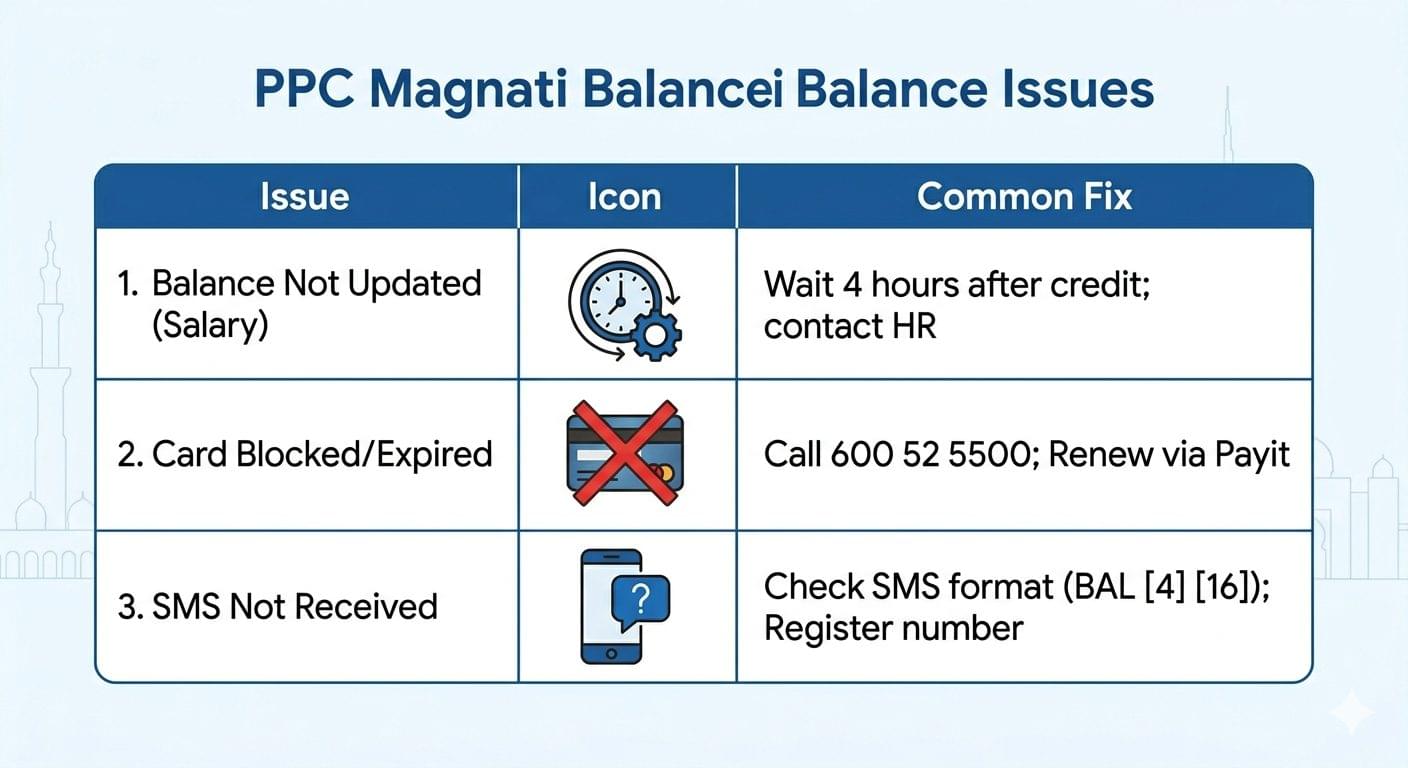
Resolve 4 frequent balance inquiry issues with these troubleshooting solutions:
Balance Not Updated After Salary Credit
Salary credits to FAB Ratibi cards via the WPS system take up to 4 hours to reflect in balance inquiries. Check balance after 4:00 PM on salary day if salary credits typically post at noon. Contact the employer’s HR department to verify salary file submission to FAB, not the bank directly, if balance remains unchanged after 24 hours.
Card Blocked or Expired
Magnati prepaid cards expire after 3 years from issuance date. Check the expiry date printed on card front (format: MM/YY). Request card renewal 2 months before expiry through the Payit app or by visiting any FAB branch with Emirates ID. Card blocking occurs after 3 consecutive incorrect PIN entries at ATMs or 5 failed online login attempts. Unblock the card by calling 600 52 5500 with card details and Emirates ID for identity verification.
“Card Not Found” Error on Portal
The “Card Not Found” error appears for 3 specific reasons:
- Incorrect Card ID entry Verify the 16-digit Card ID printed below the magnetic stripe (not the 16-digit card number on front)
- Card not activated New cards require activation within 30 days of issuance by making the first transaction at any merchant
- System maintenance PPC portal undergoes maintenance every Sunday from 2:00 AM to 4:00 AM UAE time
Clear browser cache and cookies before retrying portal access. Use the Payit app as an alternative balance checking method if portal errors persist.
SMS Balance Not Received
SMS balance responses fail to deliver for 2 common reasons:
- Mobile number not registered Complete SMS service registration through the portal or customer service before sending balance inquiry SMS
- Incorrect SMS format Ensure SMS text follows exact format: BAL [4 digits] [16-digit Card ID] with single space between elements
Wait 2 minutes before resending SMS commands. Contact mobile service provider (Etisalat or du) to verify SMS services work correctly if balance messages still do not arrive.
Frequently Asked Questions About PPC Magnati Balance Check
Can I check PPC Magnati balance from outside UAE?
Yes, PPC Magnati balance checks work internationally through the online portal at ppc.magnati.com/ppc-inquiry and the Payit mobile app. The online portal requires internet access regardless of geographic location. SMS balance checks do not work outside UAE since the 4455 service number operates only within UAE telecom networks. International phone calls to 600 52 5500 incur standard international calling rates through the caller’s telecom provider.
What is the minimum balance required for PPC Magnati cards?
PPC Magnati prepaid cards have no minimum balance requirement. Cardholders can spend the full available balance down to AED 0.00. Cards remain active with zero balance until the expiry date. FAB does not charge monthly maintenance fees or inactivity fees on Magnati prepaid cards.
How long do balance updates take after transactions?
Balance updates appear within 2 hours after card transactions at merchants and ATMs. Salary credits via WPS post within 4 hours of employer file submission to FAB. Card-to-card transfers between Payit users reflect instantly in both sender and receiver balances. International transactions take up to 24 hours to appear in balance inquiries due to currency conversion processing.
Does balance checking incur any fees?
Balance inquiries through the PPC Magnati portal, Payit app, and FAB ATMs are completely free with no charges. SMS balance checks cost AED 0.30 per inquiry charged to the mobile account. Phone balance checks via 600 52 5500 are free from FAB’s side but may incur standard call charges from the telecom provider. Non-FAB ATM balance inquiries may charge AED 2 inquiry fees.
Can I check balance for multiple cards on one account?
The Payit mobile app supports linking up to 5 prepaid cards to one user account. Check balances for all linked cards simultaneously through the app’s card management section. The online portal at ppc.magnati.com requires separate login for each card using individual card details. SMS balance checks work for one card per registered mobile number.
What information do I need for balance checks?
Balance inquiries require 2 mandatory pieces of information:
- Last 4 digits of card number The final 4 numbers of the 16-digit card number printed on card front
- Card ID The 16-digit identification number printed below the magnetic stripe on card front
Some methods require additional information: Payit app needs full 16-digit card number and expiry date for initial registration. Phone IVR requires complete Card ID entry. ATM balance checks require only physical card insertion without manual data entry.
Is the PPC Magnati portal available in Arabic?
The PPC Magnati online portal at ppc.magnati.com/ppc-inquiry operates in English only. The Payit mobile app supports both English and Arabic interface languages. Phone IVR balance checking via 600 52 5500 offers Arabic voice prompts by pressing 2 at language selection. SMS balance responses arrive in English regardless of the language used in the SMS command.
Can employers check employee card balances?
Employers cannot access individual employee PPC Magnati card balances through any method. WPS regulations prohibit employer access to employee card details for privacy protection. Employers can only verify salary file submission status and confirm salary credits processed successfully through the FAB corporate portal. Employees maintain exclusive access to personal card balances and transaction history.
How do I report incorrect balance information?
Report balance discrepancies through 3 official channels:
- FAB customer service Call 600 52 5500 and select prepaid card services to speak with agent
- Payit app support Use in-app chat support available 24 hours
- FAB branch visit Visit any FAB branch with Emirates ID, prepaid card, and transaction receipts showing discrepancy
FAB investigates balance disputes within 5 business days. Receive SMS notification when investigation completes with resolution details and corrected balance if applicable.
What happens if I forget my Card ID?
Card ID recovery requires visiting any FAB branch with valid Emirates ID and the physical prepaid card. FAB branch staff print a card details confirmation slip showing the complete Card ID immediately. Card ID cannot be retrieved by phone or online for security reasons. Alternative balance checking uses ATM insertion without Card ID entry or Payit app after initial one-time registration completes.