

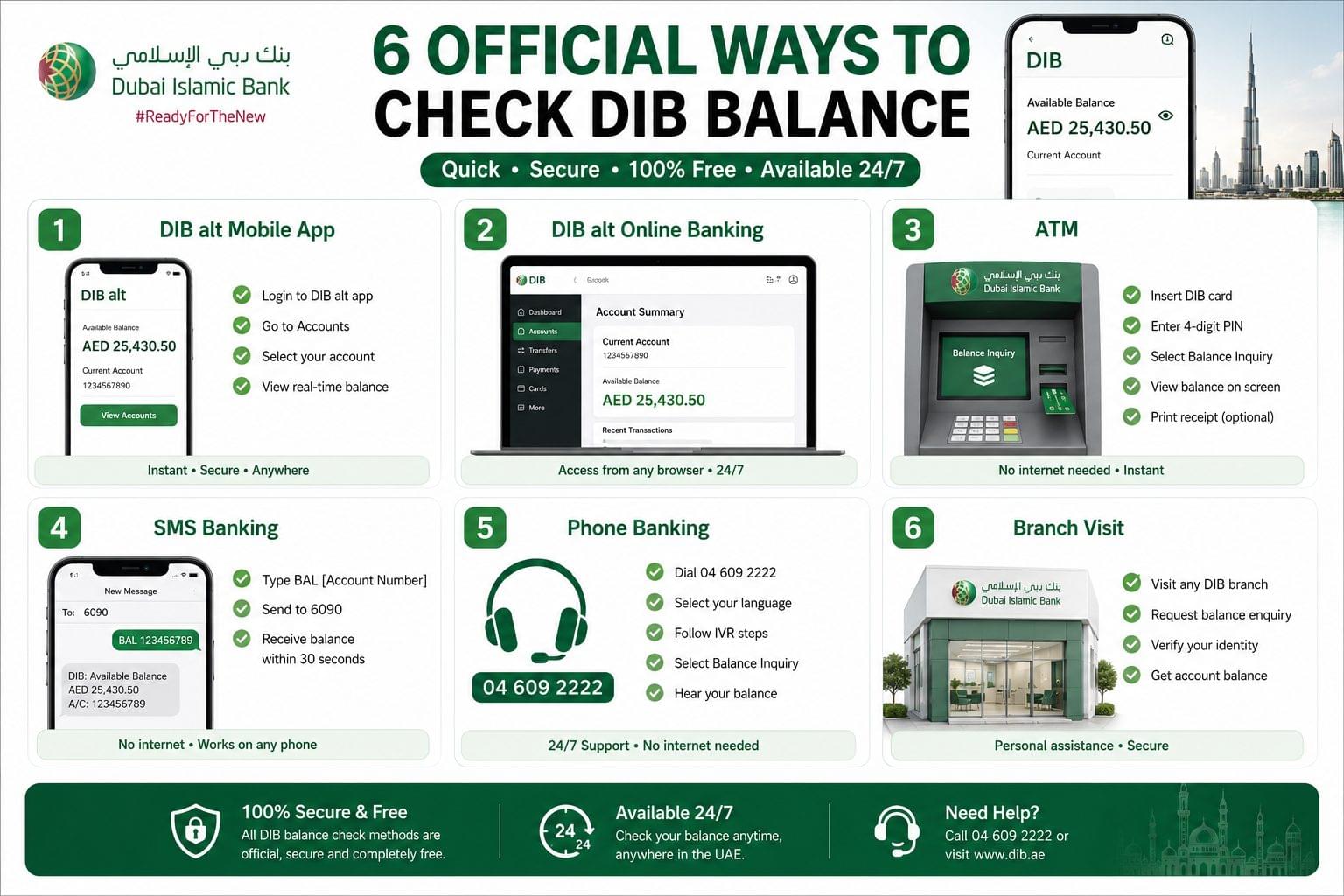
DIB balance check is available through 6 official channels: DIB alt mobile app, DIB alt online banking, ATM, SMS banking, phone banking, and branch visit. All 6 methods are free of charge for all DIB individual and business account holders regulated under the Central Bank of the UAE (CBUAE).
Dubai Islamic Bank (DIB) is the UAE’s first full-fledged Sharia-compliant bank, founded in 1975 and owned by the Government of Dubai. DIB is regulated by the CBUAE and operates across current accounts, savings accounts, salary accounts, and business accounts. Balance inquiry services are available across all 4 account types through the same 6 official channels.
DIB Balance Check Methods at a Glance
The 6 DIB balance check methods, their speed, internet requirement, and availability are:
| Method | Speed | Requires Internet | Free |
| DIB alt Mobile App | Instant | Yes | Yes |
| DIB alt Online Banking | Instant | Yes | Yes |
| ATM | Instant | No | Yes |
| SMS to 6090 | ~30 seconds | No | Yes |
| Phone Banking (04 609 2222) | ~2 minutes | No | Yes |
| Branch Visit | 5–10 minutes | No | Yes |
The DIB alt mobile app is the fastest method. SMS to 6090 is the fastest offline method, requiring no smartphone or internet connection.
For a complete UAE bank balance check guide, visit balancecheck.ae.
How to Check DIB Balance via DIB alt Mobile App
To check DIB balance via the DIB alt mobile app, open the app, authenticate with biometric login or password, and the Account Summary screen displays the real-time available balance instantly.
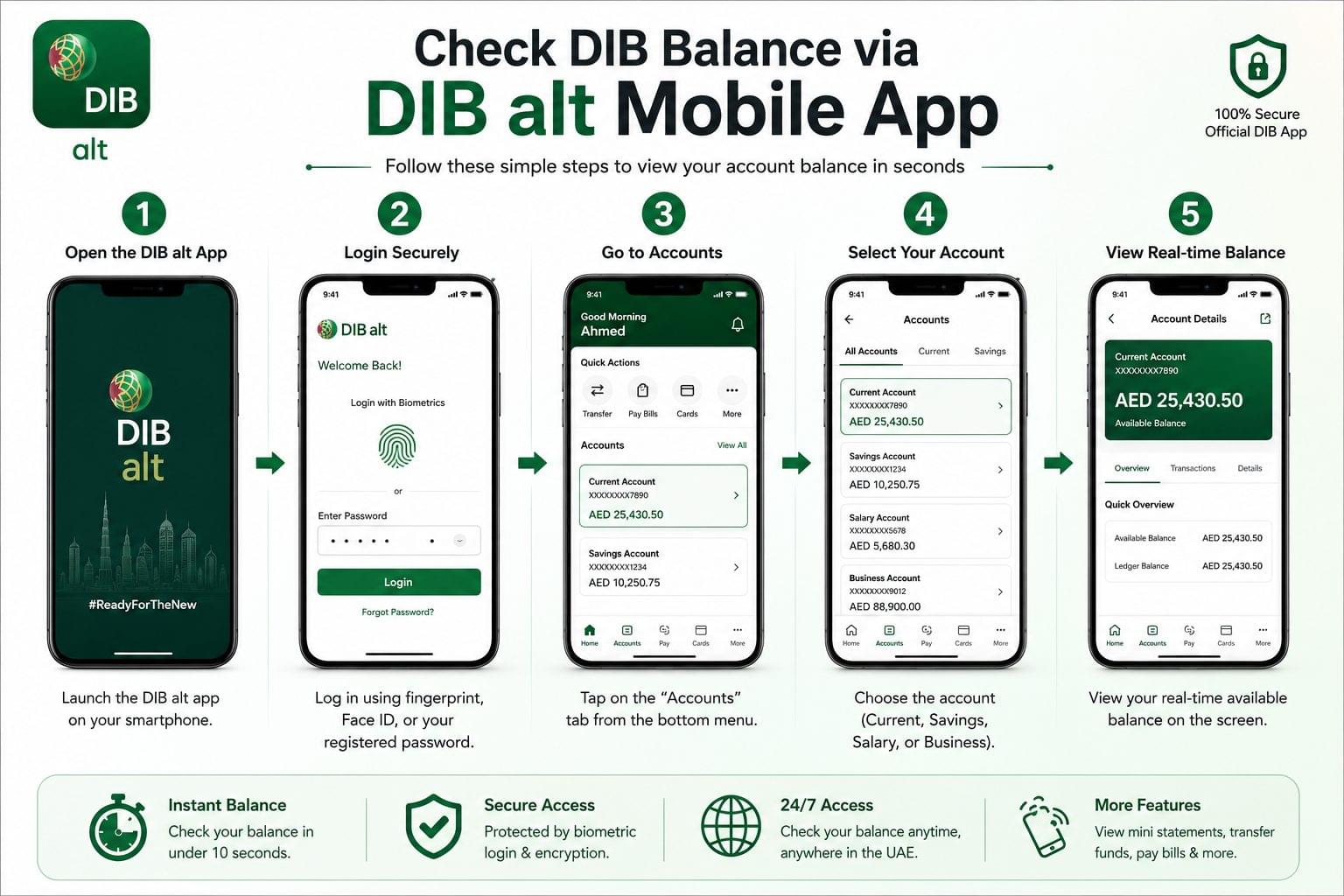
The DIB alt mobile app is available on Android (Google Play) and iOS (App Store). Biometric login fingerprint and Face ID completes the balance inquiry process in under 10 seconds after authentication. The app supports Arabic and English, switchable from the settings menu.
Steps to check DIB balance via the DIB alt mobile app:
- Open the DIB alt app on the smartphone
- Log in using fingerprint, Face ID, or the registered password
- Tap the “Accounts” tab on the home screen
- Select the specific account current, savings, salary, or business
- View the real-time available balance on the Account Details screen
The DIB alt mobile app also displays mini-statements and transaction history for the last 90 days. Card controls, bill payments, and fund transfers are accessible from the same interface.
How to Check DIB Balance via DIB alt Online Banking
To check DIB balance via DIB alt online banking, visit www.dib.ae, click Login, enter the User ID and password, complete OTP verification, and navigate to the Accounts section to view the available balance.
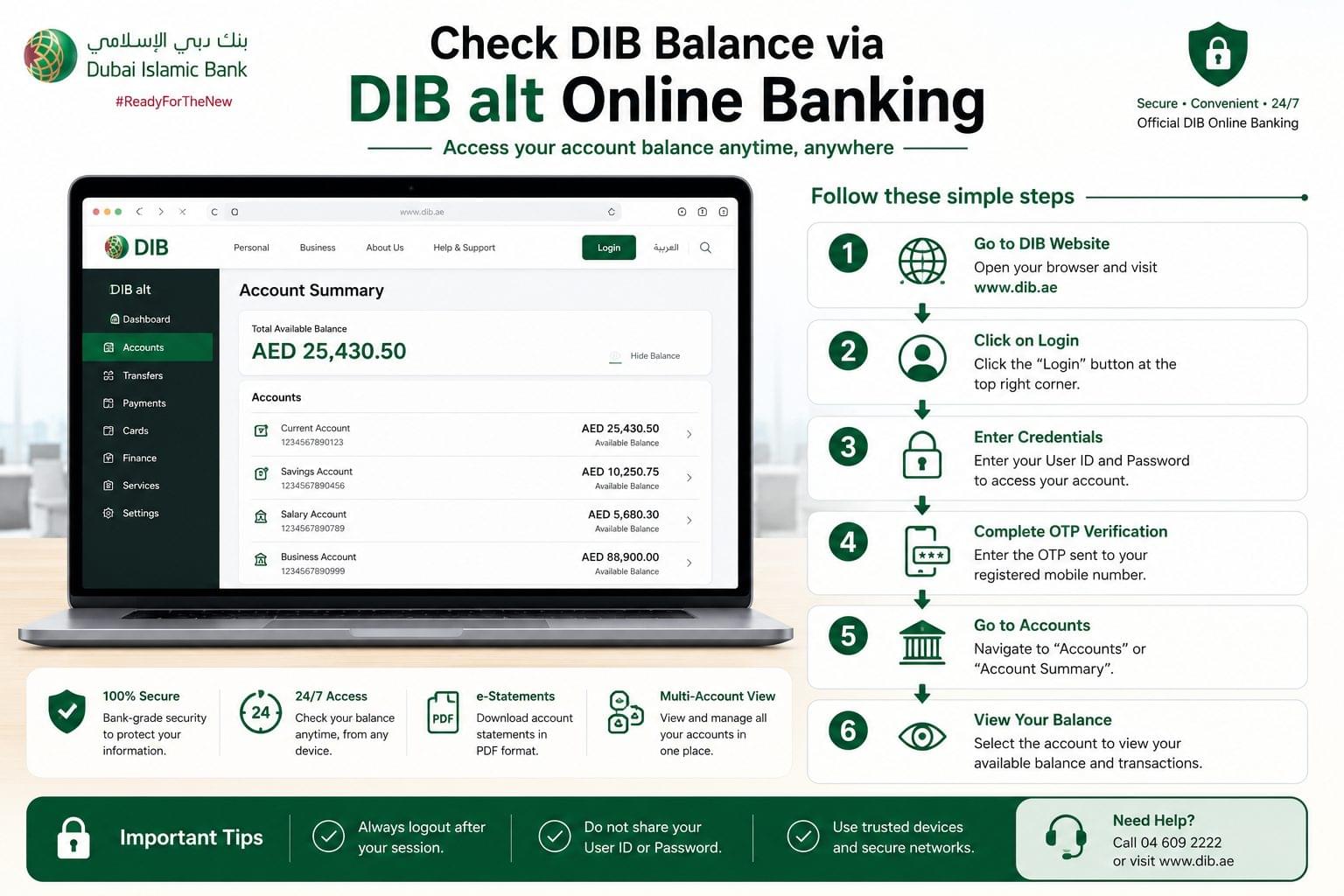
DIB alt online banking supports Arabic and English interfaces. Business owners, accountants, and corporate signatories use this channel to access multiple linked accounts and download PDF e-statements. The portal is accessible from any browser on desktop or laptop devices.
Steps to check DIB balance via DIB alt online banking:
- Open a browser and go to www.dib.ae
- Click “Login” at the top right of the homepage
- Enter the registered User ID and password
- Complete OTP verification sent to the registered mobile number
- Navigate to “Accounts” or “Account Summary”
- Select the account to view the available balance and recent transactions
- Log out after viewing the balance, especially on shared or public devices to protect account security
First-time users register for DIB alt online banking by selecting “Register” on the same portal and following the on-screen setup steps.
How to Check DIB Balance via ATM
To check DIB balance via ATM, insert the DIB debit card, enter the 4-digit PIN, select “Balance Inquiry” from the main menu, and the available balance displays on screen instantly.
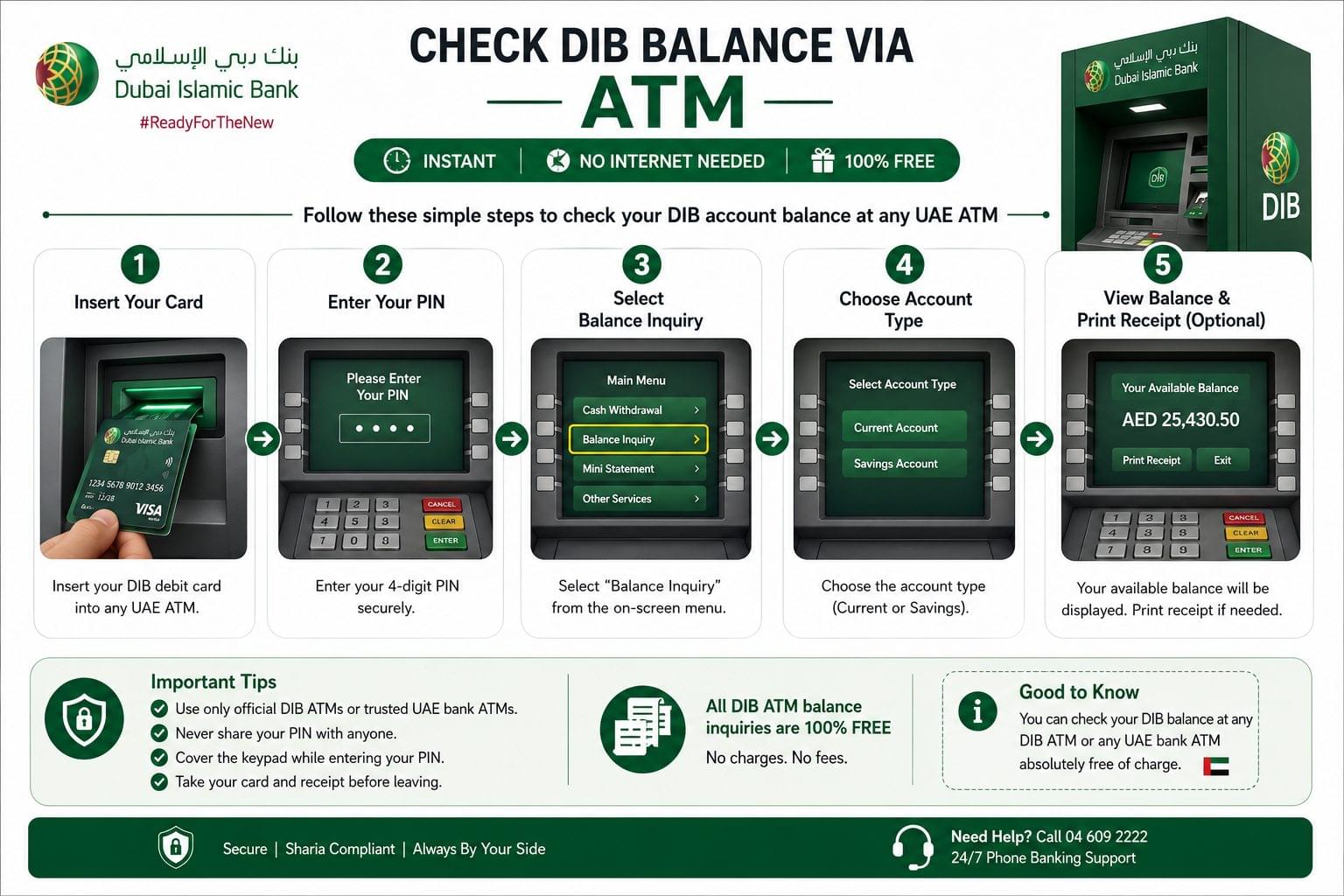
DIB operates ATMs across Dubai, Abu Dhabi, Sharjah, and all other UAE emirates. Non-DIB ATMs within the UAE also process DIB card balance inquiries at no charge. The ATM channel is the primary no-internet option for customers without a registered mobile number.
Steps to check DIB balance via ATM:
- Insert the DIB debit card into any UAE ATM
- Enter the 4-digit PIN
- Select “Balance Inquiry” from the on-screen menu
- Choose the account type current or savings
- View the available account balance on screen
- Select “Print Receipt” to obtain a printed balance record
Never share the 4-digit ATM PIN with any third party. Use only official DIB ATMs or verified UAE bank ATMs. Avoid using ATMs in isolated locations or on public networks.
For a complete UAE ATM balance check guide covering all major banks, check atm-balance-check-uae.
How to Check DIB Balance via SMS
To check DIB balance via SMS, send “BAL [Account Number]” to 6090 from the registered mobile number, and DIB returns the current balance within 30 seconds.
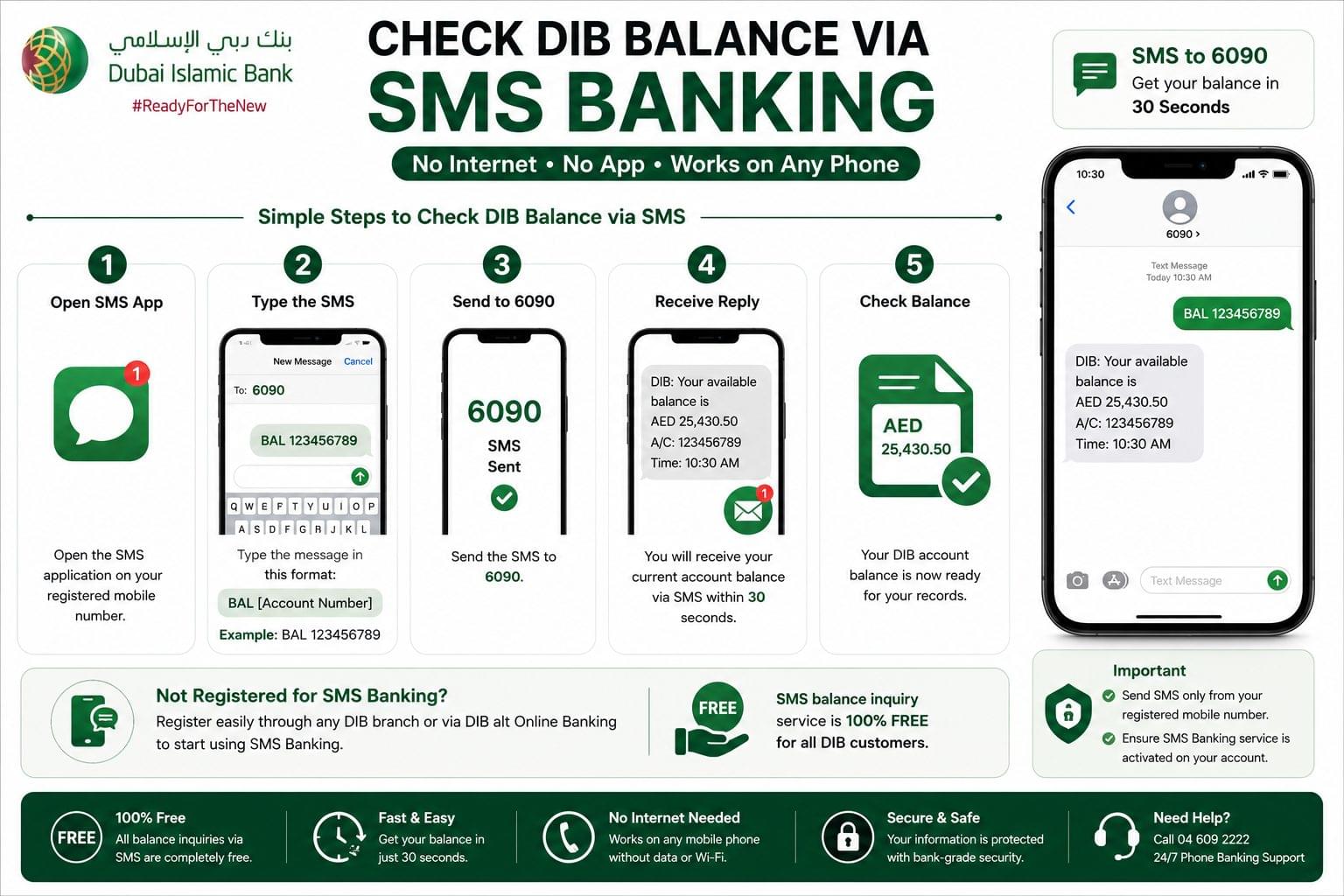
SMS banking is the most accessible offline channel for DIB balance enquiry no smartphone, no mobile data, and no app installation are required. The registered mobile number is the number linked to the DIB account at account opening.
Steps to check DIB balance via SMS:
- Open the SMS application on the registered mobile phone
- Type: BAL [Account Number] for example: BAL 123456789
- Send the message to 6090
- Receive the current account balance via SMS reply within 30 seconds
SMS banking registration is completed through any UAE DIB branch or through the DIB alt online portal. The service is free of charge for all balance inquiries.
DIB does not publish a public USSD code for balance inquiry. SMS to 6090 is the confirmed offline alternative for customers without internet access.
For balance check methods that work without internet across all UAE banks, check uae-bank-balance-check-offline.
How to Check DIB Balance via Phone Banking
To check DIB balance via phone banking, dial 04 609 2222, select the preferred language, follow the IVR prompts, and select balance inquiry to hear the current available balance.
DIB phone banking operates 24 hours a day, 7 days a week. The IVR (Interactive Voice Response) system handles balance inquiries without requiring a live agent. Corporate signatories and business account holders use the live agent option at the same number for multi-account access.
Steps to check DIB balance via phone banking:
- Dial 04 609 2222 from the registered mobile number
- Select the preferred language Arabic or English
- Enter the DIB account number or registered card number when prompted
- Select “Balance Inquiry” from the IVR menu
- Hear the current available balance confirmed by the automated system
Live agent support is available at 04 609 2222 for card disputes, blocked account resolution, and account-specific queries.
How to Check DIB Balance at a Branch
To check DIB balance at a branch, visit any UAE DIB branch with a valid Emirates ID, and a bank representative provides the current account balance at the service counter within 5 to 10 minutes.
Branch visits are used for identity-verified balance inquiries, dispute resolution, and cases where digital channels are unavailable. DIB branch locations are found through the branch locator tool at www.dib.ae.
How to View DIB Mini Statement and Transaction History
To view a DIB mini statement, log in to the DIB alt mobile app or DIB alt online banking, navigate to Account Details, and select the Statement or Transaction History option.
The DIB mini statement displays the last 10 transactions including credits, debits, and post-transaction balance. Full e-statements are available for download as password-protected PDF files through both DIB alt mobile and DIB alt online banking.
Steps to download the DIB e-statement:
- Log in to DIB alt online or DIB alt mobile
- Navigate to “Account Services”
- Select “Account Summary” and choose the specific account
- Choose the required date range
- Tap the PDF icon and download the e-statement to the device
DIB Interactive e-Statements are delivered to the registered email address. Registration is completed through DIB alt online, DIB alt mobile, or by written request at any UAE DIB branch.
DIB Salary Account Balance Check
To check a DIB salary account balance, use the DIB alt mobile app, DIB alt online banking, ATM, or SMS to 6090 the same 6 channels available for all DIB account types.
DIB salary accounts process credits under the UAE Wage Protection System (WPS). Salary deposits take up to 2 hours to reflect in the DIB alt mobile app balance display after the WPS credit is processed. An SMS alert is sent to the registered mobile number each time a salary deposit is confirmed.
For a full UAE salary balance check guide covering WPS cards and bank salary accounts, check salary-check-uae.
Is DIB WhatsApp Balance Check Still Available?
DIB WhatsApp Banking was discontinued on 28 April 2026, following a directive issued by the Central Bank of the UAE to all UAE banks as part of enhanced anti-fraud measures. DIB alt mobile and DIB alt online banking are the 2 official replacement channels for all services previously available through DIB WhatsApp Banking.
DIB Balance Not Showing? Common Fixes
DIB balance not displaying correctly is resolved by identifying 1 of 3 causes: a pending WPS credit, an expired login session, or a blocked or expired card.
Balance Not Updated After Salary or Top-Up
Salary deposits processed through the UAE Wage Protection System (WPS) take up to 2 hours to reflect in the DIB alt mobile app and DIB alt online banking balance display. The SMS alert to the registered mobile number confirms the salary receipt before the digital balance updates.
Card Blocked or Expired
A blocked or expired DIB debit card restricts ATM balance access and some digital channel functions. Contact DIB at 04 609 2222 to unblock or renew the card. Branch visits with a valid Emirates ID resolve card issues within one working day.
App Not Working or Session Expired
The DIB alt mobile app times out after a period of inactivity. Log out, close the app fully, reopen it, and log in again to refresh the balance display. Clearing the app cache from the phone’s settings resolves persistent loading errors.
Frequently Asked Questions about DIB Balance Check
What is the DIB balance enquiry number? The DIB balance enquiry number is 04 609 2222, available 24 hours a day, 7 days a week through an automated IVR system and live agent support.
What is the fastest way to check DIB balance? The DIB alt mobile app displays the real-time available balance instantly after biometric login the fastest method among the 6 available channels.
Is DIB balance check free? DIB balance inquiries through the DIB alt mobile app, DIB alt online banking, ATM, SMS to 6090, and phone banking at 04 609 2222 are free of charge for all account holders.
Is there a USSD code for DIB balance check? DIB does not publish a public USSD balance inquiry code. SMS to 6090 is the confirmed offline balance check method for customers without internet access or a smartphone.
How to register for DIB SMS banking? DIB SMS banking registration is completed at any UAE DIB branch or through the DIB alt online portal at www.dib.ae. The registered mobile number linked to the DIB account is required for activation.
Can DIB balance be checked from outside the UAE? DIB balance check is available from outside the UAE through the DIB alt mobile app and DIB alt online banking at www.dib.ae, as long as an active internet connection is available.
How to download the DIB e-statement to check account balance? Log in to DIB alt online, navigate to Account Services, select the account, choose the date range, and tap the PDF icon to download the e-statement as a password-protected PDF to the device.
Does DIB balance check work for business accounts? DIB alt online banking supports business account balance inquiries, with access to specific account selection, mini-statements, and corporate signatory permissions set during account opening.
What replaced DIB WhatsApp Banking after April 2026? DIB alt mobile app and DIB alt online banking at www.dib.ae replaced WhatsApp Banking, which was discontinued on 28 April 2026 following a UAE Central Bank directive to all UAE banks.
How to check DIB balance without internet? DIB balance check without internet is available through ATM (insert card, enter PIN, select Balance Inquiry) and SMS (send BAL [Account Number] to 6090). Both methods are free and require no internet connection.
Related Balance Checks
DIB is 1 of 5 major UAE banks covered on balancecheck.ae. For balance checks across related UAE banks, salary cards, and generic balance enquiry methods:
- FAB Bank Balance Check Online All Methods 2026
- Emirates NBD Balance Check NBAD Inquiry Guide 2026
- Mashreq Bank Balance Check App, Online & ATM 2026
- ADCB Balance Check All Methods for Abu Dhabi Commercial Bank
- ATM Balance Check UAE How to Check Balance at Any ATM
- Salary Check UAE How to Verify Your Salary Credit
- UAE Balance Enquiry Complete Guide to All Balance Check Methods
- UAE Bank Balance Check Without Internet