

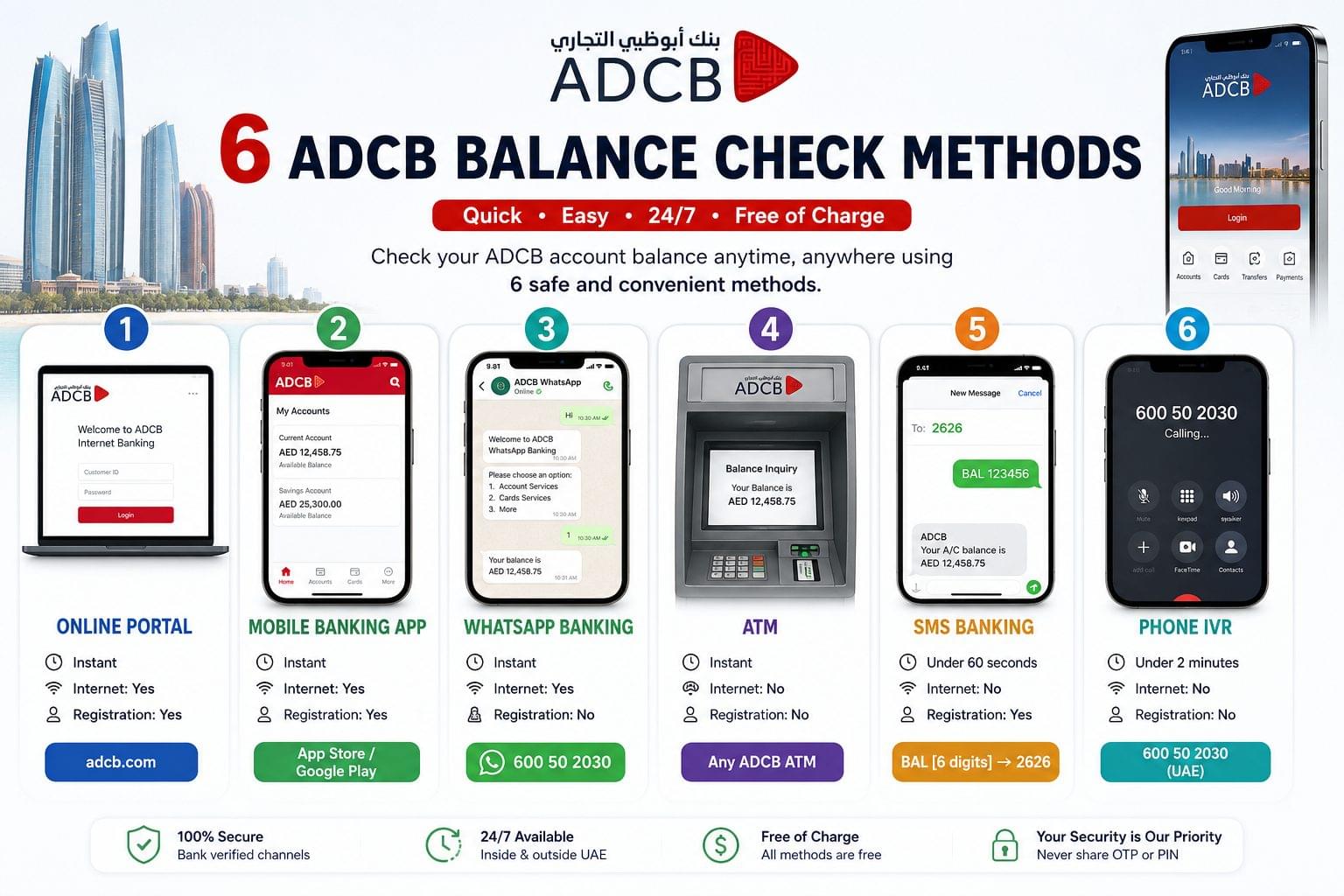
ADCB balance check provides account holders access to their current, savings, credit card, and salary account balances through 6 verified methods: online internet banking, ADCB Mobile Banking App, WhatsApp banking, ATM, SMS banking, and phone IVR. Abu Dhabi Commercial Bank (ADCB), founded in 1985 and 62.5% owned by the Government of Abu Dhabi, operates as one of the UAE’s 3 largest banks by total assets, alongside First Abu Dhabi Bank (FAB) and Emirates NBD. According to ADCB’s 2024 Annual Report, the bank holds total assets of AED 148 billion and serves over 1 million retail customers across the Emirates. All 6 ADCB balance check methods are free of charge from the bank, available 24 hours a day, and accessible from both inside and outside the UAE.
What is ADCB?
ADCB is Abu Dhabi Commercial Bank PJSC, a publicly listed UAE bank traded on the Abu Dhabi Securities Exchange (ADX: ADCB). The bank operates 4 primary account types relevant to balance checking: current accounts (minimum balance AED 5,000), savings accounts (standard and active saver variants), salary accounts (WPS-compliant accounts for employer salary transfers), and ADCB Islamic Banking accounts (Sharia-compliant current and savings accounts managed via a separate ADCB Islamic Mobile Banking App). Each account type is accessible through the same 6 balance check channels, with minor navigation differences inside the mobile app and online portal depending on account classification.
ADCB also operates the TouchPoints rewards program, the MoneyBuddy personal finance app, and the uBank digital service centers self-service banking locations equipped with balance check terminals, card printing, and Emirates ID update facilities across Abu Dhabi and Dubai.
ADCB Balance Check Methods at a Glance
The 3 fastest ADCB balance check methods are the mobile app (instant, internet required), WhatsApp banking (instant, internet required), and the online portal (instant, internet required). The 3 offline methods ATM (instant, no internet), SMS (under 60 seconds, no internet), and phone IVR (under 2 minutes, no internet) serve account holders without active data connections. SMS is faster than phone IVR for balance-only queries because the response arrives as a text without requiring navigation through a voice menu.
| Method | Speed | Requires Internet | Requires Registration | Contact / Code |
| Online Portal | Instant | Yes | Yes Customer ID | adcb.com |
| Mobile Banking App | Instant | Yes | Yes UAE PASS / Card No. | App Store / Google Play |
| WhatsApp Banking | Instant | Yes | No | 600 50 2030 |
| ATM | Instant | No | No | Any ADCB ATM |
| SMS Banking | Under 60 seconds | No | Yes REG via 2626 | BAL [6 digits] → 2626 |
| Phone IVR | Under 2 minutes | No | No | 600 50 2030 (UAE) |
How to Check ADCB Balance Online
To check the ADCB balance online, log in to the official ADCB internet banking portal at adcb.com and navigate to the Accounts section.
What is needed for ADCB online balance check: a registered Customer ID, a password or active UAE PASS digital identity, and a device with internet access. To retrieve a forgotten Customer ID, send “CID” as an SMS to 2626 from the registered mobile number the Customer ID arrives within 60 seconds.
Step-by-step: ADCB online balance check
- Open adcb.com and select “Personal Internet Banking.”
- Enter the Customer ID and password, or authenticate via UAE PASS.
- Select the “Accounts” tab on the main dashboard.
- View the available balance and ledger balance for each linked account.
- Select “Cards” to view credit card outstanding and available credit balances separately.
The ADCB online portal displays balance data in real time. Salary credits, ATM withdrawals, and card transactions reflect immediately after processing by the bank.
How to Check ADCB Balance via Mobile App
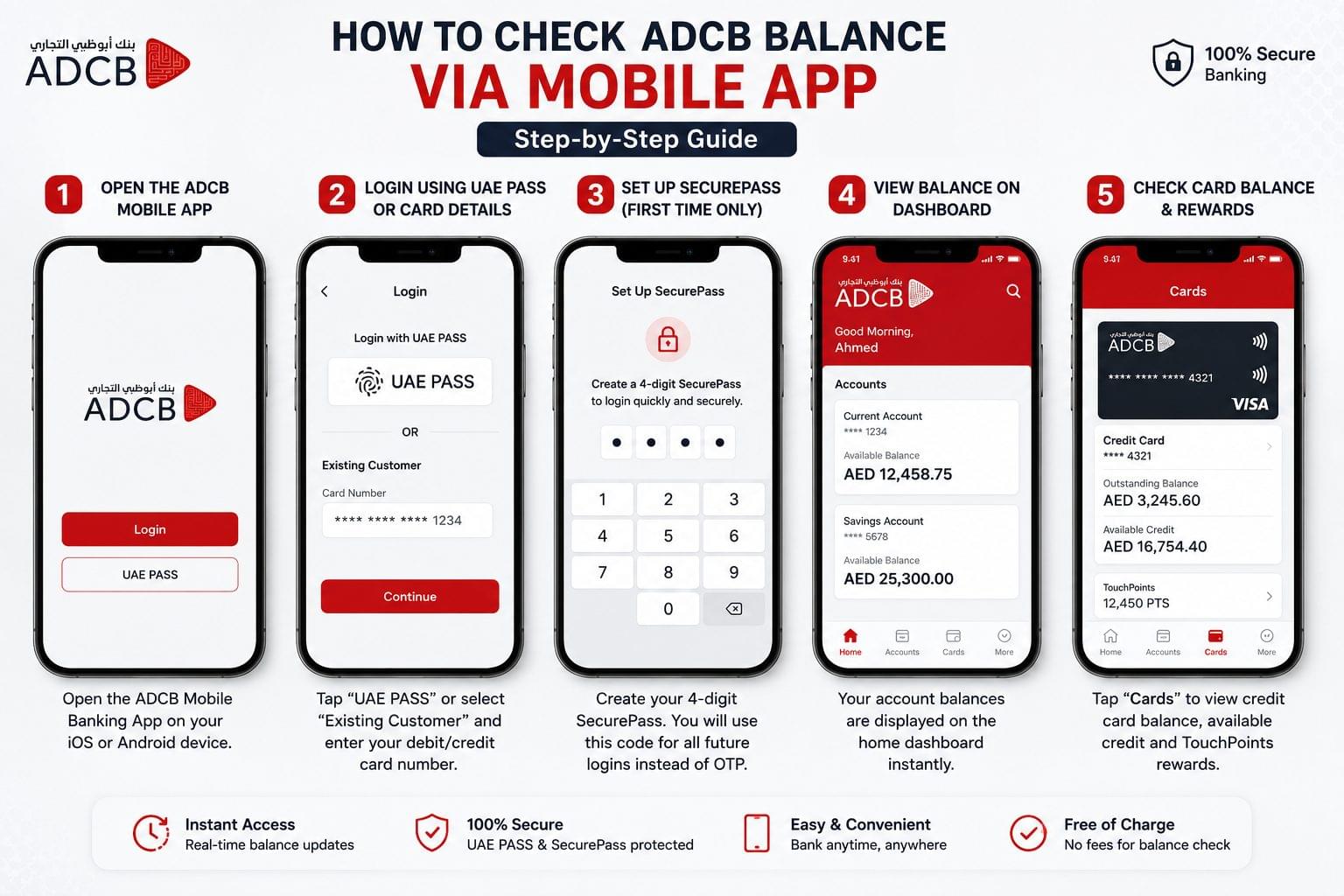
To check the ADCB balance via the mobile app, download the ADCB Mobile Banking App from the Apple App Store or Google Play Store, log in using UAE PASS or a 4-digit SecurePass code, and view the balance on the main dashboard.
Step-by-step: ADCB Mobile App balance check
- Open the ADCB Mobile Banking App on iOS or Android.
- Tap “UAE PASS” on the login screen, or select “Existing Customer” and enter the debit or credit card number.
- Complete SecurePass setup on the first login a 4-digit code that replaces OTP for all future sessions.
- View account balances displayed on the main dashboard home screen.
- Tap “Cards” in the bottom navigation to view credit card balances and TouchPoints rewards points separately.
ADCB Islamic Banking account holders use the ADCB Islamic Mobile Banking App, available separately on the App Store and Google Play. The Islamic app follows the same login path (UAE PASS or card number → SecurePass) and displays the Sharia-compliant current or savings account balance on the home dashboard. Balance check, fund transfers, card management, and TouchPoints redemption are all available within the Islamic app.
ADCB Hayyak Account holders digital-only current account customers who opened the account entirely via mobile access balance through the main ADCB Mobile Banking App with no branch visit required. The Hayyak Account balance displays on the app dashboard immediately after account activation.
ADCB MoneyBuddy is a secondary personal finance app, also available on the App Store and Google Play, that displays all ADCB account and card transaction history in a single dashboard. MoneyBuddy categorises spending into Outflow and Inflow, sends SMS and email alerts for salary credits and ATM withdrawals, and provides cash flow analysis tools. MoneyBuddy supplements the main ADCB Mobile Banking App it does not replace it for balance check purposes.
How to Check ADCB Balance via WhatsApp
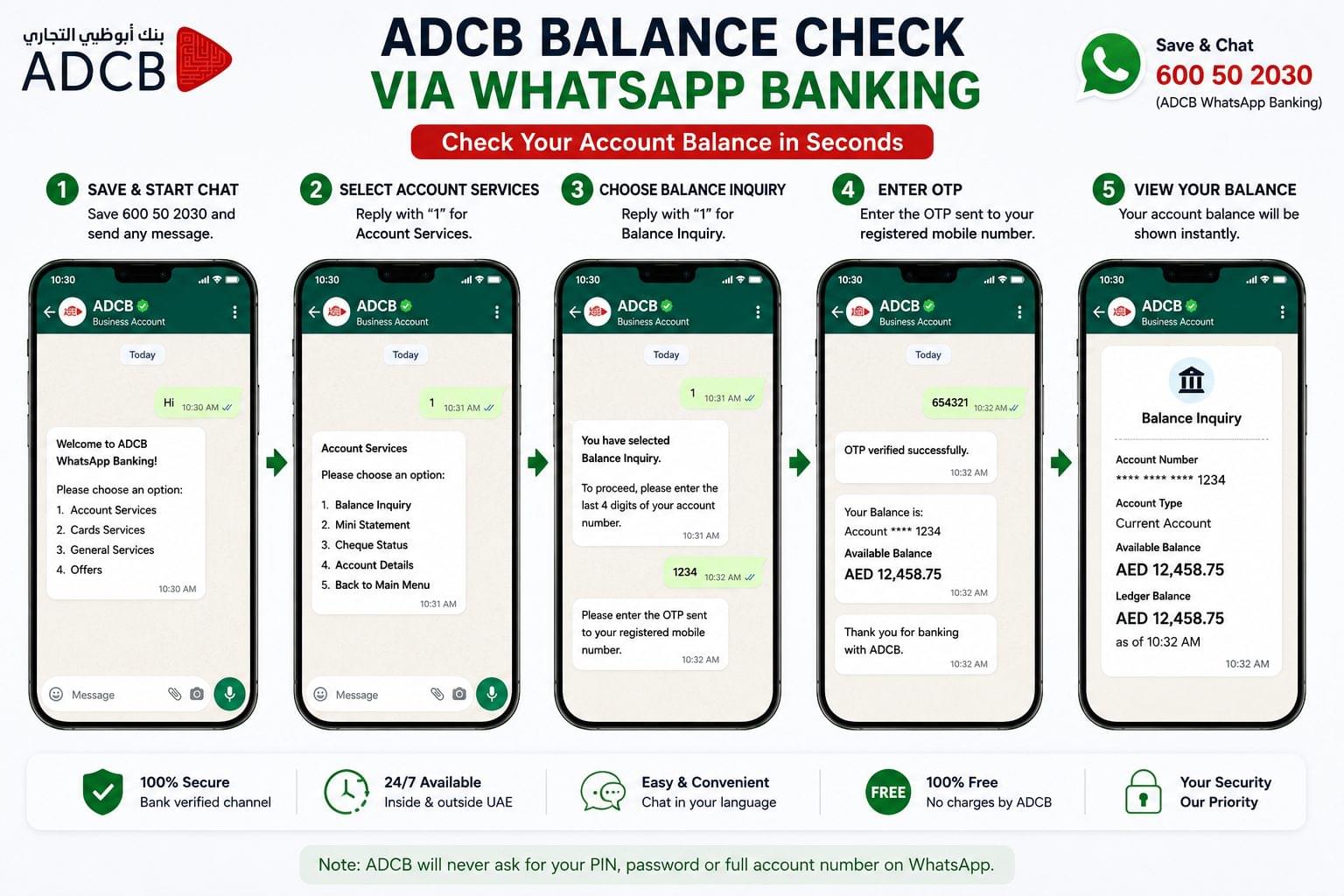
To check the ADCB balance via WhatsApp, save 600 50 2030 as a contact and send any message to initiate the ADCB WhatsApp Banking menu.
Step-by-step: ADCB WhatsApp balance check
- Save 600 50 2030 in phone contacts.
- Open WhatsApp and start a conversation with the saved contact.
- Select the preferred language: Arabic or English.
- Choose “Account Balance” from the WhatsApp Banking menu.
- Verify identity via the OTP sent to the registered mobile number.
- View the account balance and last 10 transactions in the WhatsApp chat.
ADCB WhatsApp Banking also displays outstanding loan balances and credit card balances within the same session. The service operates 24 hours a day. WhatsApp Banking covers the same balance types as phone IVR, with the added advantage of a text record of the balance response saved in WhatsApp chat history accessible without repeating the verification process.
How to Check ADCB Balance via ATM
To check the ADCB balance via ATM, insert the ADCB debit card into any ADCB ATM, enter the 4-digit PIN, and select “Balance Inquiry” from the ATM menu.
Step-by-step: ADCB ATM balance check
- Insert the ADCB debit or credit card into an ADCB ATM or any UAE network ATM (UAEFTS / Visa / Mastercard).
- Enter the 4-digit PIN.
- Select “Balance Inquiry” from the main ATM menu.
- Choose to display the balance on screen or print a mini statement.
- Collect the card after the transaction completes.
ADCB ATMs display both the available balance (funds accessible for immediate withdrawal) and the ledger balance (total posted account balance including pending transactions). The 2 figures differ when cheques are in clearance or card transactions are pending authorisation.
ADCB cardless cash withdrawal is available at ADCB ATMs for account holders who initiate the transaction via the ADCB Mobile Banking App before approaching the ATM. The same ATM menu displays the account balance during a cardless session.
ADCB also operates uBank digital service centers self-service banking facilities in Abu Dhabi and Dubai that include balance check terminals, cardless ATM machines, instant card printing, and Emirates ID update kiosks. uBank terminals provide the same account balance output as standard ATMs without requiring card insertion.
For a full guide covering all UAE banks’ ATM balance check procedures, including Emirates NBD, FAB, Mashreq, and DIB, see the ATM balance check UAE guide on balancecheck.ae. For the complete list of USSD balance codes and ATM procedures across all major UAE banks, dubaisweb.com/atm-balance-check maintains a verified method list updated for 2026.
How to Check ADCB Balance via SMS
To check the ADCB balance via SMS, send “BAL [last 6 digits of account number]” to 2626 from the registered mobile number.
Step-by-step: ADCB SMS balance check
First-time registration (required once):
- Open the SMS app on the registered mobile number.
- Type: REG [full ADCB account number]. Example: REG 126786034401
- Send to 2626.
- Receive a confirmation SMS within 60 seconds.
Balance check after registration:
- Type: BAL [last 6 digits of account number]. Example: BAL 034401
- Send to 2626.
- Receive an SMS containing the current account balance within 60 seconds.
According to ADCB’s official SMS Banking FAQ at adcb.com, commands are not case-sensitive BAL, bal, and Bal all return the same result. SMS Banking operates 24 hours a day, 7 days a week. Standard SMS charges from the mobile service provider apply; ADCB charges AED 0 for the balance inquiry itself. ADCB SMS Banking remains available when roaming internationally, provided the registered SIM has international roaming enabled.
To check a credit card balance via SMS, send “BAL [last 6 digits of credit card number]” to 2626 using the same command format as account balance checks.
ADCB USSD balance check: Dial *222# from the registered mobile number to access the ADCB USSD self-service menu. Select “Balance Enquiry” from the menu options to receive the account balance as an on-screen response without an internet connection. The USSD method, like SMS, requires no active data and operates across all UAE mobile networks including Etisalat (e&) and du.
How to Check ADCB Balance by Phone
To check the ADCB balance by phone, dial 600 50 2030 inside the UAE or +971 2 621 0090 outside the UAE and follow the IVR menu.
Step-by-step: ADCB phone IVR balance check
- Dial 600 50 2030 from the registered mobile number.
- Press 1 for Arabic, 2 for English, or 3 for Hindi.
- Press 2 for Account Balance Enquiry.
- Press 1 for Balance Enquiry.
- Press 2 to hear the account balance.
- Receive the balance by voice and as a follow-up SMS to the registered number simultaneously.
ADCB phone banking IVR operates 24 hours a day. Customers calling from outside the UAE dial +971 2 621 0090 international call rates from the caller’s network apply. The IVR delivers the balance in the selected language and sends an automatic SMS confirmation to the registered number.
ADCB Credit Card Balance Check
To check the ADCB credit card balance, use the ADCB Mobile Banking App, the online portal at adcb.com, or send “BAL [last 6 digits of credit card number]” to 2626.
ADCB credit card balance check displays 3 distinct figures: the outstanding balance (total amount owed), the available credit (remaining credit limit minus outstanding), and the minimum payment due with the payment due date. All 3 figures appear in the Cards section of the ADCB Mobile Banking App and the online portal.
ADCB TouchPoints balance is viewable separately within the ADCB Mobile Banking App. Log in, navigate to the main dashboard, and select TouchPoints to view the accumulated rewards points balance and eligible redemption options, including cashback, travel miles, and retail vouchers across partner merchants in the UAE.
ADCB Balance Not Showing? 5 Common Fixes
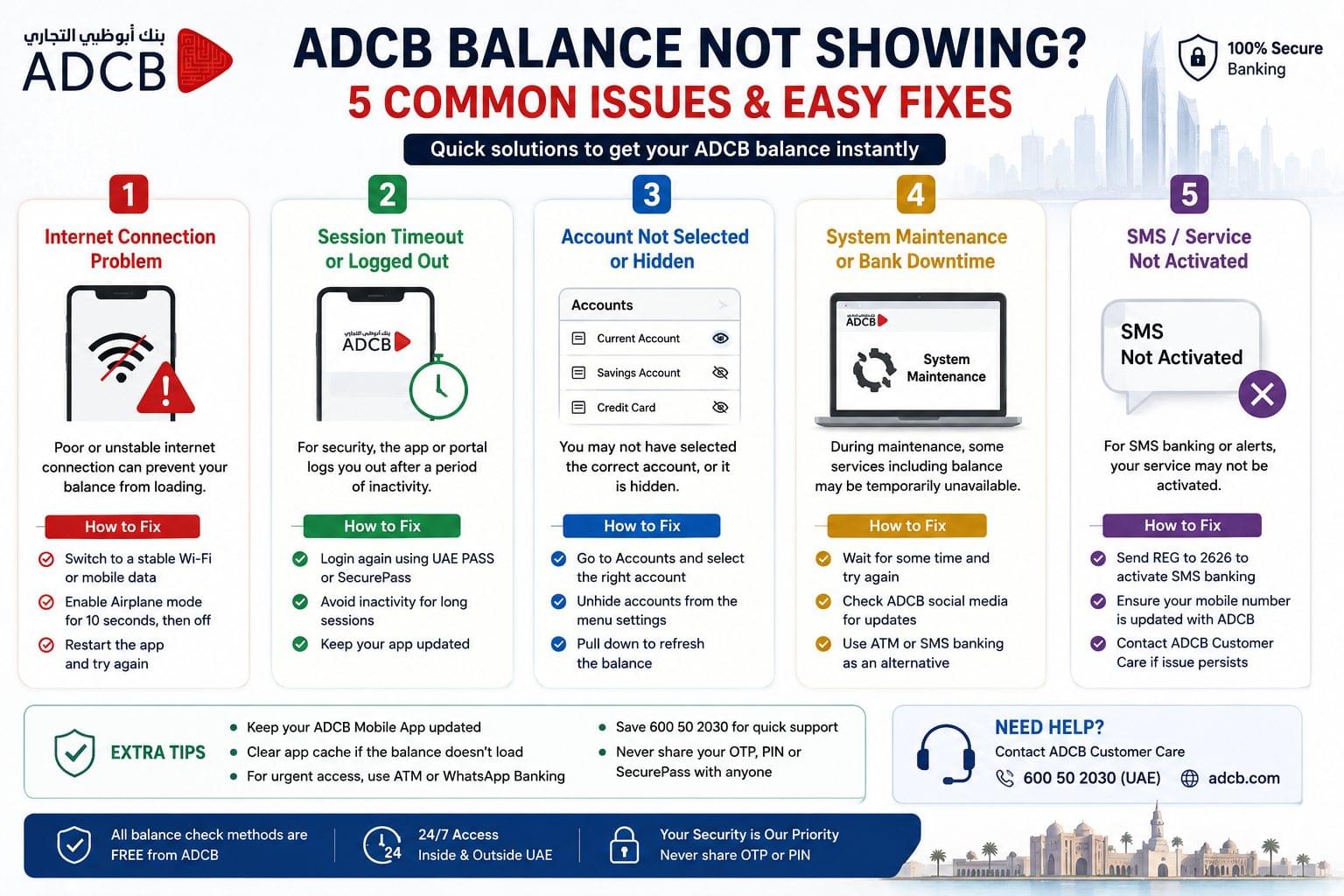
ADCB balance displays correctly across all 6 methods when the account is active, the registered mobile number is current, and the debit or credit card is neither blocked nor expired. The 5 most common causes of ADCB balance not showing are an unregistered SMS number, a lapsed SecurePass session, a pending salary credit, an expired UAE PASS linkage, and a blocked or expired debit card.
Fix 1 SMS balance not received: Confirm registration by sending “REG [account number]” to 2626. Re-registration resolves most SMS delivery failures caused by a SIM change or number update.
Fix 2 App balance not loading: Clear the app cache, log out, and log back in using UAE PASS. Reset SecurePass via the “Forgot SecurePass” option on the login screen to restore full app access.
Fix 3 Salary balance not updated: ADCB processes WPS salary credits on the same business day. Salary amounts credited after 4:00 PM UAE time reflect in the account balance on the following business day.
Fix 4 UAE PASS login rejected: Update the Emirates ID linked to UAE PASS at a UAE PASS-authorised kiosk or via the UAE PASS app, then re-link to ADCB Mobile Banking through the app settings.
Fix 5 Card blocked or expired at ATM: A blocked or expired ADCB debit card prevents ATM balance check. Report a blocked card by calling 600 50 2030 (24 hours). Request a replacement card via the ADCB Mobile Banking App under Cards → Replace Card, or visit any ADCB uBank digital center for instant card printing without a branch appointment.
Frequently Asked Questions about ADCB Balance Check
What is the ADCB balance check number? The ADCB balance check number is 600 50 2030 for phone IVR banking and WhatsApp banking inside the UAE. Callers outside the UAE dial +971 2 621 0090.
How to check ADCB balance via SMS? To check ADCB balance via SMS, send “BAL [last 6 digits of account number]” to 2626 from the registered mobile number after completing the one-time registration by sending “REG [full account number]” to 2626.
Does ADCB charge for balance check? ADCB charges AED 0 for balance checks via online banking, mobile app, WhatsApp, phone IVR, and SMS enquiry. Standard SMS charges from the mobile network provider apply to the SMS banking method only.
Can ADCB balance be checked from outside UAE? ADCB balance check is accessible from outside the UAE via the ADCB Mobile Banking App, the online portal at adcb.com, and phone banking at +971 2 621 0090. SMS Banking operates internationally with active roaming enabled on the registered SIM.
How to check ADCB credit card balance? To check the ADCB credit card balance, log in to the ADCB Mobile Banking App and select “Cards,” or send “BAL [last 6 digits of credit card number]” to 2626. The available credit, outstanding balance, and minimum payment due display in both methods.
What is the ADCB WhatsApp banking number? The ADCB WhatsApp banking number is 600 50 2030. Save it as a contact, open WhatsApp, send any message, and select “Account Balance” from the menu in Arabic or English.
How long does ADCB salary credit take to reflect in the balance? ADCB salary credits received before 4:00 PM UAE time reflect in the account balance on the same business day. Credits received after 4:00 PM UAE time reflect on the following business day.
Can ADCB balance be checked if the registered SIM is not in the phone? ADCB online banking and the mobile app do not require the registered SIM to be active in the device for balance viewing after SecurePass setup. SMS Banking and USSD require the registered SIM to be inserted and active in the device at the time of the query. WhatsApp Banking requires the WhatsApp account linked to the registered number to be active on any device.
Related Balance Checks
ADCB is 1 of 5 major UAE banks covered on balancecheck.ae. The UAE balance enquiry hub page lists all balance check methods across banks, prepaid cards, transit cards, and telecom operators in a single reference. For specific entity balance check guides covering other UAE banks and card systems, see:
- FAB bank balance check First Abu Dhabi Bank online portal, Payit app, PPC Magnati prepaid card portal, and FAB Mobile App
- Emirates NBD balance check Emirates NBD App, UAE PASS login, NBAD legacy account methods, and NBD phone banking
- Mashreq balance check Mashreq Neo digital banking, NeoPay, and Mashreq online portal
- DIB balance check Dubai Islamic Bank app, Islamic banking account balance methods, and DIB phone banking
- ATM balance check UAE all UAE bank ATM balance inquiry procedures including ADCB, FAB, Emirates NBD, and Mashreq
- UAE prepaid card balance check Ratibi, Lulu Exchange PayPlus, Al Ansari PayPlus, and PPC Magnati prepaid card balance methods
For expat workers managing salary accounts across prepaid card systems, the salary check UAE guide covers WPS salary credit verification for Ratibi cards, Lulu Exchange salary cards, and Al Ansari PayPlus cards. For balance checks without an internet connection, the UAE bank balance check offline guide covers USSD codes, SMS commands, and phone IVR numbers for all major UAE banks including ADCB, FAB, Emirates NBD, Mashreq, and DIB.
For independent third-party verification of ADCB balance check methods and UAE banking SMS codes, paisabazaar.ae and uaehelper.com maintain independently updated UAE bank balance check reference guides.