

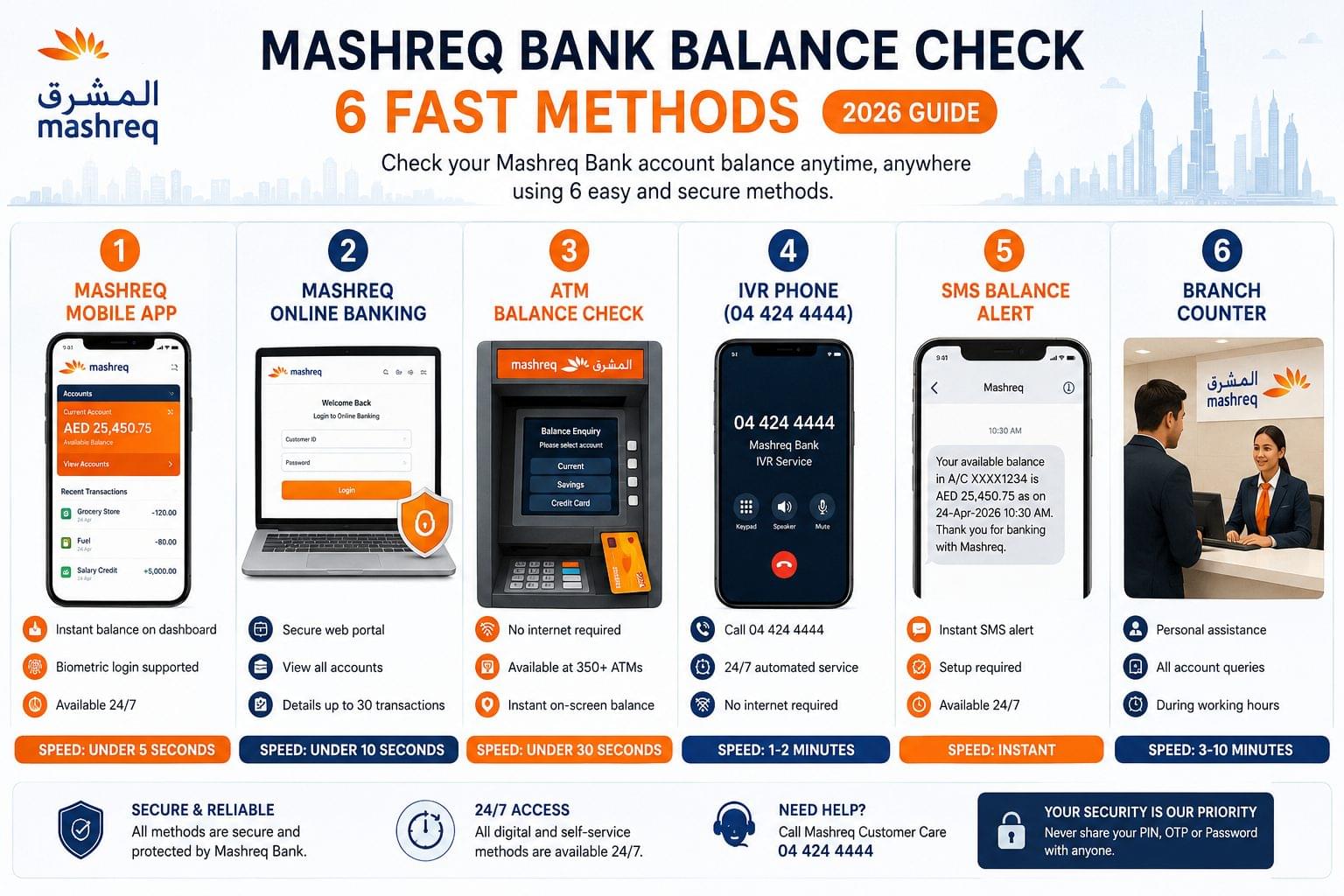
Mashreq Bank balance check is available through 6 methods: the Mashreq Mobile app, Mashreq Online Banking portal, ATM, IVR phone line (04 424 4444), SMS alerts, and branch counter. Mashreq is the oldest privately-owned bank in the UAE, operating since 1967. The fastest method is the Mashreq Mobile app, which displays the current balance in under 5 seconds. All 6 methods are available 24 hours a day, 7 days a week, except the branch counter.
What is Mashreq Bank?
Mashreq Bank is a UAE-headquartered private commercial bank, founded in 1967 and listed on the Dubai Financial Market (DFM). It operates across 4 business segments: Retail Banking, Corporate and Investment Banking, Islamic Banking, and Digital Banking through its subsidiary NeoPay. Mashreq Bank serves customers across the UAE through 25 branches, 350+ ATMs, and digital platforms, including the Mashreq Mobile app and Mashreq Online Banking portal at www.mashreqbank.com. The customer service helpline at 04 424 4444 handles balance inquiries, card services, and account support.
Mashreq Bank Balance Check Methods at a Glance
| Method | Speed | Requires Internet | Requires Registration | Available 24/7 |
| Mashreq Mobile App | Instant (under 5 seconds) | Yes | Yes | Yes |
| Mashreq Online Banking | Under 10 seconds | Yes | Yes | Yes |
| ATM | Under 30 seconds | No | No | Yes |
| IVR Phone (04 424 4444) | 1–2 minutes | No | No | Yes |
| SMS Balance Alert | Instant (push notification) | No | Yes (setup required) | Yes |
| Branch Counter | 3–10 minutes | No | No | No (business hours only) |
Check Mashreq Bank Balance via Mobile App
The Mashreq Mobile app displays the current account balance and available balance on the home screen immediately after login. The app is available on both the Apple App Store (iOS 14 and above) and the Google Play Store (Android 8 and above). Biometric login fingerprint and Face ID is supported on both platforms.
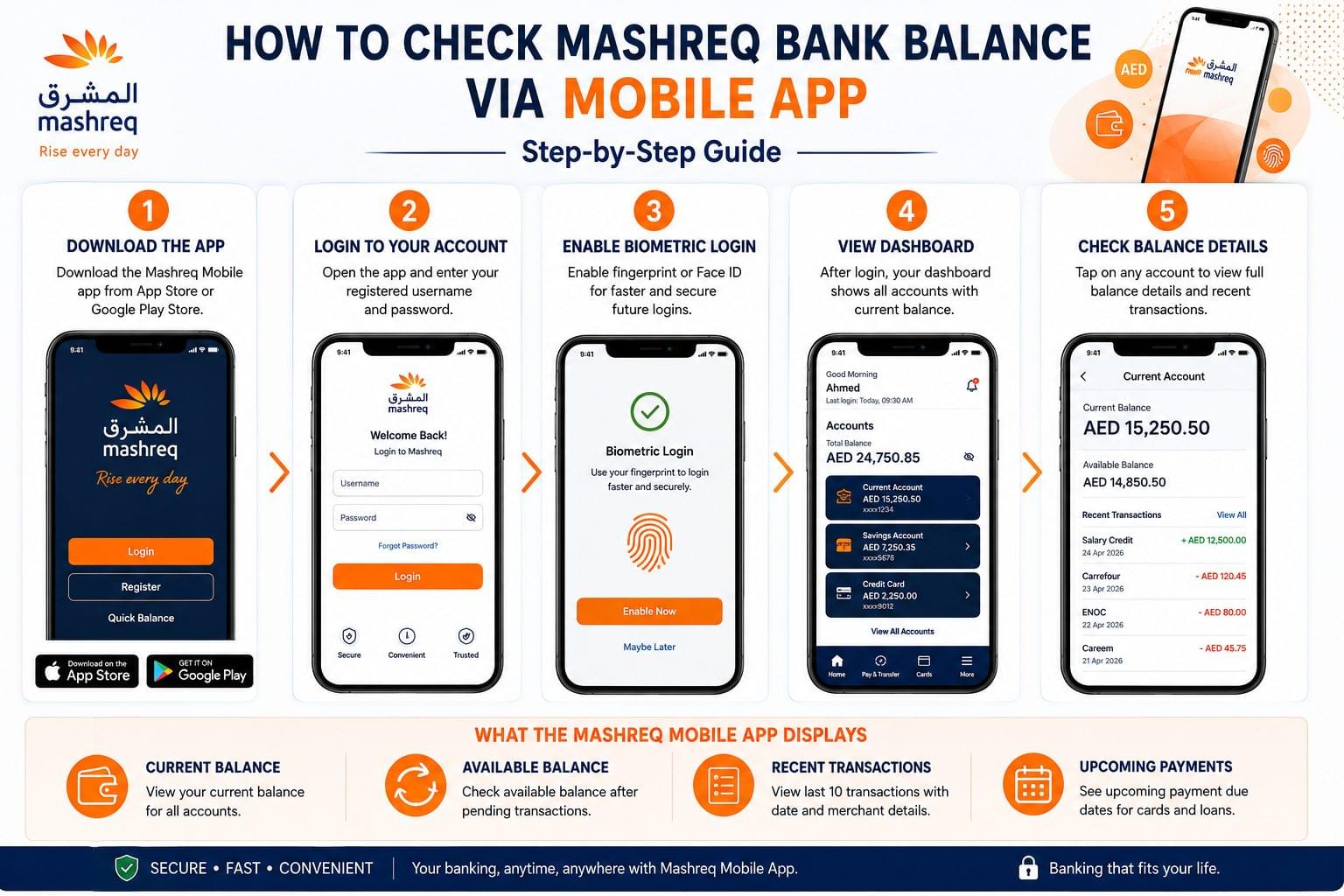
Step-by-Step: Mashreq Mobile App Balance Check
- Download the Mashreq Mobile app from the Apple App Store or Google Play Store.
- Open the app and enter the registered username and password.
- Enable biometric authentication fingerprint or Face ID for faster future login.
- View the dashboard. The current balance for each account appears on the home screen.
- Tap on any account card to view the full balance breakdown, including available balance, outstanding balance, and recent transactions.
What the Mashreq Mobile App Displays
The Mashreq Mobile app displays 4 key balance details for each account:
- Current account balance
- Available balance (after pending transactions are deducted)
- Last 10 transactions with date and merchant name
- Upcoming payment due dates for credit cards and loans
UAE residents who also hold salary accounts at other banks check their salary credits through similar digital channels see the salary check UAE guide for WPS salary verification across all major UAE banks.
Check Mashreq Bank Balance via Online Banking
Mashreq Online Banking at www.mashreqbank.com provides full account balance access through a secure browser portal. The online portal supports balance checks for current accounts, savings accounts, fixed deposits, and credit cards.
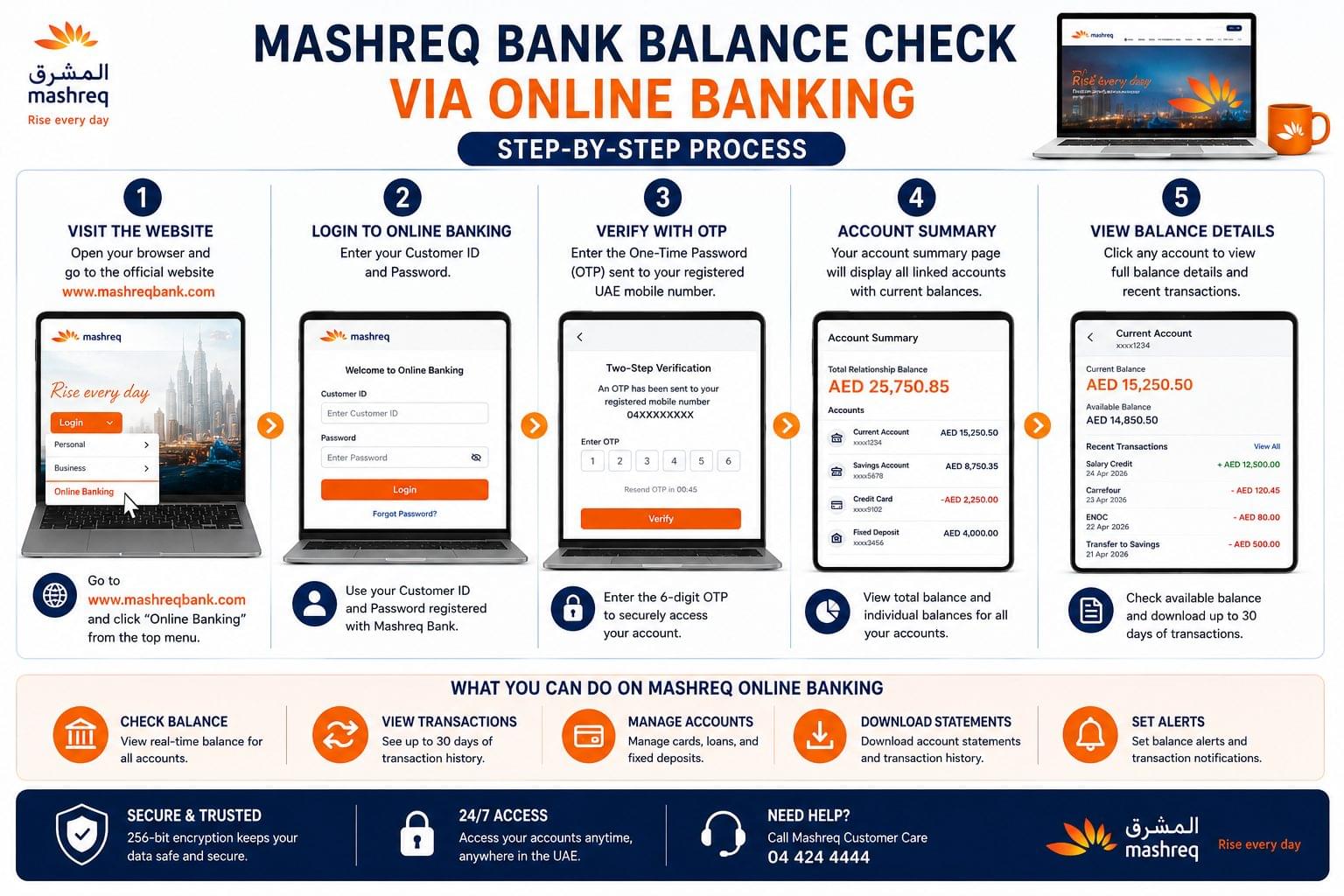
Step-by-Step: Mashreq Online Banking Balance Check
- Open a browser and navigate to www.mashreqbank.com.
- Click “Online Banking” in the top navigation menu.
- Enter the Customer ID and password on the login page.
- Complete the OTP verification sent to the registered UAE mobile number.
- The Account Summary page displays the current balance for all linked accounts.
- Click on any account name to view full balance details and the last 30 transaction records.
What Information is Required for Online Banking Login?
3 details are required to access Mashreq Online Banking:
- Customer ID provided at account opening or available on account statements
- Password set during online banking registration
- OTP a one-time password sent to the registered UAE mobile number
Customers who manage multiple UAE bank accounts use the UAE balance enquiry guide to access balance check portals for all major banks in one place.
Check Mashreq Bank Balance via ATM
Mashreq Bank ATMs display the account balance at AED 0 fee per inquiry. Mashreq operates 350+ ATMs across the UAE, located in Dubai, Abu Dhabi, Sharjah, Ajman, Ras Al Khaimah, Fujairah, and Umm Al Quwain. Balance inquiries at non-Mashreq ATMs within the UAE interbank network are available at a fee of AED 2–5 per inquiry, depending on the issuing bank.
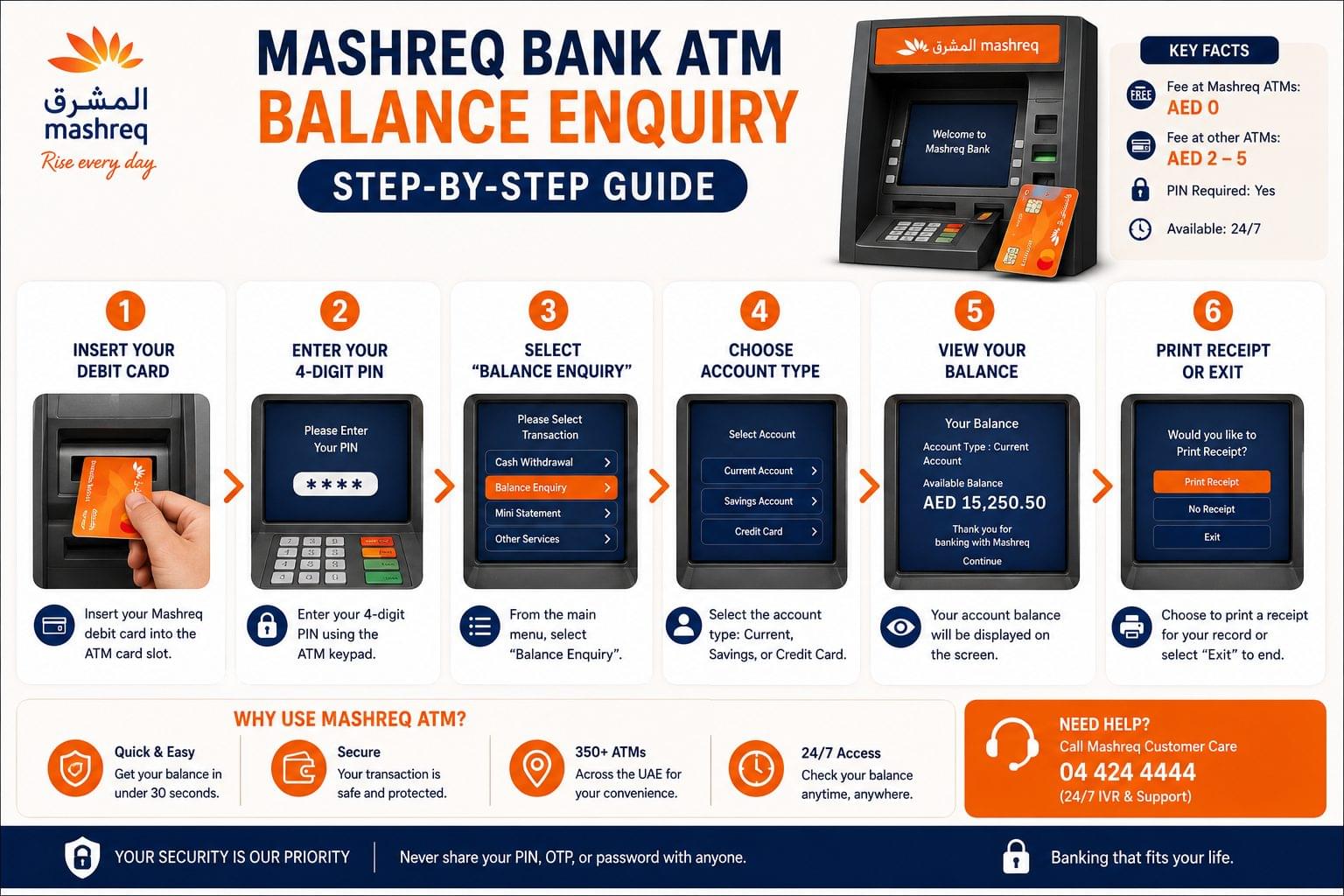
Step-by-Step: Mashreq ATM Balance Check
- Insert the Mashreq debit card into the ATM card slot.
- Enter the 4-digit PIN using the ATM keypad.
- Select “Balance Enquiry” from the main menu.
- Choose the account type: Current, Savings, or Credit Card.
- The balance appears on screen. Select “Print Receipt” for a paper record, or “Exit” to end the inquiry.
ATM Balance Check Key Facts
- Fee at Mashreq ATMs: AED 0 per inquiry
- Fee at non-Mashreq ATMs: AED 2–5 per inquiry, depending on the network
- PIN required: Yes the 4-digit debit card PIN is mandatory
- Internet required: No the ATM operates independently of the customer’s internet connection
- Card types supported: Mashreq Debit Mastercard and Mashreq Debit Visa
For a complete guide to ATM balance checks across all UAE banks, including Emirates NBD, FAB, and ADCB, see the ATM balance check UAE guide.
Check Mashreq Bank Balance via Phone (IVR)
The Mashreq IVR system at 04 424 4444 provides automated balance checks without requiring a bank representative. The IVR system operates 24 hours a day, 7 days a week. Live agent support operates from 8:00 AM to 10:00 PM (Sunday to Thursday) and 9:00 AM to 6:00 PM (Friday and Saturday), UAE time.
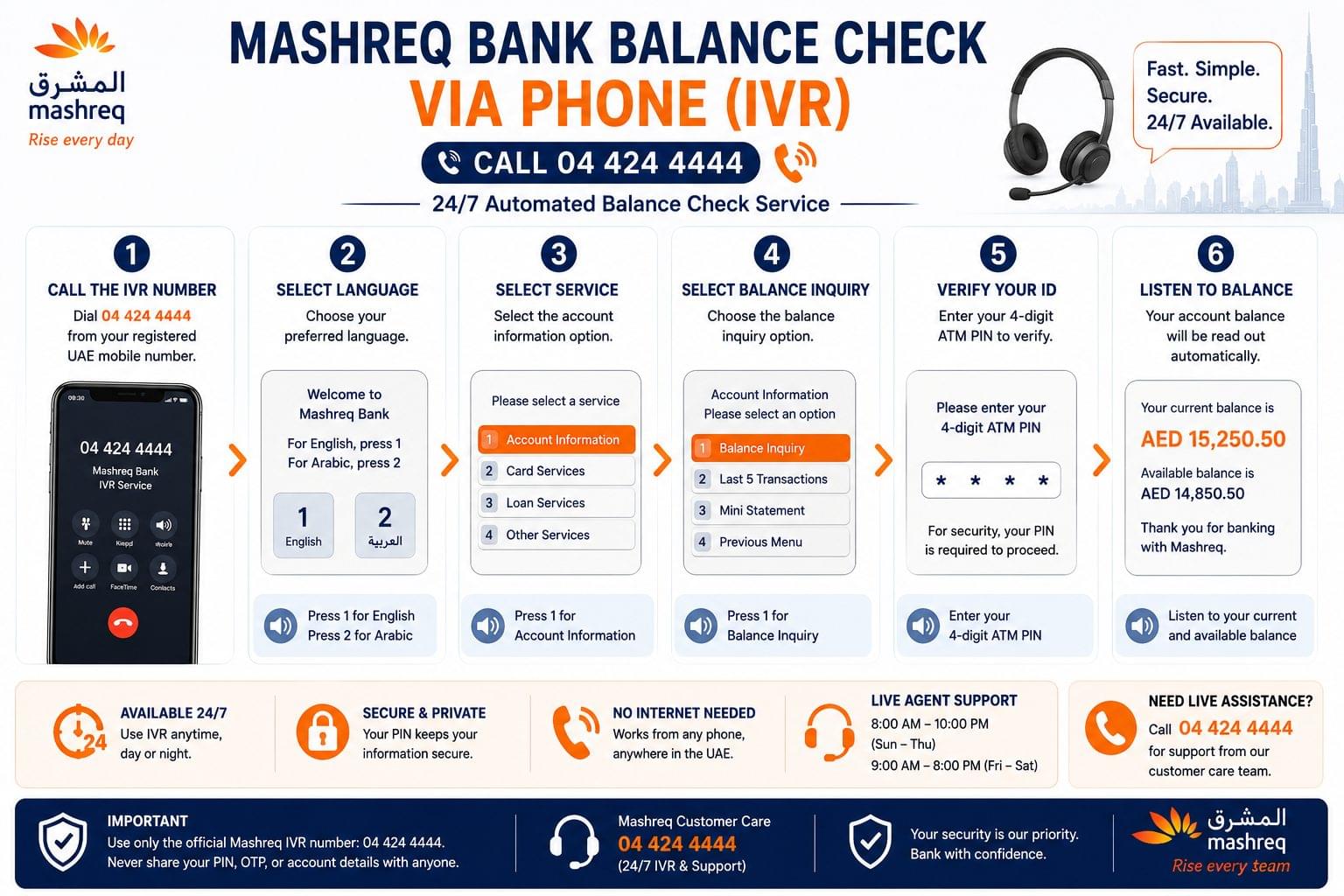
Step-by-Step: Mashreq IVR Balance Check
- Dial 04 424 4444 from any UAE landline or mobile number.
- Select the preferred language Arabic or English from the opening menu.
- Press 1 for “Account Services.”
- Enter the 16-digit account number or the registered UAE mobile number when prompted.
- Enter the 4-digit telephone banking PIN when prompted.
- Press the option for “Balance Inquiry.” The IVR reads the current balance aloud.
- Press 9 to return to the main menu or end the call.
How to Set Up a Telephone Banking PIN for Mashreq
A telephone banking PIN is set through 3 channels: the Mashreq Mobile app under Security Settings, the Mashreq Online Banking portal under Profile Settings, or at any Mashreq branch counter. The PIN is 4–6 digits and is separate from the ATM debit card PIN.
Customers who need to check their Emirates NBD balance check by phone use the Emirates NBD IVR line at 600 54 0000, which operates on the same automated structure as the Mashreq IVR system.
Check Mashreq Bank Balance via SMS Alerts
To receive Mashreq Bank balance alerts via SMS, activate transaction notifications through the Mashreq Mobile app under Settings > Notifications. SMS alerts deliver automatic balance updates to the registered UAE mobile number after every transaction. SMS alerts push balance notifications when account activity occurs salary credits, ATM withdrawals, card purchases, and online transfers.
How to Activate Mashreq SMS Balance Alerts
Mashreq SMS balance alerts are activated through 3 methods:
- Log in to the Mashreq Mobile app, go to Settings > Notifications, and enable Transaction Alerts.
- Log in to Mashreq Online Banking, go to Preferences > Alert Settings, and activate SMS alerts for all transactions.
- Visit any Mashreq branch and request SMS alert activation at the customer service desk.
What the Mashreq SMS Alert Contains
Each Mashreq transaction SMS contains 4 details:
- Transaction type credit or debit
- Transaction amount in AED
- Account balance after the transaction
- Transaction date and time
Expat workers who receive salaries via the UAE Wage Protection System (WPS) rely on SMS alerts to confirm salary credits. For salary prepaid card holders, the FAB Ratibi card balance check guide covers WPS salary verification via the PPC Magnati portal and Payit app.
Check Mashreq Bank Balance at a Branch Counter
Mashreq branch counter balance inquiries provide a printed or verbal balance confirmation from a bank teller. This method is available during branch operating hours and requires a valid Emirates ID or Mashreq debit card for identity verification.
Mashreq Branch Operating Hours
| Day | Hours |
| Sunday to Thursday | 8:00 AM – 5:00 PM |
| Friday | 9:00 AM – 12:00 PM |
| Saturday | Closed |
Step-by-Step: Mashreq Branch Balance Check
- Visit the nearest Mashreq branch in the UAE available in Dubai, Abu Dhabi, Sharjah, Ajman, Ras Al Khaimah, Fujairah, and Umm Al Quwain.
- Take a queue token from the service counter machine.
- Present a valid Emirates ID or Mashreq debit card to the teller when called.
- Request an account balance inquiry verbally or ask for a printed mini-statement.
- The teller provides the current balance and the last 5 transactions on a printed slip.
Mashreq Bank Balance Not Showing? 4 Common Fixes
Mashreq Bank balance display failures occur due to 4 main causes: pending transaction processing, app cache issues, incorrect login credentials, and temporary system outages. Each cause has a direct fix.
Balance Not Updated After Salary Credit
Salary credits on the Mashreq Wage Protection System (WPS) account reflect within 2 working hours of the employer’s transfer. The salary credit appears in the Mashreq Mobile app and Online Banking portal after the WPS processing cycle completes. Contact Mashreq at 04 424 4444 if the salary credit does not appear within 4 business hours.
Workers across the UAE who receive salaries via WPS into multiple bank types use the salary check UAE guide to verify credits across FAB, NBD, Lulu Exchange, and other WPS-compliant banks simultaneously.
Mashreq Mobile App Not Loading the Balance
The Mashreq Mobile app fails to load the balance due to 3 causes: a poor internet connection, an outdated app version, and a corrupted app cache. Clear the app cache through the device Settings > Apps > Mashreq > Clear Cache, update the app to the latest version from the App Store or Google Play, then re-login.
ATM Shows Incorrect Balance
The Mashreq ATM displays an incorrect balance after a recent deposit if the transaction is still in pending state. Pending transactions take 1–2 business hours to clear. Check the balance again via the Mashreq Mobile app, where the “available balance” line shows the spendable amount after pending debits are deducted.
Customers who prefer ATM balance checks across multiple UAE banks without visiting separate branches use the ATM balance check UAE guide, which covers step-by-step ATM balance inquiry procedures for FAB, Emirates NBD, ADCB, and DIB.
Mashreq Online Banking OTP Not Received
The Mashreq Online Banking OTP fails to arrive if the registered UAE mobile number is inactive, the SIM is absent from the device, or the number is roaming internationally. Update the registered mobile number at a Mashreq branch or through the Mashreq Mobile app under Profile Settings.
Customers who need to check their bank balance without internet access including at branches and via IVR use the UAE bank balance check without internet guide for all offline methods across UAE banks.
Frequently Asked Questions: Mashreq Bank Balance Check
What is the Mashreq Bank balance check number? The Mashreq Bank balance check number is 04 424 4444. The IVR system provides automated balance inquiries 24 hours a day, 7 days a week, in Arabic and English.
Is there a fee to check Mashreq Bank balance? Mashreq Bank charges AED 0 for balance inquiries via the mobile app, online banking, IVR phone line, and SMS alerts. ATM balance inquiries at non-Mashreq ATMs attract a fee of AED 2–5 per inquiry, depending on the network.
Can Mashreq Bank balance be checked from outside the UAE? Mashreq Bank balance is checked from outside the UAE through 2 methods: the Mashreq Mobile app (requires an internet connection) and the Mashreq Online Banking portal at www.mashreqbank.com. The IVR phone service at 04 424 4444 is also reachable via international dialing.
What does the Mashreq Mobile app require for login? The Mashreq Mobile app requires a Customer ID, password, and OTP for the initial login. After the first login, biometric authentication fingerprint or Face ID is available for subsequent sessions.
Does Mashreq Bank support Arabic for balance checks? Mashreq Bank supports Arabic and English across all 6 balance check channels: the Mobile app, Online Banking portal, IVR phone system, ATM interface, SMS alerts, and branch counter service.
How many ATMs does Mashreq Bank operate in the UAE? Mashreq Bank operates 350+ ATMs across the UAE, located in all 7 emirates: Dubai, Abu Dhabi, Sharjah, Ajman, Ras Al Khaimah, Fujairah, and Umm Al Quwain.
Is Mashreq Neo the same as Mashreq Bank for balance checks? Mashreq Neo is a separate digital banking subsidiary of Mashreq Bank, targeting younger customers and the unbanked segment. Mashreq Neo balance checks are managed exclusively through the Mashreq Neo app not the standard Mashreq Mobile app or Online Banking portal.
What is the Mashreq Bank customer care number? The Mashreq Bank customer care number is 04 424 4444, available 24 hours a day for automated services. Live agents are available Sunday to Thursday 8:00 AM – 10:00 PM and Friday to Saturday 9:00 AM – 6:00 PM UAE time.
How does Mashreq balance check compare to FAB balance check? Mashreq bank balance check uses the Mashreq Mobile app and www.mashreqbank.com portal, while FAB bank balance check uses the FAB Mobile app, the PPC Magnati portal at ppc.magnati.com, and the Payit wallet. Both banks offer 6+ balance check methods, with FAB adding the Payit digital wallet and PPC Magnati prepaid card inquiry as additional channels not available at Mashreq.
Can Mashreq Bank balance be checked via USSD? Mashreq Bank does not currently offer a USSD balance check code. USSD balance checks in the UAE are available for telecom accounts Etisalat balance check uses *121# and du balance check uses *135# for prepaid data and credit balances.
Related Balance Checks
Mashreq Bank is one of 5 major UAE bank balance check services covered on balancecheck.ae. The 4 most contextually related balance check guides are:
Sibling bank pages (upward banking cluster):
- FAB bank balance check covers 7 methods for First Abu Dhabi Bank, including the PPC Magnati prepaid card portal, Payit wallet, and Ratibi salary card inquiry via USSD and SMS.
- Emirates NBD balance check covers UAE PASS login, the Emirates NBD app, and the 600 54 0000 IVR for NBAD legacy account holders.
- ADCB balance check covers ADCB Mobile, TouchPoints rewards account balance, and the 600 502 030 IVR for Abu Dhabi Commercial Bank account holders.
- DIB balance check covers Dubai Islamic Bank balance check via the DIB app, SMS, ATM, and the 04 609 2222 IVR for Sharia-compliant account holders.
- ATM balance check UAE step-by-step ATM balance inquiry procedures for all major UAE banks, including Mashreq, FAB, Emirates NBD, and ADCB, covering PIN entry, account selection, and receipt printing.
- UAE bank balance check without internet covers all offline methods available to UAE bank customers, including IVR phone lines, SMS alerts, and in-branch counter inquiries for Mashreq and other major banks.
- Salary check UAE covers WPS salary verification for Mashreq, FAB, Emirates NBD, Lulu Exchange, and Al Ansari Exchange account holders, including how to confirm a salary credit has cleared.
- UAE balance enquiry a complete guide to all balance enquiry methods across UAE banks, transit cards, telecoms, and prepaid cards, with direct links to every entity page on balancecheck.ae.