

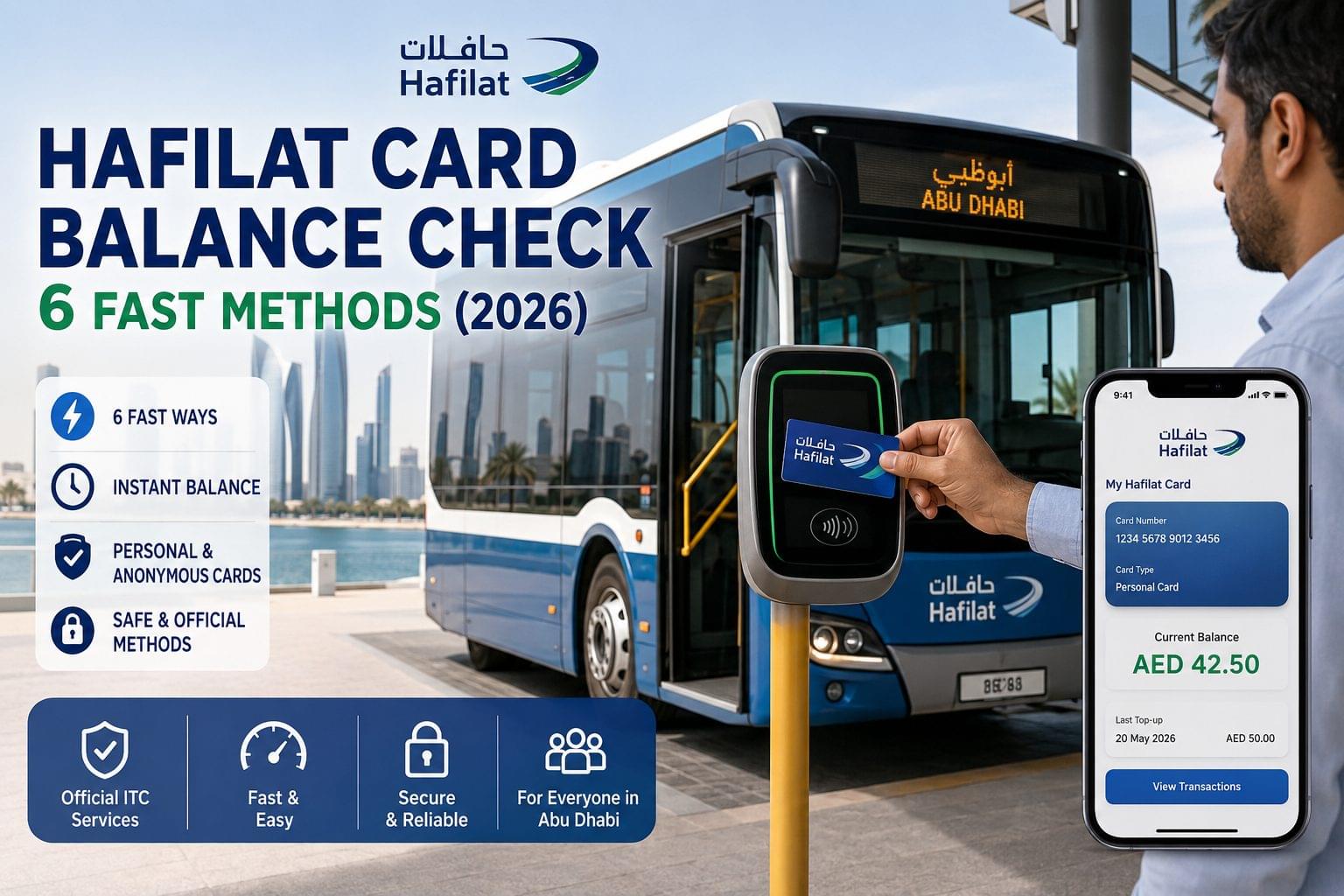
The Hafilat Card is an Abu Dhabi transit smart card issued by the Integrated Transport Centre (ITC) for use on public buses across Abu Dhabi emirate. There are 6 methods to check a Hafilat Card balance in 2026: online via hafilat.darb.ae, the Darb app, Payit, SMS, ITC helpline, and ITC service centres. The UAE balance check guide covers all balance check methods across banks, transit cards, telecom, and toll systems in the UAE.
Abu Dhabi residents and expat workers including Indian, Pakistani, and Filipino workers use the Hafilat Card to board public buses operated by the Department of Municipalities and Transport. The card comes in 2 types: personal cards, registered to an Emirates ID, and anonymous cards, requiring no registration. The balance check method available depends on the card type. For Dubai transit, see the Nol Card balance check.
Hafilat Card Balance Check Methods at a Glance
There are 6 methods to check a Hafilat Card balance in 2026, with 3 online methods and 3 offline methods available depending on card type.
| Method | Requires Internet | Requires Registration | Speed | Card Types Supported |
| hafilat.darb.ae portal | Yes | Yes Emirates ID login | Instant | Personal card only |
| Darb app | Yes | Yes mobile number + PIN | Instant | Personal card only |
| Payit app | Yes | Yes FAB Payit account | Instant | Personal card only |
| SMS | No | No | Under 60 seconds | Personal + Anonymous |
| ITC Helpline (800 482) | No | No | Under 2 minutes | Personal + Anonymous |
| ITC Service Centre | No | No | Under 5 minutes | Personal + Anonymous |
Personal Card vs Anonymous Card Balance Check Differences
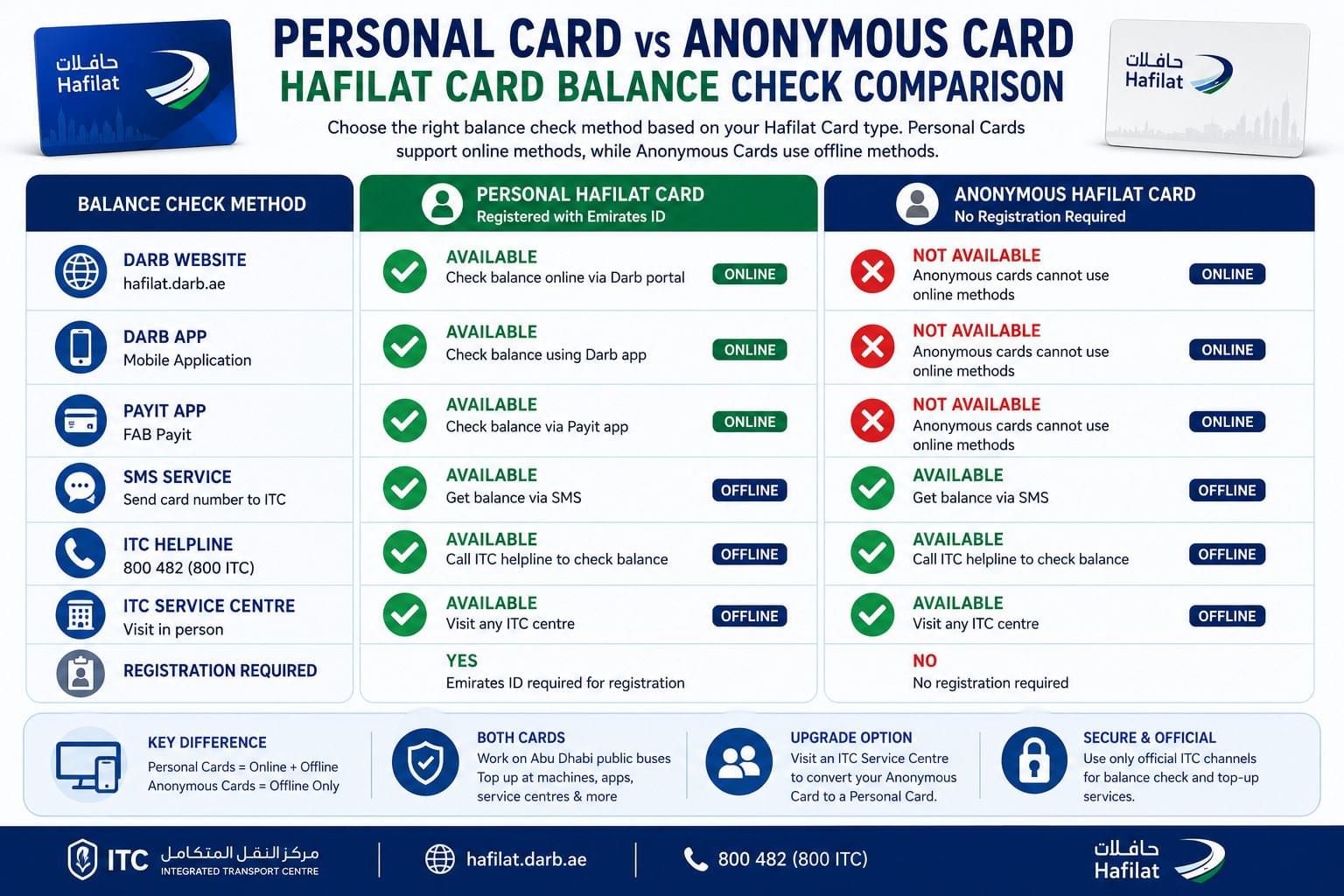
Personal Hafilat Cards support online balance checks via the Darb portal, Darb app, and Payit, while anonymous Hafilat Cards require SMS, the ITC helpline, or an in-person service centre visit. Personal cards are registered at hafilat.darb.ae using an Emirates ID. Anonymous cards are available at ITC service centres and selected bus stations with no registration requirement. Anonymous cardholders gain online access by visiting an ITC centre to convert and register the card to a personal account.
Check Hafilat Card Balance Online via hafilat.darb.ae
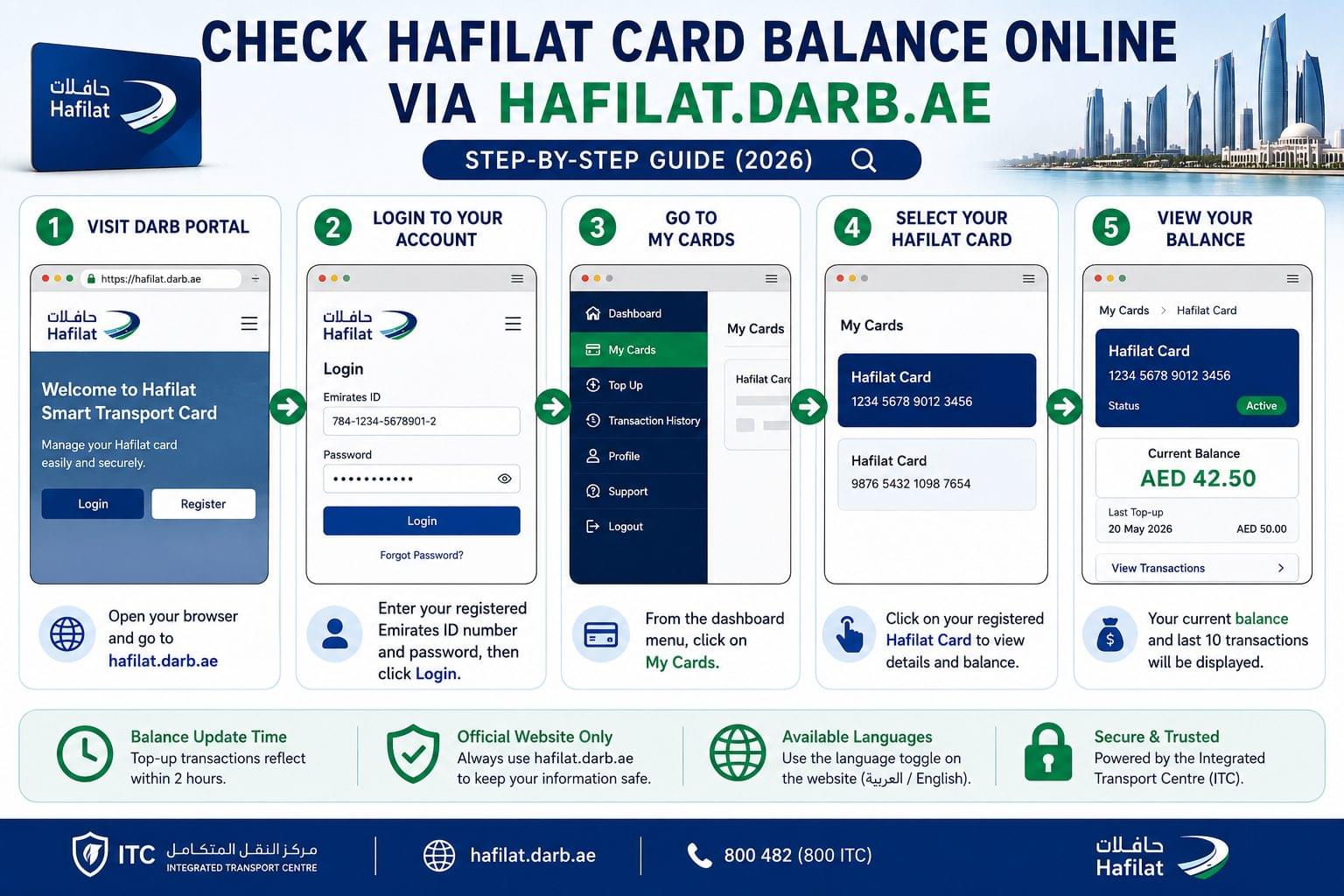
To check the Hafilat Card balance online, visit hafilat.darb.ae, log in with the registered Emirates ID number and password, and navigate to the My Cards section to view the current balance.
Step-by-Step: Hafilat Balance Check on the Darb Portal
- Open a browser and navigate to hafilat.darb.ae.
- Click Login and enter the registered Emirates ID number and password.
- Select My Cards from the dashboard menu.
- Click the registered Hafilat Card to view the current balance and last 10 transactions.
- Note the balance displayed in AED per hafilat.darb.ae, the portal reflects top-up transactions within 2 hours.
What Information Is Needed for the Online Balance Check?
The hafilat.darb.ae portal requires 2 credentials for login: the Emirates ID number and the registered account password. The portal is available in Arabic and English via the language toggle on the homepage. The balance and full transaction history are accessible once logged in. Use only the official hafilat.darb.ae URL avoid third-party Hafilat balance checker sites that request card credentials.
Check Hafilat Card Balance via the Darb App
To check the Hafilat Card balance via the Darb app, open the app, log in with the registered UAE mobile number and PIN, and tap My Cards to view the current balance.
How to Download and Set Up the Darb App
- Download the Darb app from the Apple App Store or Google Play Store.
- Open the app and register using the UAE mobile number linked to the Hafilat Card account.
- Set a 4-digit PIN during the registration process.
- Tap My Cards on the home screen to add the Hafilat Card using the card number.
What the Darb App Shows: Balance, Transactions, and Top-Up
The Darb app displays 4 pieces of card information: the current AED balance, last top-up date and amount, recent transaction history, and card expiry status. The app updates the balance within 15 minutes of a top-up faster than the hafilat.darb.ae portal. Card top-up via the Darb app requires no service centre visit.
Check Hafilat Card Balance via Payit
To check the Hafilat Card balance via Payit, open the FAB Payit app, navigate to Linked Cards, select the Hafilat Card, and the current balance displays on the card detail screen. Payit is the official digital wallet operated by FAB (First Abu Dhabi Bank). For salary and prepaid card balance checks via Payit, see the FAB bank balance check guide.
- Open the FAB Payit app on iOS or Android.
- Log in with the registered FAB account credentials.
- Tap Cards or Linked Cards on the main dashboard.
- Select the linked Hafilat Card from the list.
- The current balance and card status display on the card detail screen.
Check Hafilat Card Balance via SMS
To check the Hafilat Card balance via SMS, send the 16-digit Hafilat Card number to the ITC SMS shortcode and receive a balance confirmation reply within 60 seconds. No internet connection is required. The SMS method works on all UAE mobile networks, including Etisalat (e&) and du, with no internet connection required. For Etisalat prepaid balance checks, see the Etisalat balance check guide. The SMS method supports both personal and anonymous Hafilat Cards the online restriction applies to anonymous cards only, not offline methods. For all offline balance check methods across UAE banks and cards, see the UAE bank balance check without internet guide.
The current ITC SMS shortcode is confirmed at hafilat.darb.ae or via the ITC helpline at 800 482.
Check Hafilat Card Balance by Calling ITC
To check the Hafilat Card balance by phone, call the ITC helpline at 800 ITC (800 482) and select the balance enquiry option from the IVR menu.
- Dial 800 482 from any UAE number.
- Select language preference Arabic or English.
- Choose the balance enquiry option from the IVR menu.
- Enter the Hafilat Card number when prompted.
- Listen to the balance read out by the automated system.
The ITC helpline operates 7 days a week. The call is free from UAE landlines and mobile numbers on Etisalat (e&) and du networks.
Check Hafilat Card Balance at an ITC Service Centre
To check the Hafilat Card balance at a service centre, visit any ITC-authorised customer service point in Abu Dhabi and present the card to the service agent. ITC service centres are located at Abu Dhabi Central Bus Station, Musaffah Bus Station, Al Ain Bus Station, and selected Department of Municipalities and Transport offices. ITC service centre balance checks support personal and anonymous cards and complete in under 5 minutes.
Hafilat Card Balance Not Showing? Common Issues and Fixes
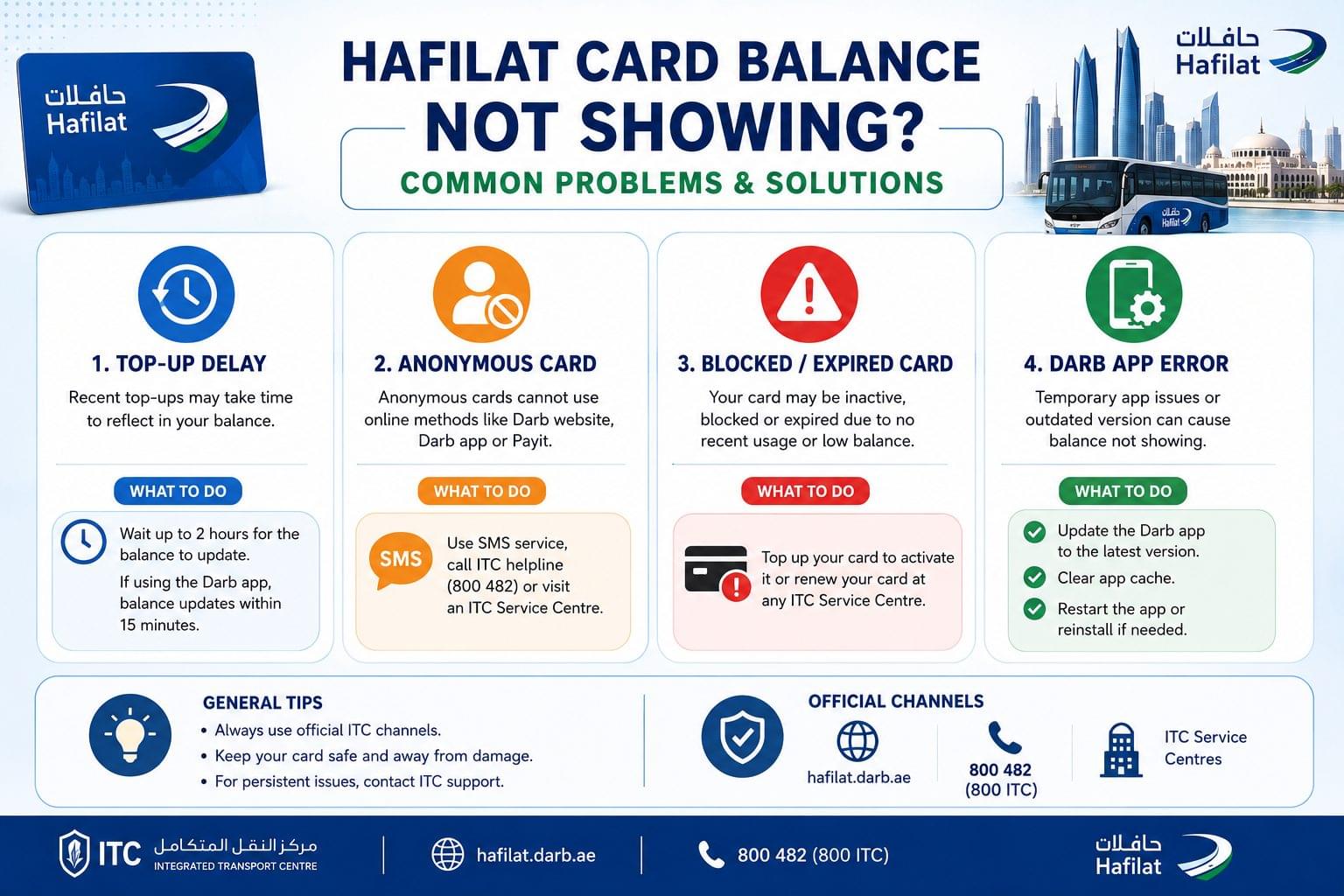
Hafilat Card balance not showing is caused by 4 common issues: delayed top-up processing, anonymous card portal restrictions, a blocked or expired card, or a Darb app login error.
Balance Not Updated After Top-Up
According to the Integrated Transport Centre (ITC), the Hafilat Card balance takes up to 2 hours to update on the hafilat.darb.ae portal after a top-up. The Darb app reflects the updated balance within 15 minutes. The card is usable for bus travel before the portal update completes the balance loads to the card immediately at the point of top-up. Contact the ITC helpline at 800 482 with the transaction receipt, if the balance has not updated after 24 hours.
Anonymous Card Balance Check Limitations
Anonymous Hafilat Card balances are not accessible via the hafilat.darb.ae portal or the Darb app. Online balance check access requires a registered personal card linked to an Emirates ID. Anonymous cardholders check the balance via SMS, the ITC helpline at 800 482, or an ITC service centre. Anonymous cardholders gain online access by visiting an ITC service centre to register and convert the card to a personal account.
Card Blocked or Expired
A blocked Hafilat Card displays an error at the bus card reader and shows a zero usable balance. According to the ITC, cards are blocked when the balance falls below the minimum AED 2 required to board a bus, or when the card expires. Top up the card to restore access, or visit an ITC service centre with the Emirates ID to renew an expired card.
Darb App Not Working
The Darb app requires an active internet connection and the latest app version installed. Force-close and reopen the app, if the balance screen does not load. Clear the app cache under device settings, if the login screen freezes. Reinstalling the Darb app resolves login errors that persist after a cache clear.
Frequently Asked Questions about Hafilat Card Balance Check
How do I check my Hafilat Card balance online? To check the Hafilat Card balance online, visit hafilat.darb.ae, log in with the Emirates ID credentials, and select My Cards. The balance and last 10 transactions display instantly. Personal card registration is required for online access.
Can I check an anonymous Hafilat Card balance online? Anonymous Hafilat Card balances are not accessible via hafilat.darb.ae or the Darb app online access requires a personal card registered to an Emirates ID. Anonymous cardholders check the balance via SMS, the ITC helpline at 800 482, or an ITC service centre.
How long does the balance take to update after a top-up? The Hafilat Card balance updates on the Darb app within 15 minutes after a top-up. The hafilat.darb.ae portal takes up to 2 hours. The card is usable for travel before either platform reflects the update.
What is the minimum balance required to board a bus? According to the ITC, the minimum balance required to board an Abu Dhabi public bus is AED 2. Cards with a balance below AED 2 are declined at the bus card reader until topped up.
Is the Hafilat Card balance check free? All 6 Hafilat Card balance check methods are free. The ITC does not charge a fee for balance enquiries via the portal, Darb app, Payit, SMS, helpline, or service centre.
Can I check the Hafilat Card balance from outside the UAE? Hafilat Card balance checks are available from outside the UAE via hafilat.darb.ae and the Darb app, as both are accessible with an internet connection from any country. SMS and phone methods require a UAE SIM.
What is the ITC helpline number for balance check? The ITC helpline number is 800 482 (800 ITC). The line operates 7 days a week and supports Arabic and English.
Is the Darb app available in Arabic? The Darb app and hafilat.darb.ae portal are available in both Arabic and English. Users switch the display language in the app settings or via the language toggle on the portal homepage.
What is the difference between the Hafilat Card and the Nol Card? The Hafilat Card is the Abu Dhabi transit smart card operated by ITC for Abu Dhabi public buses. The Nol Card is the Dubai transit smart card operated by RTA for Dubai Metro, buses, trams, and water buses. The two cards are not interchangeable. For a full comparison, see the Nol Card vs Hafilat Card balance check.
How do I top up a Hafilat Card? The Hafilat Card is topped up via the Darb app, Payit, hafilat.darb.ae portal, or ITC service centres, including Abu Dhabi Central Bus Station, Musaffah Bus Station, and Al Ain Bus Station.