

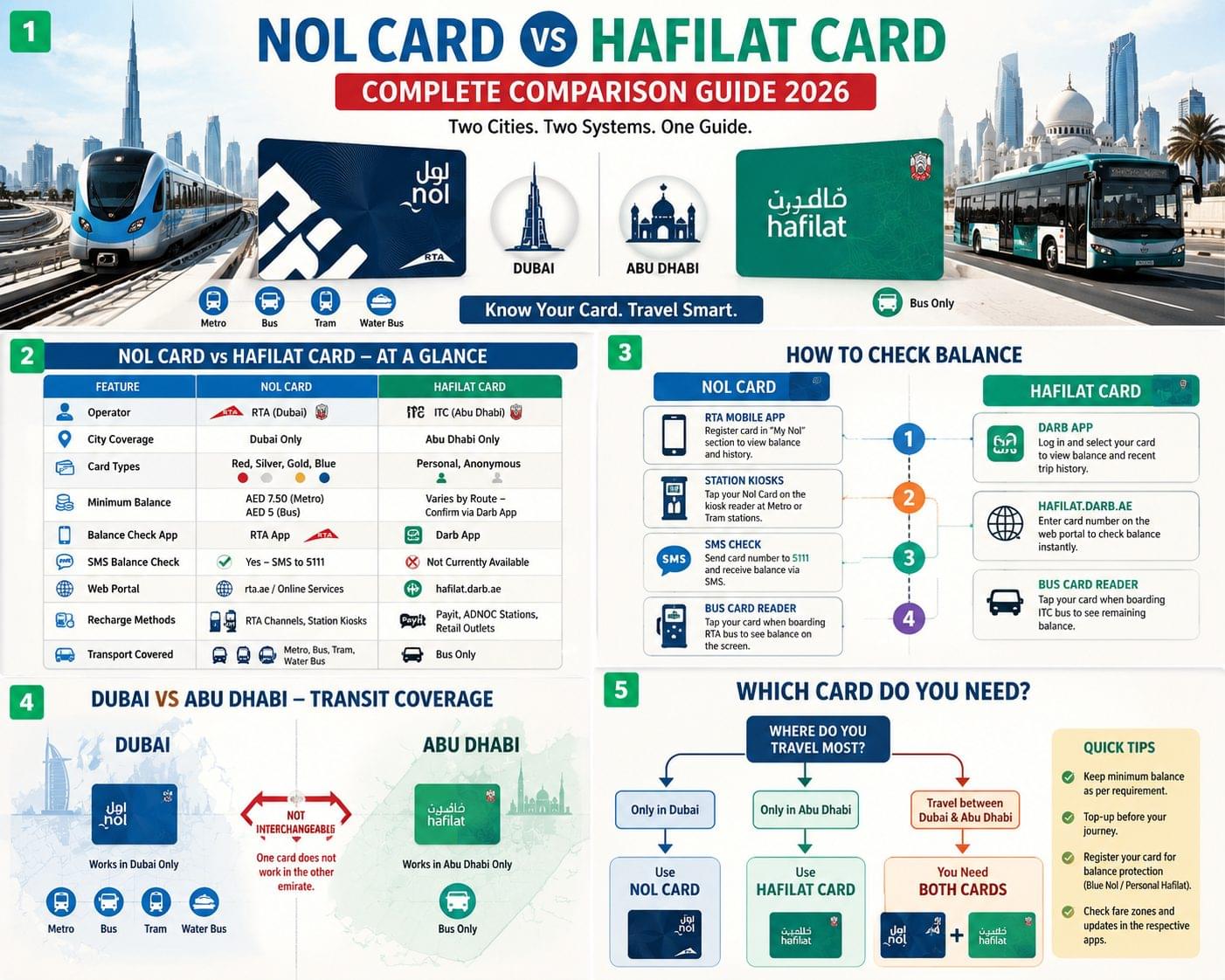
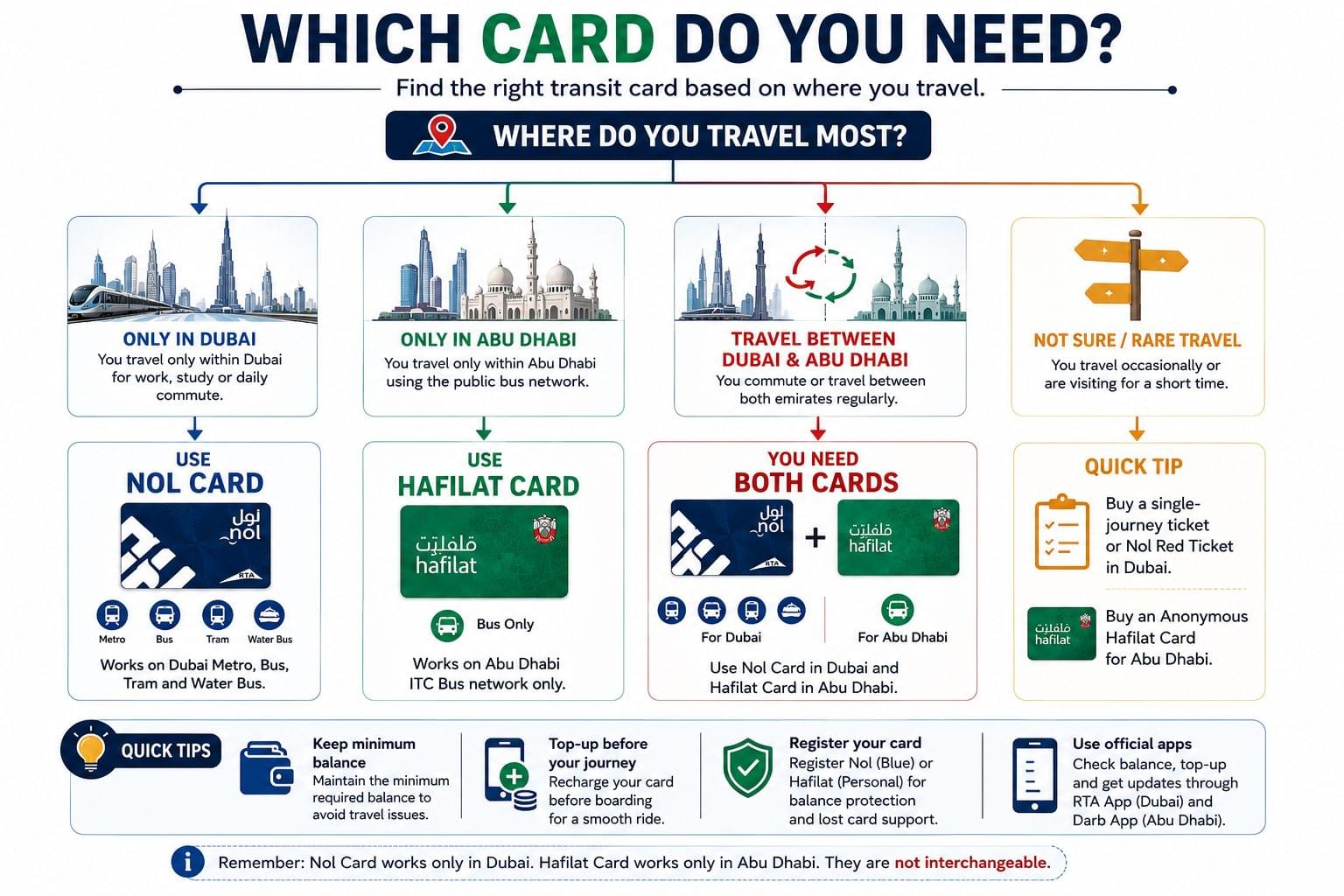
Nol Card and Hafilat Card are two separate transit smart card systems that do not work interchangeably between Dubai and Abu Dhabi. Nol Card operates exclusively within Dubai’s RTA network, while Hafilat Card operates exclusively within Abu Dhabi’s ITC bus network. Commuters who travel between both emirates need one card for each system, since neither transport authority accepts the other’s card.
This guide compares both cards across balance-check methods, minimum balance requirements, card types, and recharge options, so UAE residents and workers can quickly identify which card matches their commute and how to manage both if they travel between Dubai and Abu Dhabi regularly.
What Is a Nol Card?
Nol Card is a rechargeable smart card issued by the RTA (Roads and Transport Authority) for Dubai’s public transport network, including the Metro, buses, trams, and water buses. Nol Card comes in four types: Red, Silver, Gold, and Blue. Each type carries different minimum balance rules, daily caps, and eligibility requirements.
The Red Nol Card is a limited-use paper card popular with tourists and short-term visitors. The Silver Nol Card is a standard rechargeable card available to residents and long-term users. The Gold Nol Card grants access to Gold Class Metro cabins at a higher fare. The Blue Nol Card is a personalized card linked to the holder’s identity, offering fare capping and loss protection if the card is registered online.
The minimum balance to enter the Dubai Metro with a Nol Card is AED 7.50, while the minimum balance required for Dubai buses is AED 5. Riders check their Nol Card balance through the RTA mobile app, station kiosks, tram and bus card readers, or by sending an SMS to 5111.
What Is a Hafilat Card?
Hafilat Card is Abu Dhabi’s equivalent smart card, issued by the ITC (Integrated Transport Centre) for the emirate’s public bus network. Hafilat Card is available in two types: Personal and Anonymous. Personal cards require registration with an Emirates ID and offer fare discounts along with balance protection if lost. Anonymous cards do not require identification and can be purchased instantly at bus stations, but they carry standard, non-discounted fares.
Hafilat Card’s minimum balance requirement varies by route and has not been standardized in public documentation the way Nol Card’s has commuters should confirm the exact figure for their specific route through the Darb app before boarding, since Abu Dhabi’s bus fare zones affect the minimum deduction per trip.
Hafilat Card balance is checked primarily through the Darb app or the hafilat.darb.ae web portal. Recharge is available through Payit, Abu Dhabi bus station kiosks, and retail partners including ADNOC petrol stations and select supermarket outlets across the emirate.
Nol Card vs Hafilat Card: Quick Comparison Table
| Attribute | Nol Card | Hafilat Card |
| Operator | RTA (Dubai) | ITC (Abu Dhabi) |
| City coverage | Dubai only | Abu Dhabi only |
| Card types | Red, Silver, Gold, Blue | Personal, Anonymous |
| Minimum balance | AED 7.50 (metro), AED 5 (bus) | Varies by route confirm via Darb app |
| Balance-check app | RTA app | Darb app |
| SMS balance check | Yes SMS to 5111 | Not currently available |
| Web portal | RTA online services | hafilat.darb.ae |
| Recharge method | RTA channels, station kiosks | Payit, ADNOC stations, retail outlets |
| Transport covered | Metro, bus, tram, water bus | Bus only |
The core difference between the two cards is geographic coverage. Nol Card supports Dubai’s multi-modal transport network, while Hafilat Card supports Abu Dhabi’s bus-only network.
How to Check Nol Card Balance
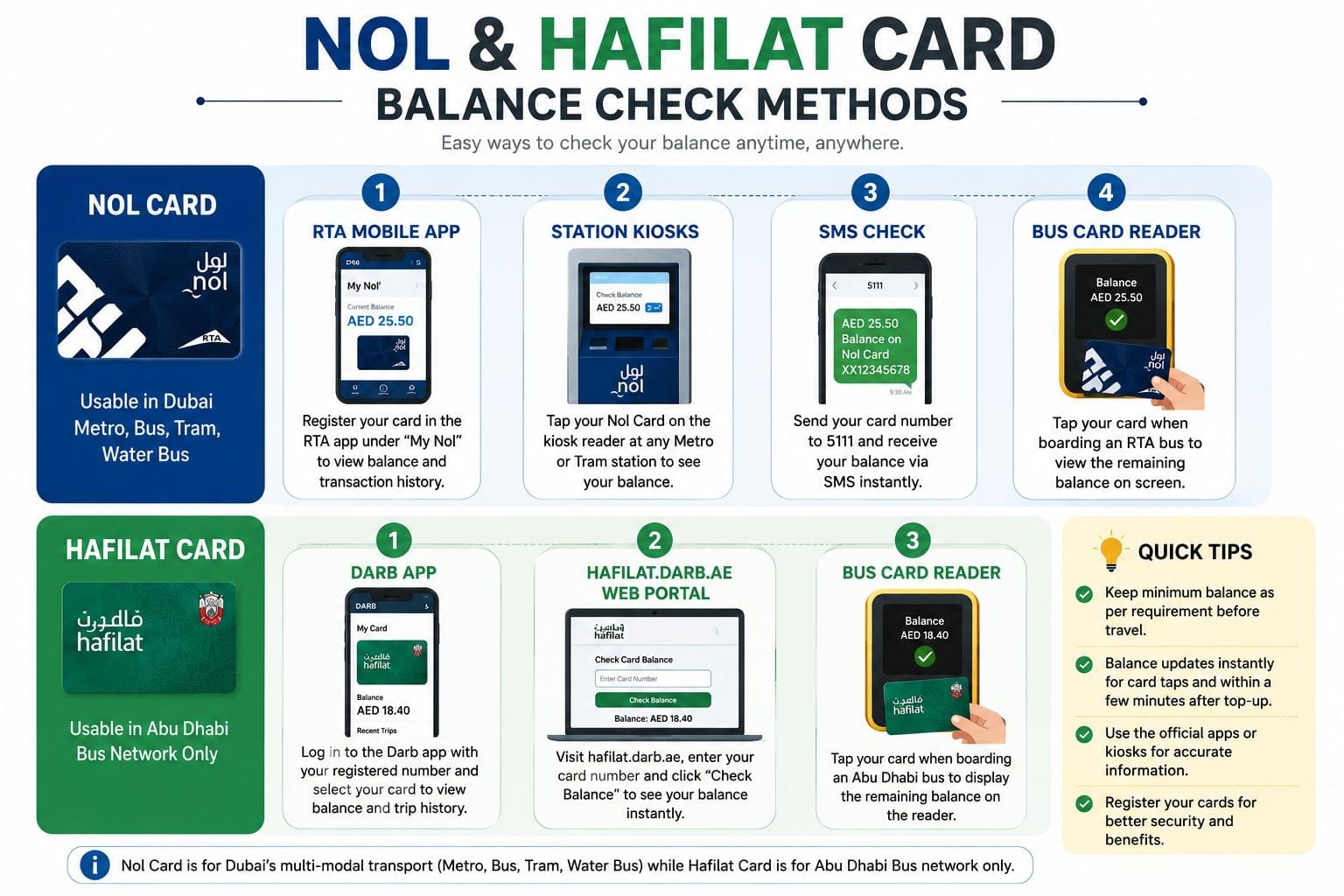
Nol Card balance checking follows 4 primary methods.
- RTA Mobile App Register the card under the “My Nol” section, then view the current balance and full transaction history instantly.
- Metro and Tram Station Kiosks Tap the card on the kiosk reader at any Dubai Metro or tram station to display the balance on screen.
- SMS Check Send the card number to 5111 to receive the balance via text message within seconds.
- Bus Card Reader Tap the card when boarding any Dubai RTA bus to see the remaining balance on the reader display.
Nol Card balance updates instantly for bus, metro, and tram taps, and it updates within a few minutes for top-ups completed through the RTA app or at station kiosks. Riders using the Blue Nol Card also receive fare-capping benefits, meaning daily and monthly spending is automatically limited once a cap threshold is reached.
For the complete step-by-step walkthrough of every method, including screenshots and registration steps, visit the Nol Card balance check guide.
How to Check Hafilat Card Balance
Hafilat Card balance checking follows 3 primary methods.
- Darb App Log in with the registered mobile number, then select the card to view balance and recent trip history.
- hafilat.darb.ae Web Portal Enter the card number on the web portal to display the balance instantly without installing an app.
- Bus Card Reader Tap the card when boarding any Abu Dhabi ITC bus to display the remaining balance on the reader.
Hafilat Card balance updates typically take a few minutes after a Payit recharge, and instantly after a station kiosk top-up. Personal Hafilat cardholders can also view a full transaction history inside the Darb app, which Anonymous cardholders cannot access since no account is linked to the card.
For the complete method breakdown including registration requirements, visit the Hafilat Card balance check guide.
Which Card Is Faster to Check?
Nol Card offers more balance-check methods than Hafilat Card, including SMS-based checking, which Hafilat Card does not support as a standard feature. Nol Card riders check balance via 4 channels: app, kiosk, SMS, and card reader. Hafilat Card riders check balance via 3 channels: app, web portal, and card reader.
For instant, no-app balance checks, Nol Card’s SMS option to 5111 gives Dubai commuters a faster alternative when a smartphone or internet connection is unavailable. Abu Dhabi commuters using Hafilat Card need either the Darb app or the web portal, since no SMS shortcode is currently available for balance checks, which makes Hafilat Card slightly slower to check without a data connection.
Can You Use a Nol Card in Abu Dhabi or a Hafilat Card in Dubai?
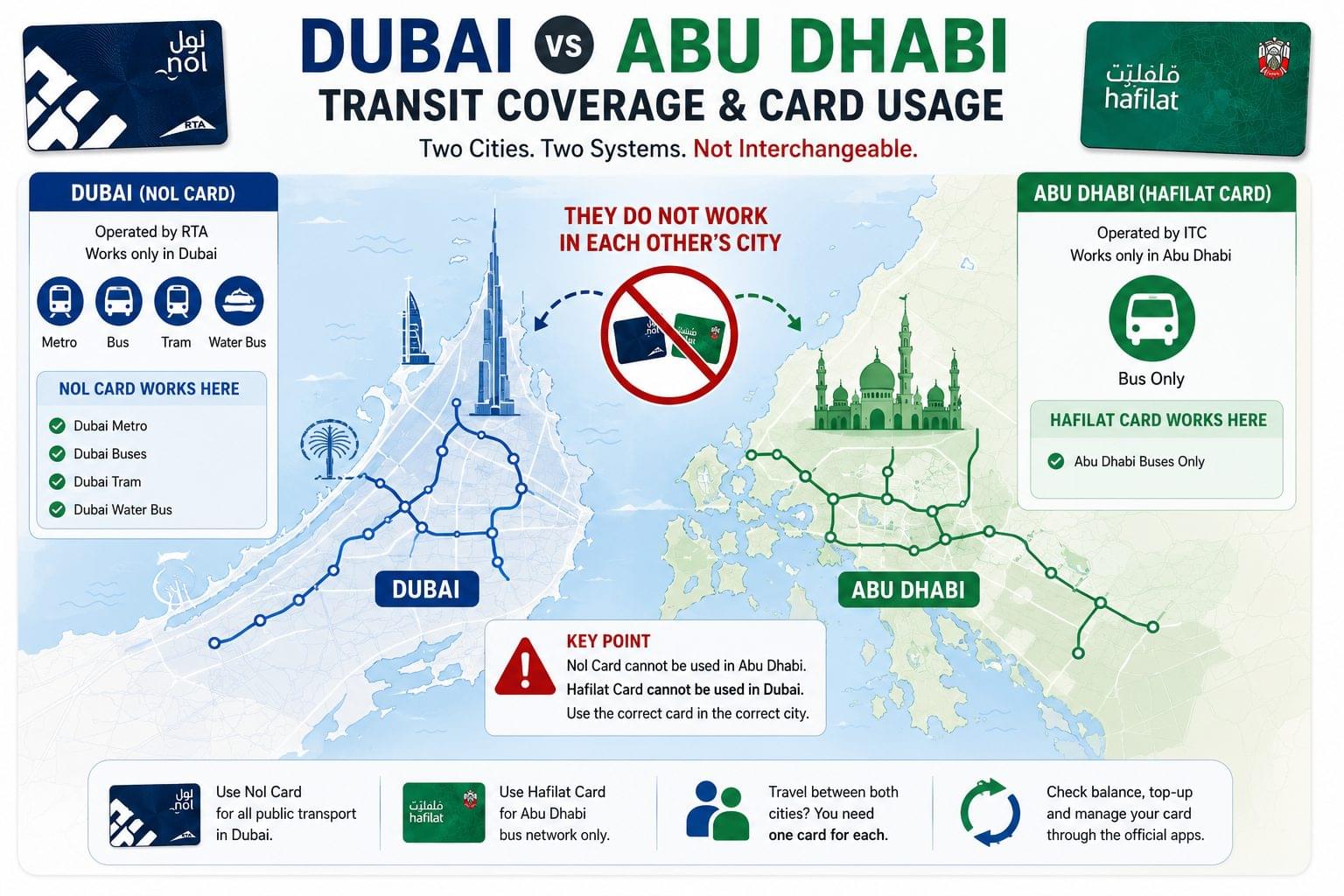
No Nol Card and Hafilat Card are not interchangeable between the two emirates. Nol Card only works on Dubai’s RTA network, and Hafilat Card only works on Abu Dhabi’s ITC network. A commuter traveling between both cities needs a separate card for each system, since neither card is accepted on the other emirate’s transport infrastructure.
Workers who commute daily between Dubai and Abu Dhabi typically carry both cards, topping up each independently through their respective apps. There is currently no unified card or wallet that combines both systems, so dual-card ownership remains the only practical solution for cross-emirate commuters.
Common Issues When Checking Balance
Balance not updating after top-up is the most frequent issue reported for both cards. For Nol Card, this typically resolves within 10–15 minutes of an app-based top-up. For Hafilat Card, Payit-based recharges can take slightly longer to reflect, particularly during peak commuting hours.
Card reader not detecting the card usually indicates a low battery in the reader device rather than a card fault commuters should try a different reader or kiosk before assuming the card itself is damaged.
SMS balance check not received (Nol Card only) can occur if the mobile number is not registered against the card. Registering the Nol Card through the RTA app resolves this in most cases.
Frequently Asked Questions
Is Nol Card accepted on Abu Dhabi buses?
No. Nol Card only works on Dubai Metro, buses, trams, and water buses operated by the RTA.
Is Hafilat Card accepted on the Dubai Metro?
No. Hafilat Card only works on Abu Dhabi buses operated by the ITC.
Which card has a lower minimum balance requirement?
Nol Card requires a minimum of AED 5 for bus travel, which is confirmed and standardized. Hafilat Card’s minimum varies by route and should be confirmed via the Darb app.
Can I check both card balances from one app?
No. Nol Card balance is checked through the RTA app, while Hafilat Card balance is checked through the Darb app these are separate, unlinked systems with no shared login.
Do both cards support online top-up?
Yes. Nol Card supports top-up through RTA channels and the RTA app, and Hafilat Card supports top-up through Payit, station kiosks, and retail outlets including ADNOC stations.
Which card is better for a Dubai-to-Abu Dhabi commuter?
Commuters traveling between both emirates need both cards, since neither system covers the other city’s transport network. There is no dual-city card currently available.
Does either card charge a fee for balance checks?
Neither Nol Card nor Hafilat Card charges a fee for standard balance-check methods, including app, SMS, kiosk, or card reader checks.
Can tourists use Nol Card or Hafilat Card?
Yes. Tourists can purchase Red Nol Cards or Anonymous Hafilat Cards without registration, though Blue Nol Cards and Personal Hafilat Cards offer additional discounts reserved for residents with an Emirates ID.
What happens if a Nol Card or Hafilat Card is lost?
Registered cards Blue Nol Card or Personal Hafilat Card can have their balance protected and transferred to a replacement card. Unregistered cards, including Red Nol Cards and Anonymous Hafilat Cards, lose their balance permanently if lost, since no account is linked to recover it.
Related Balance Checks
For step-by-step instructions specific to each card, along with troubleshooting for blocked cards, incorrect balances, and app errors, visit the dedicated guides below:
- Nol Card Balance Check Full Guide
- Hafilat Card Balance Check Full Guide
- Transit Card Balance Check UAE
- ATM Balance Check UAE
- UAE Balance Enquiry Complete Guide
For the full directory of UAE balance-check guides across banks, cards, and telecoms, return to the UAE Balance Check homepage.