

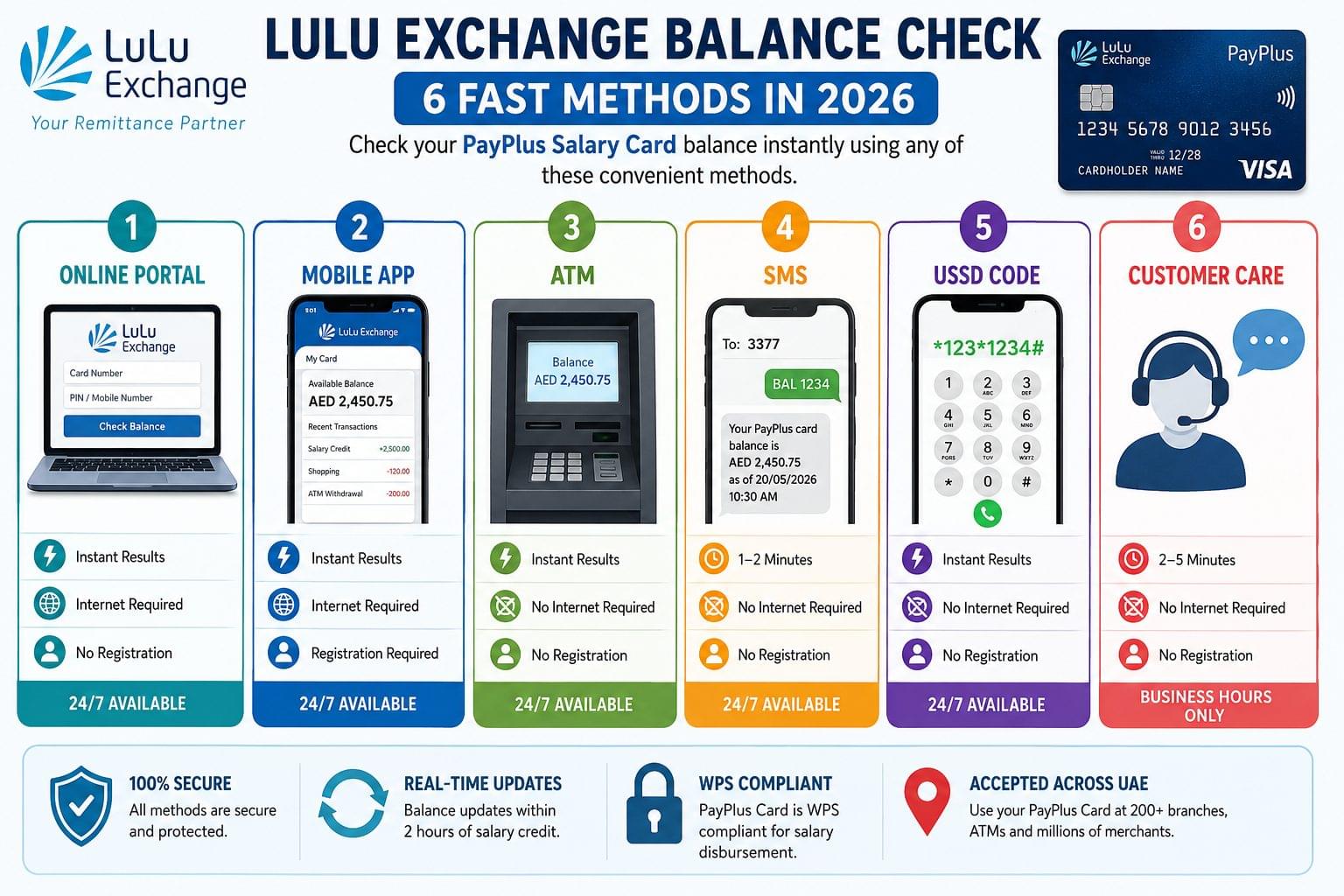
Lulu Exchange balance check is available through 6 methods: online portal, mobile app, ATM, SMS, USSD code, and customer care helpline. UAE residents and expat workers use Lulu Exchange’s PayPlus WPS salary card to receive wages. Checking the balance confirms salary credit, available funds, and recent transactions across all 6 channels.
Lulu Exchange Balance Check Methods at a Glance
The 6 Lulu Exchange balance check methods provide instant or near-instant results, with most requiring no registration for basic balance enquiry.
| Method | Speed | Requires Internet | Requires Registration | Available 24/7 |
| Online Portal | Instant | Yes | No | Yes |
| Mobile App | Instant | Yes | Yes | Yes |
| ATM | Instant | No | No | Yes |
| SMS | 1–2 minutes | No | No | Yes |
| USSD Code | Instant | No | No | Yes |
| Customer Care | 2–5 minutes | No | No | No (business hours) |
What is Lulu Exchange?
Lulu Exchange is a UAE-based money transfer and financial services brand operated by LuLu Financial Holdings. Lulu Exchange serves over 2 million customers across the UAE through 200+ branches. The primary financial product for blue-collar workers is the PayPlus WPS salary card, a Wages Protection System-compliant prepaid card used by employers to disburse monthly salaries directly to employees.
Lulu Exchange holds Central Bank of UAE approval as a licensed exchange house. Workers in construction, hospitality, retail, and domestic sectors across Dubai, Abu Dhabi, Sharjah, and all UAE emirates use the PayPlus card to receive wages and check salary credits.
Check Lulu Exchange Balance Online (Official Portal)
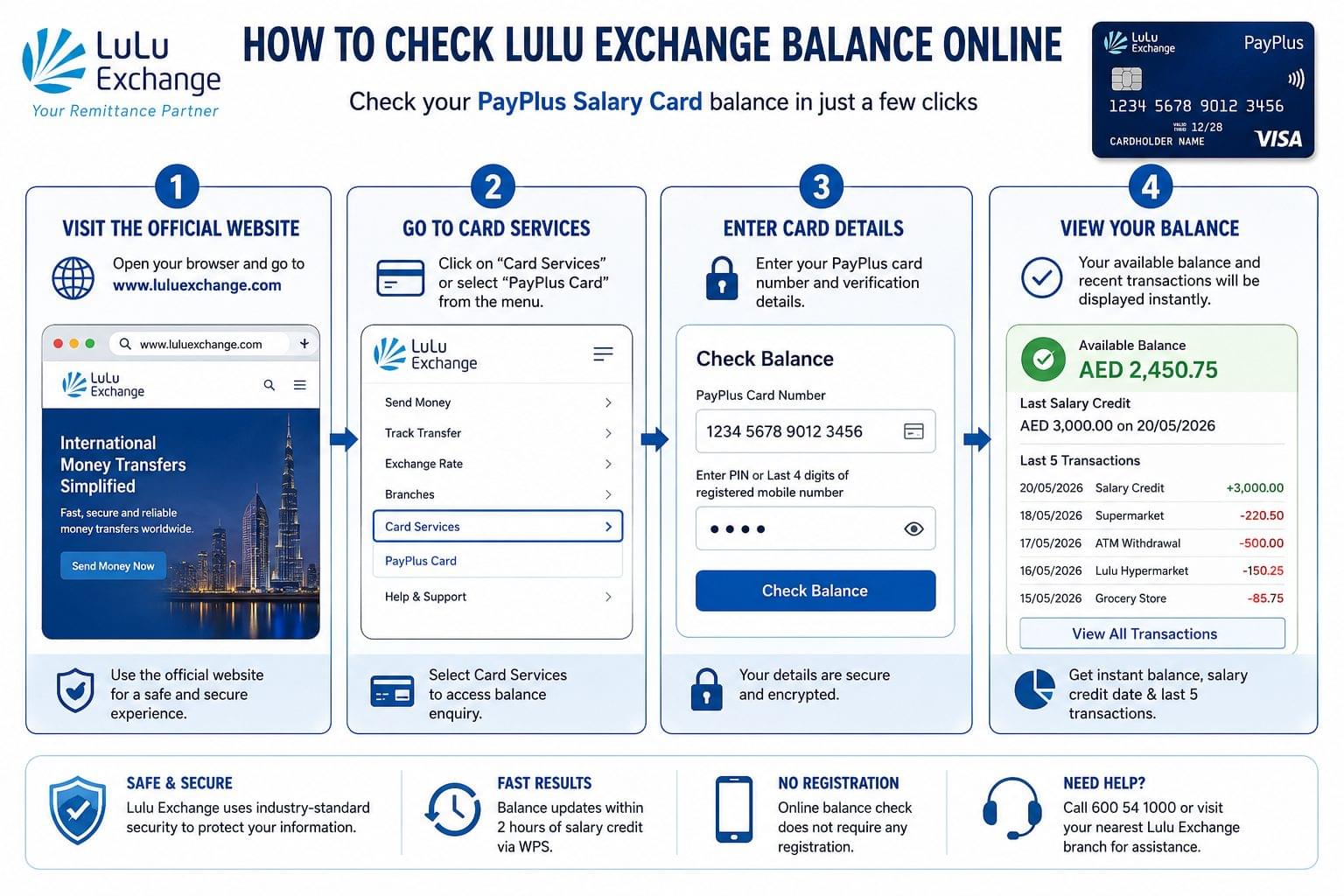
To check Lulu Exchange balance online, access the official Lulu Exchange portal and enter the card details. The online method provides instant balance results without downloading any application.
Step-by-Step: Lulu Exchange Online Balance Check
- Open a browser and navigate to the official Lulu Exchange website at www.luluexchange.com
- Select the “Card Services” or “PayPlus Card” section from the navigation menu
- Enter the 16-digit PayPlus card number in the balance enquiry field
- Enter the 4-digit PIN or the last 4 digits of the registered mobile number
- Click “Check Balance” to view the available balance, salary credit date, and last 5 transactions
What Information Is Required:
- PayPlus card number (16 digits, printed on the front of the card)
- Registered mobile number or card PIN
Balance Update Timing: Online portal balance updates within 2 hours of salary credit via the WPS system.
For additional prepaid card balance check options across UAE, read the complete UAE prepaid card balance check guide.
Check Lulu Exchange Balance via Mobile App
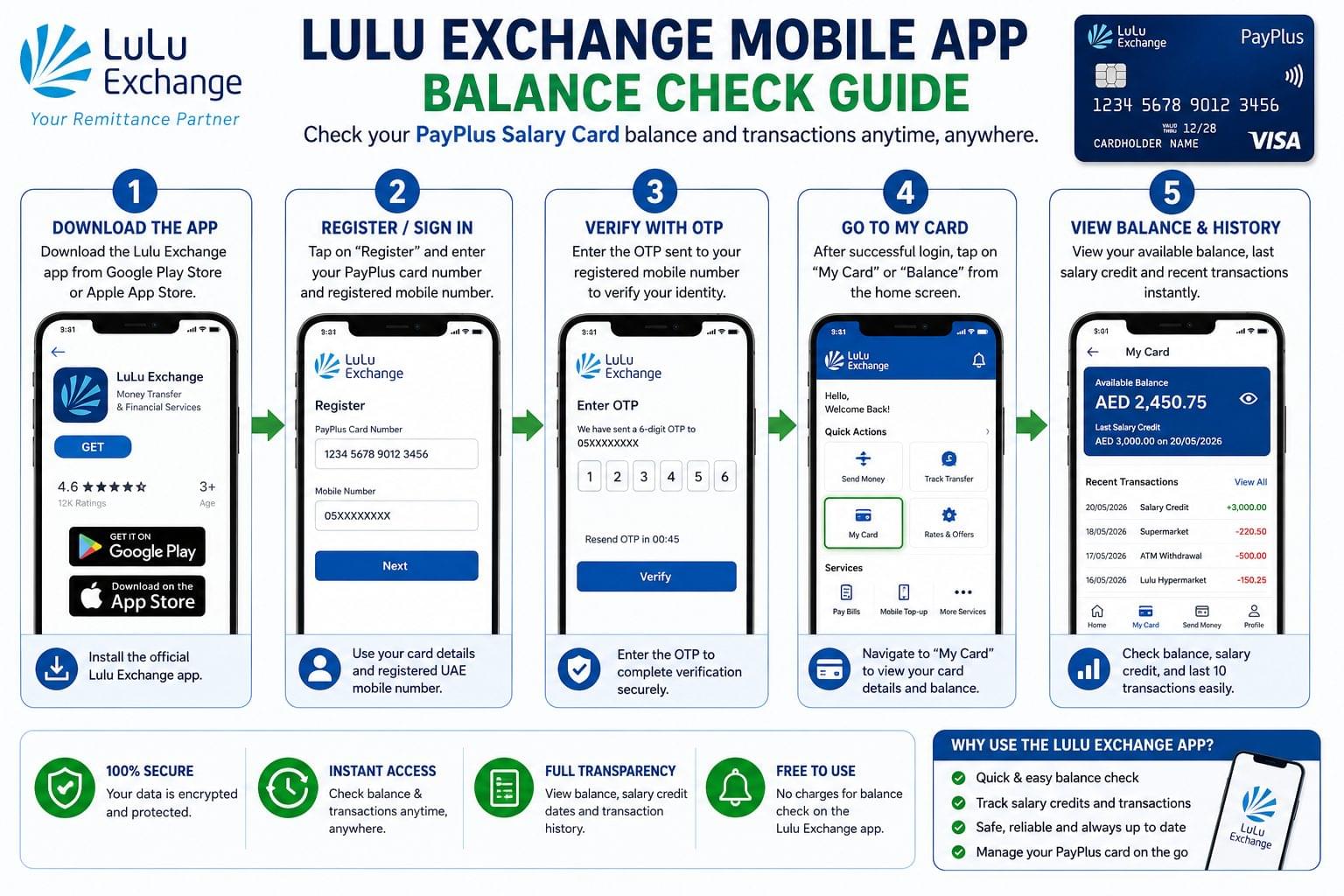
To check Lulu Exchange balance via mobile app, download the Lulu Exchange app from Google Play Store or Apple App Store and register using the PayPlus card number and registered mobile number.
Step-by-Step: Lulu Exchange App Balance Check
- Download the Lulu Exchange app from Google Play or the App Store
- Open the app and tap “Register” if using for the first time
- Enter the PayPlus card number and registered UAE mobile number
- Enter the OTP sent to the registered number to verify identity
- After registration, tap “My Card” or “Balance” from the home screen
- The app displays the available balance, salary credit history, and transaction list
What the App Shows:
- Current available balance in AED
- Last salary credit date and amount
- Last 10 transactions with merchant names and timestamps
- Card expiry date and card status
The mobile app is the most comprehensive Lulu Exchange balance check method, providing full transaction history rather than just the current balance.
Check Lulu Exchange Balance via ATM
To check Lulu Exchange PayPlus card balance via ATM, use any UAE network ATM that accepts Visa or Mastercard prepaid cards. No internet connection is required for this method.
Step-by-Step: ATM Balance Check
- Insert the Lulu Exchange PayPlus card into any UAE ATM machine accepting Visa/Mastercard
- Enter the 4-digit card PIN on the ATM keypad
- Select “Balance Enquiry” from the ATM main menu
- The screen displays the available balance in AED
- Select “Print Receipt” for a physical record of the balance (optional)
ATM Networks Accepted:
- UAE Exchange ATMs across all 7 emirates
- ENBD ATMs, FAB ATMs, ADCB ATMs, Mashreq ATMs
- Any ATM displaying the Visa or Mastercard logo
ATM balance enquiry at non-Lulu ATMs charges AED 1–2 per transaction at some banks. Confirm the fee before proceeding.
For a complete guide on balance checking at UAE ATMs across all card types, read the ATM balance check UAE guide.
Check Lulu Exchange Balance via SMS
To check Lulu Exchange balance via SMS, send a formatted text message from the registered mobile number to the Lulu Exchange SMS service number. The SMS method works without internet and without visiting a branch.
SMS Balance Check Instructions:
- Type: BAL <space> Last 4 digits of PayPlus card
- Send to: The Lulu Exchange registered SMS number (printed on the card carrier or welcome letter)
- Response time: 1–2 minutes
- Response format: “Your Lulu Exchange PayPlus card balance is AED [amount] as of [date/time]”
Requirements for SMS Balance Check:
- SMS must be sent from the registered UAE mobile number linked to the card
- The SIM card must be active and have SMS credit or an active plan
- International SMS works if the registered number is a UAE number with roaming enabled
Check Lulu Exchange Balance via USSD Code
To check Lulu Exchange balance via USSD, dial the USSD code from the registered mobile number. USSD requires no internet connection and works on all mobile networks including Etisalat (e&) and du.
USSD Balance Check Steps:
- Open the phone dialer on any UAE mobile phone
- Dial *XXX*[last 4 digits of card]# (confirm the exact USSD code from the Lulu Exchange welcome SMS or branch)
- Press Call
- A menu appears on screen showing the available balance in AED
- Press End or wait for the session to close automatically
Note: USSD balance check is available 24 hours a day, 7 days a week across both Etisalat and du prepaid networks.
Check Lulu Exchange Balance by Phone (Customer Care)
To check Lulu Exchange balance by phone, call the Lulu Exchange customer care helpline and provide the card details for verbal balance confirmation. The phone method is available during business hours and suits workers without smartphone access.
Customer Care Balance Check Steps:
- Call the Lulu Exchange UAE helpline on the number printed on the back of the PayPlus card
- Select the language preference from the IVR menu (English, Hindi, Urdu, Tagalog, Arabic)
- Select “Card Balance Enquiry” from the automated menu options
- Enter the PayPlus card number using the phone keypad when prompted
- The IVR system announces the current available balance in AED
- For agent assistance, press 0 to speak with a customer service representative
Customer Care Operating Hours: Sunday to Thursday, 8:00 AM to 8:00 PM UAE time. The IVR automated balance option is available 24 hours.
Lulu Exchange Salary Check WPS Credit Verification
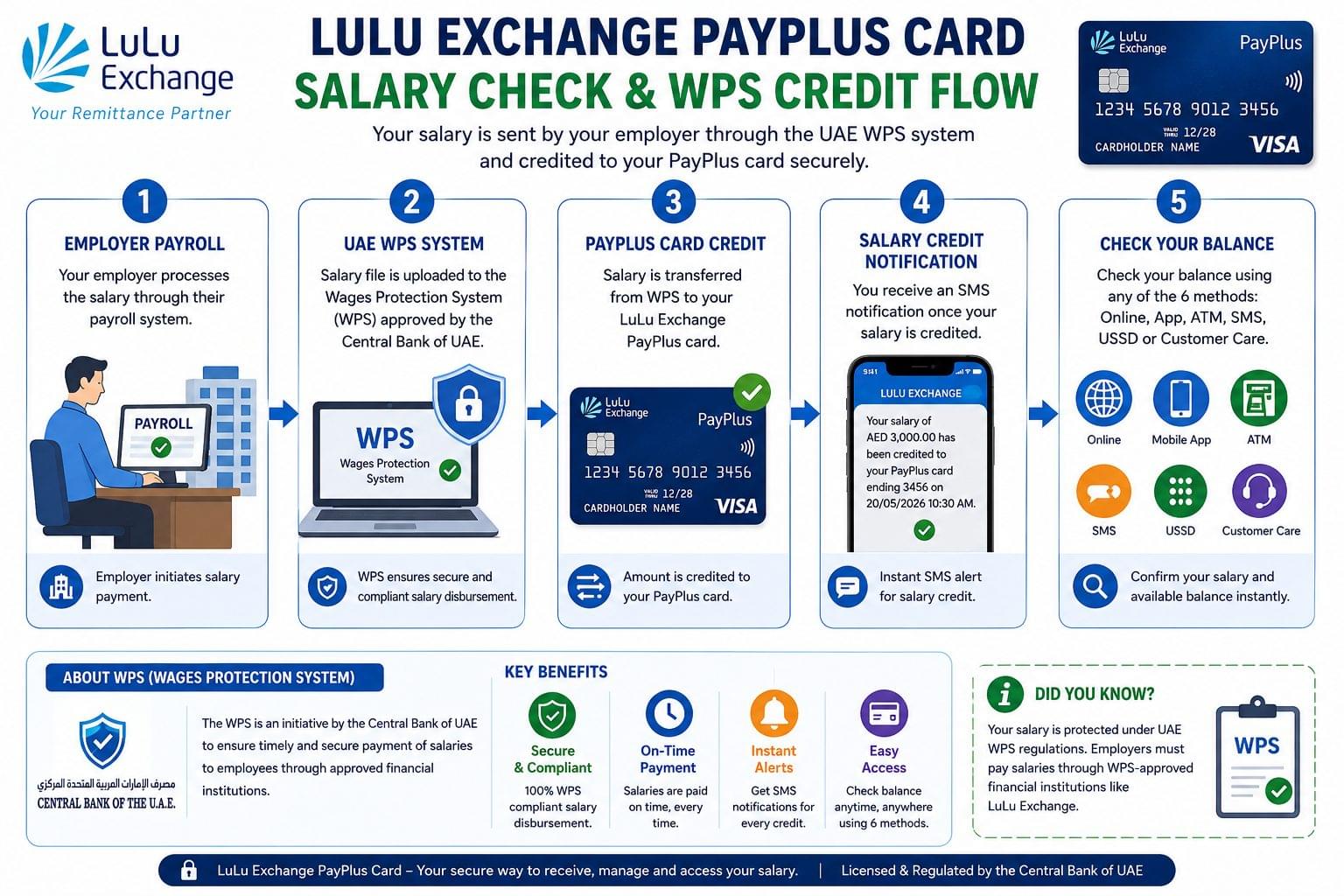
Lulu Exchange salary check confirms whether the employer has transferred wages through the UAE Wages Protection System to the PayPlus card. The WPS system processes salary payments within 24 hours of the employer’s transfer instruction.
4 Ways to Verify Lulu Exchange Salary Credit:
- Online portal shows the salary credit date and amount under “Transaction History”
- Mobile app sends a push notification when salary is credited
- SMS alert automatic SMS notification from Lulu Exchange when WPS salary arrives
- ATM receipt prints the updated balance confirming the salary deposit
Salary Credit Timing: WPS salary credits to the PayPlus card within 2–24 hours of the employer submitting payroll through the UAE Ministry of Human Resources WPS system.
Workers checking salary status across multiple UAE card types can read the full salary check UAE guide covering FAB Ratibi, Lulu Exchange, and Al Ansari PayPlus cards.
Lulu Exchange PayPlus Card Balance Check
Lulu Exchange PayPlus card balance check uses the same 6 methods as the standard Lulu Exchange balance enquiry. The PayPlus card is a Visa prepaid card issued to WPS-enrolled employees earning below AED 5,000 per month.
PayPlus Card Balance Check Requirements:
- The 16-digit card number on the front of the PayPlus card
- The registered UAE mobile number submitted during card issuance
- A 4-digit PIN set at the time of card activation
Card Types Supported:
- Lulu Exchange PayPlus WPS Salary Card (standard)
- Lulu Exchange Travel Prepaid Card
- Lulu Exchange Gift Card
All 3 card types support online portal, ATM, and customer care balance checks. App and USSD balance check methods apply to the WPS PayPlus card primarily.
For comparison of all UAE prepaid salary cards and their balance check methods, see the FAB Ratibi card balance check and Al Ansari Exchange balance check guides.
Lulu Exchange Balance Not Showing Common Fixes
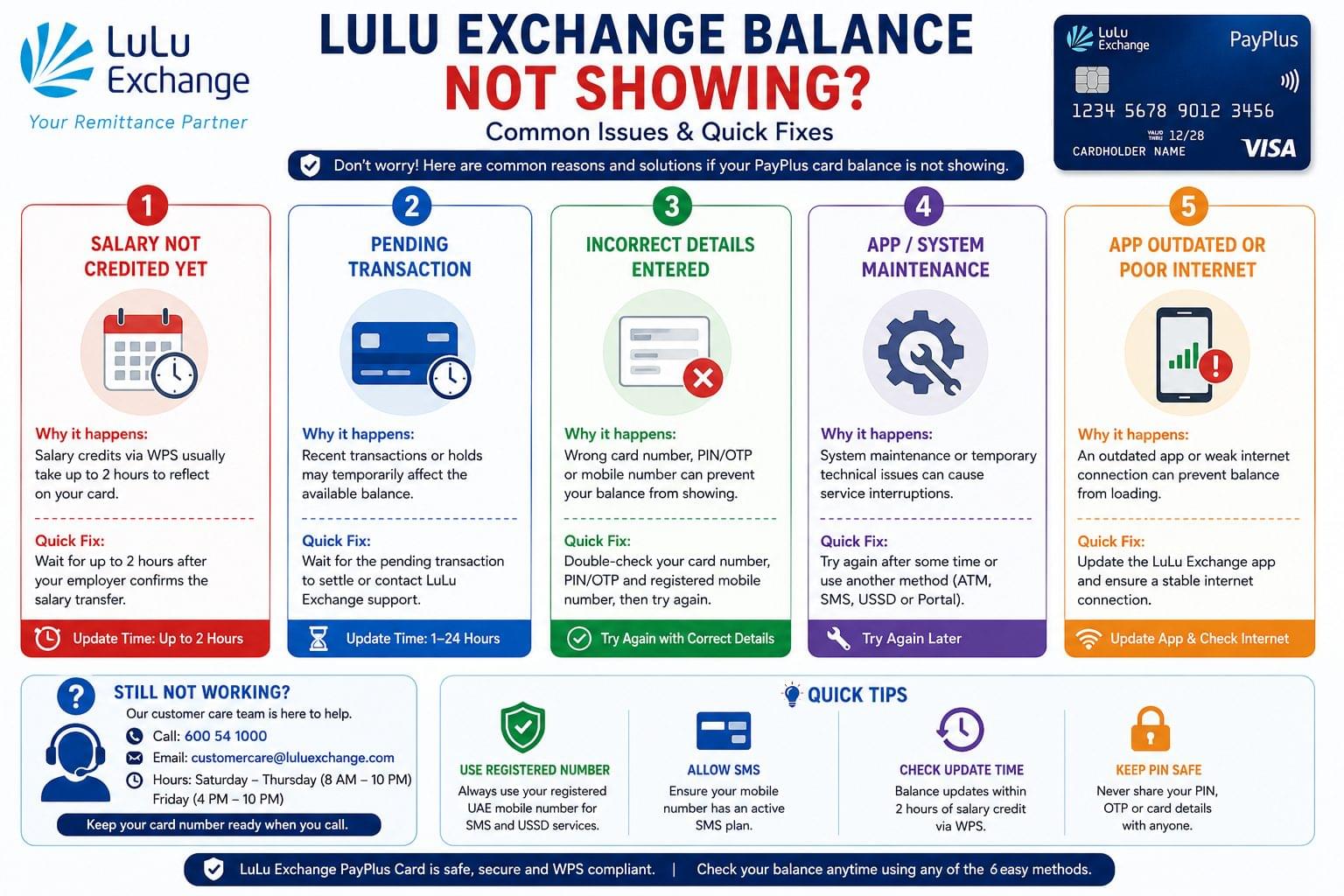
Balance Not Updated After Salary Credit
Lulu Exchange balance takes up to 2 hours to update on the online portal after WPS salary is deposited. The mobile app displays the updated balance within 30 minutes through push notification. If the balance does not update after 24 hours, contact Lulu Exchange customer care with the employer’s WPS transfer reference number.
PayPlus Card Showing Incorrect Balance
Lulu Exchange PayPlus card shows an incorrect balance when a pending transaction has not settled. Pending transactions reduce the available balance but are not listed as completed transactions for up to 3 business days. The balance corrects automatically once the transaction settles.
Lulu Exchange App Not Loading Balance
Lulu Exchange app balance does not load when the app version is outdated or the server is under maintenance. Update the Lulu Exchange app from Google Play or the App Store and try again. Clear the app cache on Android devices if the balance screen remains blank after updating.
Frequently Asked Questions About Lulu Exchange Balance Check
How do I check my Lulu Exchange balance online? Check Lulu Exchange balance online at www.luluexchange.com by entering the 16-digit PayPlus card number and registered mobile number in the card services balance enquiry section.
Does Lulu Exchange charge a fee to check balance? Lulu Exchange balance check is free through the online portal, mobile app, SMS, and USSD methods. ATM balance enquiry at non-Lulu ATMs charges AED 1–2 depending on the ATM operator.
Can I check Lulu Exchange balance from outside UAE? Lulu Exchange balance check is available from outside the UAE through the online portal and mobile app. SMS balance check works from outside UAE if the registered number has international roaming enabled.
How long does salary take to show in Lulu Exchange balance? Lulu Exchange WPS salary appears in the PayPlus card balance within 2–24 hours of the employer’s payroll submission through the UAE Wages Protection System.
What is the Lulu Exchange customer care number for balance check? The Lulu Exchange customer care number for balance check is printed on the back of the PayPlus card and on the official Lulu Exchange website under the contact section.
Is the Lulu Exchange app available for iPhone? The Lulu Exchange app is available for both iPhone (iOS App Store) and Android (Google Play Store) and supports balance check, transaction history, and card management for PayPlus cardholders.
What is the minimum balance on a Lulu Exchange PayPlus card? Lulu Exchange PayPlus card does not require a minimum balance to remain active. The card balance reaches AED 0 and reactivates upon the next salary credit.
Related Balance Checks in UAE
UAE residents managing multiple financial accounts can check balances across all major cards and banks:
- FAB Bank balance check First Abu Dhabi Bank online, app, and ATM methods
- Emirates NBD balance check NBAD inquiry guide for all methods
- PPC Magnati prepaid card inquiry FAB WPS salary card portal
- Al Ansari Exchange balance check PayPlus card balance enquiry guide
- UAE balance enquiry complete guide to all balance check methods in UAE