

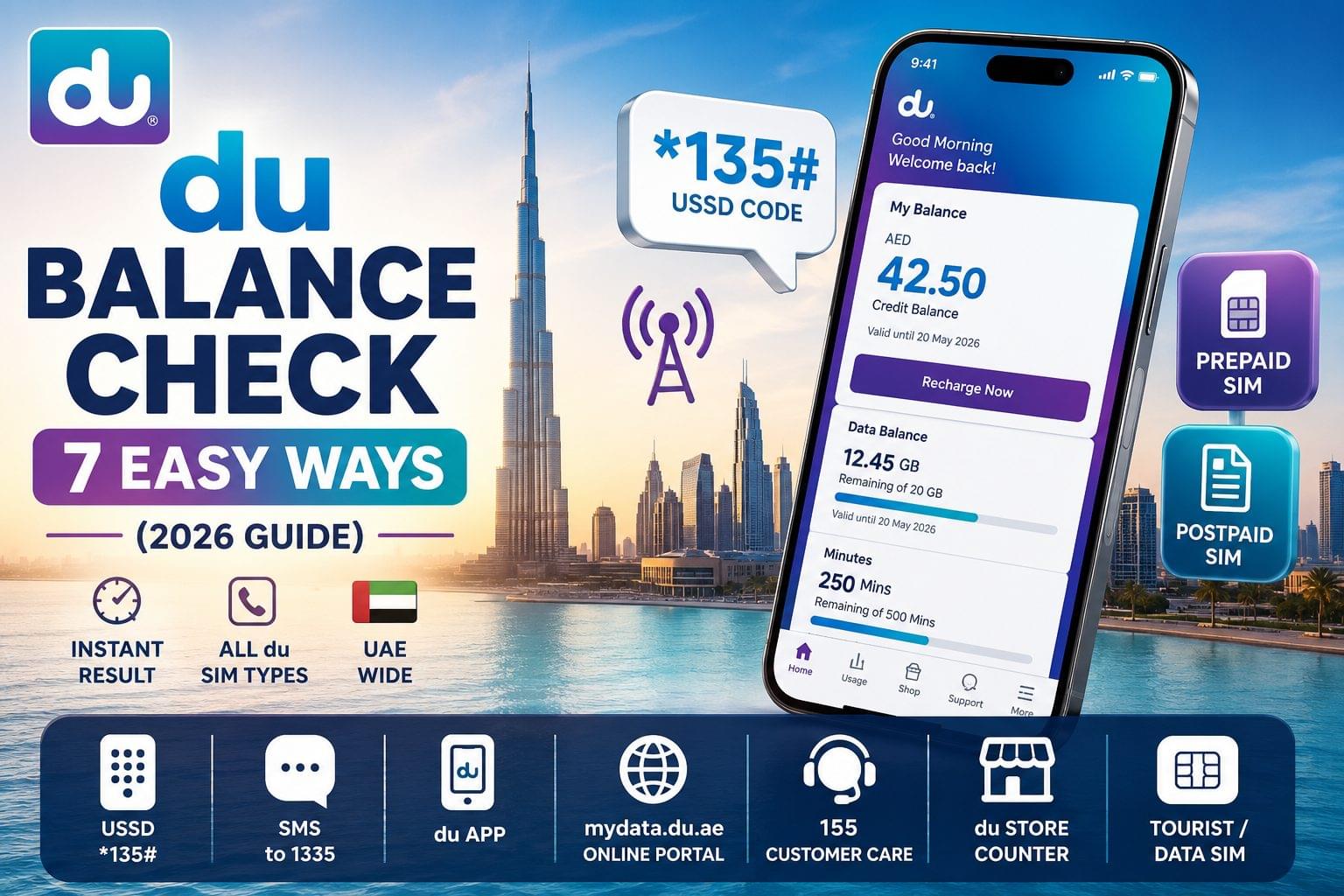
du balance check in UAE covers prepaid credit, postpaid bill, data, and minutes balance across all du SIM types issued by Emirates Integrated Telecommunications Company (EITC). Prepaid SIM users lose calls mid-conversation when credit runs out unnoticed. Postpaid SIM users face unexpected bill amounts when data consumption goes untracked before the billing date. Data SIM and tourist SIM users exhaust bundles without warning because no automatic low-balance alert is triggered. du resolves all 4 scenarios through 7 balance check methods, including USSD codes, SMS, the du app, and the mydata.du.ae portal each available free of charge on the UAE network.
du Balance Check: 7 Fast Methods for Prepaid, Data & Postpaid in UAE
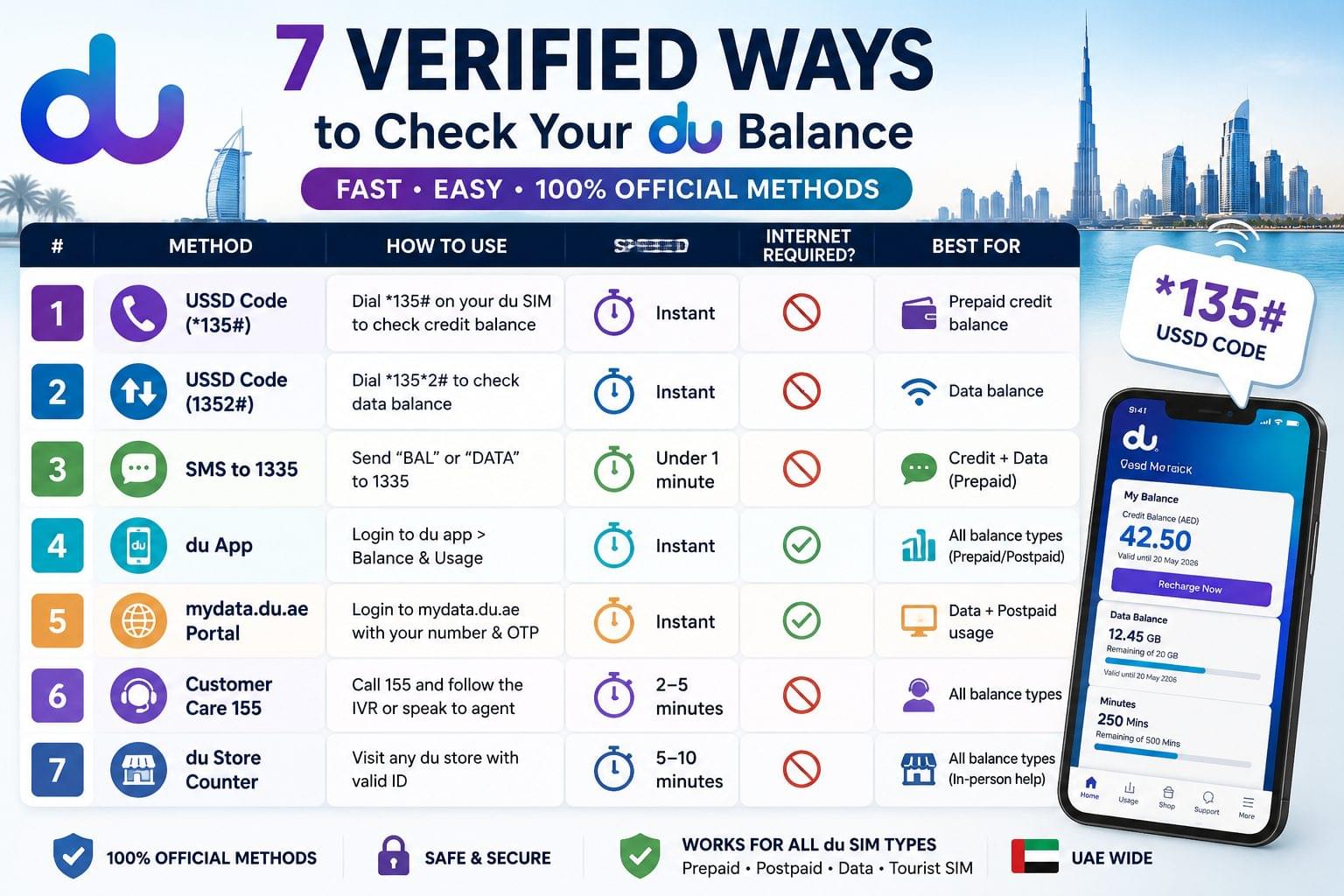
du balance check in UAE is performed through 7 verified methods, including USSD code *135#, SMS to 1335, the du app, and the mydata.du.ae online portal. du, operated by Emirates Integrated Telecommunications Company (EITC), provides these methods for prepaid SIM, postpaid SIM, data SIM, and tourist SIM users across the UAE.
du is 1 of 2 licensed telecom operators in the UAE, alongside Etisalat (e&). The UAE balance check guide covers all major telecom operators, transit cards, and banking entities active in the UAE.
du Balance Check Methods at a Glance
The 7 du balance check methods cover credit balance, data balance, minutes balance, and postpaid usage across all du SIM types.
| Method | Type | Requires Internet | Speed |
| USSD *135# | Prepaid credit balance | No | Instant |
| USSD 1352# | Data balance | No | Instant |
| SMS to 1335 | Credit + data | No | Under 1 minute |
| du App | All balance types | Yes | Instant |
| mydata.du.ae | Data + postpaid | Yes | Instant |
| Customer Care 155 | All balance types | No | 2–5 minutes |
| du Store Counter | All balance types | No | 5–10 minutes |
How to Check du Balance via USSD Code
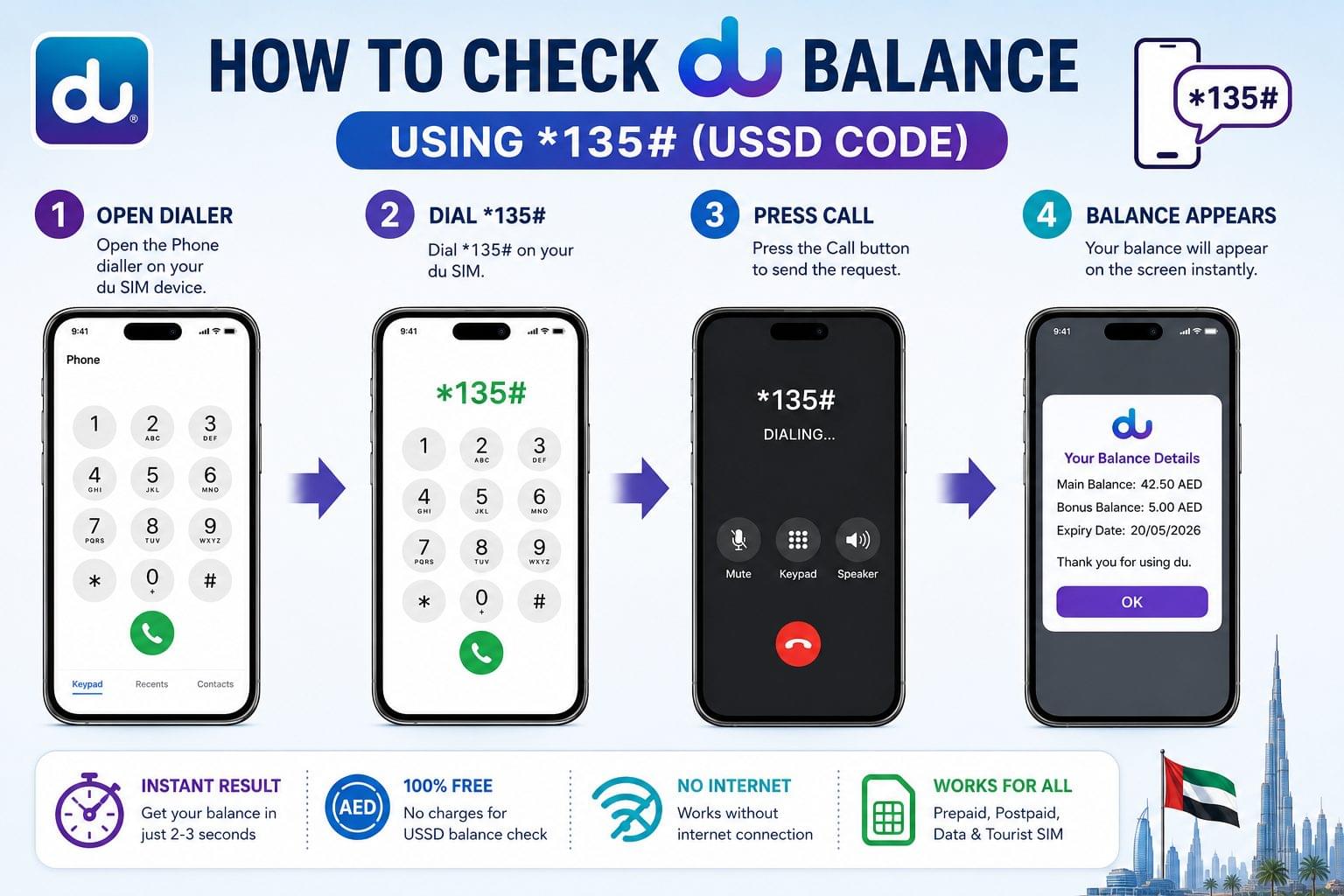
To check du prepaid credit balance, dial *135# from the du SIM. The USSD shortcode *135# is the fastest du balance check code, providing the current credit balance on-screen within 3 seconds without an internet connection.
The 3 primary USSD codes for du balance check are:
- *135# displays prepaid credit balance (main balance)
- *135*2# displays remaining data balance in MB or GB
- *135*1# displays remaining minutes balance for postpaid and flexi-minute plans
Step-by-Step: du Balance Check via USSD
To check du balance via USSD code, follow these 4 steps:
- Open the phone dialler on the du SIM device
- Dial *135# for credit balance or *135*2# for data balance
- Press the call button
- Read the balance displayed on the pop-up screen
The USSD balance check on du is free of charge. No deduction applies to the credit balance for using this method.
How to Check du Prepaid Balance
du prepaid balance check is performed by dialling *135# or sending “BAL” via SMS to 1335. du prepaid SIM users hold a credit-based account where the main balance reflects the available credit for calls, SMS, and data purchases.
The 3 attributes displayed during a du prepaid balance check are:
- Main credit balance remaining AED credit on the SIM
- Bonus balance promotional credit from active offers
- Expiry date the date by which the credit expires
How to Check du Prepaid Balance via SMS
To check du prepaid balance via SMS, follow these 3 steps:
- Open the SMS application on the du prepaid SIM
- Type “BAL” and send to 1335
- Read the balance reply received from du within 60 seconds
The SMS balance check method on du operates without an internet connection. It is the recommended method for users in areas with low mobile data connectivity.
How to Check du Postpaid Balance
du postpaid balance check is performed through the du app or mydata.du.ae portal. Both platforms display bill amount, data used, and minutes consumed. du postpaid SIM users receive a monthly bill based on their active plan, with balance referring to the remaining data, minutes, and any outstanding bill amount.
The 4 balance types displayed in a du postpaid account are:
- Outstanding bill balance amount due before the billing date
- Data balance remaining GB from the monthly plan
- Minutes balance remaining local and international call minutes
- Flexi-minutes balance rollover minutes applicable to postpaid plans
How to Check du Postpaid Balance via the du App
To check du postpaid balance via the du app, follow these 5 steps:
- Download the du app from the App Store or Google Play Store
- Log in using the registered du mobile number and password
- Tap “My Account” on the home screen
- Select “Balance & Usage” from the menu
- View the displayed data balance, minutes balance, and outstanding bill
The du app displays real-time postpaid balance data. Bill amounts update within 24 hours of a new billing cycle.
How to Check du Data Balance
du data balance check is performed by dialling *135*2# from any du SIM, displaying remaining MB or GB instantly. du data balance applies to prepaid data bundles, postpaid monthly data plans, daily data add-ons, and data SIM accounts.
The 5 data balance types tracked on du SIM accounts are:
- Monthly data balance GB remaining from the main plan
- Daily data bundle balance MB remaining from a 1-day add-on
- Social data balance MB allocated to social media apps, including WhatsApp and Instagram
- National data balance data restricted to UAE network usage only
- Bonus data balance promotional data from active du offers
How to Check du Data Balance Online via mydata.du.ae
To check du data balance online, follow these 4 steps:
- Open a browser and navigate to mydata.du.ae
- Enter the du mobile number in the login field
- Enter the OTP received on the registered du number
- View the data balance breakdown displayed on the dashboard
The mydata.du.ae portal is operated by du (EITC) and displays real-time data consumption for both prepaid and postpaid SIM types.
How to Check du Data Balance via SMS
To check du data balance via SMS, follow these 2 steps:
- Type “DATA” and send to 1335 from the du SIM
- Read the data balance reply received within 60 seconds
This method displays remaining MB or GB for the active data bundle without requiring internet access.
How to Check du Minutes Balance
du minutes balance check is performed by dialling *135*1# or through the du app under “Balance & Usage”. du minutes balance applies to postpaid plan users with allocated national minutes, international direct dial (IDD) minutes, and flexi-minutes bundles.
The 3 minutes balance types on du postpaid plans are:
- National minutes local UAE call minutes included in the monthly plan
- IDD minutes international call minutes for countries including India, Pakistan, and the Philippines
- Flexi-minutes rollover minutes that carry forward to the next billing cycle
How to Check du International Minutes Balance
To check du international minutes balance, dial *135*1# and select the “International Minutes” option from the USSD menu. The displayed value shows remaining IDD minutes for the active postpaid plan, separated from national call minutes.
How to Check du Balance via Customer Care
du balance check via customer care is completed by calling 155 from a du SIM. The IVR system delivers the balance without agent assistance. The Interactive Voice Response (IVR) system on the du 155 helpline delivers prepaid credit balance and postpaid bill balance through an automated menu.
To check du balance via customer care, follow these 3 steps:
- Dial 155 from the du SIM (free of charge from du network)
- Select the balance inquiry option from the automated IVR menu
- Listen to the balance announcement provided by the system
Calls to 155 from non-du numbers incur standard call charges. The du customer care line connects to a live agent, available 24 hours a day, 7 days a week.
du Balance Not Showing? 4 Common Fixes
du balance not showing after a USSD query or SMS request is resolved by restarting the SIM device, checking network signal, or contacting du customer care at 155. The 4 most common causes of du balance not displaying correctly are:
1. Balance Not Updated After Top-Up
du prepaid balance updates within 5 minutes of a successful recharge. Recharge via the du app, du website, or authorised retail outlets, including Carrefour, Lulu Hypermarket, and du branded stores, reflects on the account within 300 seconds. Restart the device, then re-dial *135# to confirm the updated balance.
2. SIM Card Blocked or Suspended
A blocked du SIM displays no balance because the account is deactivated. du suspends prepaid SIMs after 90 days of inactivity or upon expiry of the credit validity period. Contact du customer care at 155 or visit a du store to reactivate the account. The Etisalat balance check page covers similar suspension rules for the UAE’s second telecom operator, e&.
3. USSD Code Not Responding
USSD codes on du return no balance result, if the SIM is in a roaming state outside the UAE or the network signal is below 1 bar. Connect to a stable du network signal and re-dial *135#. Use the du app or mydata.du.ae to check balance remotely, if the device is abroad.
4. Data Balance Showing Zero After Bundle Purchase
du data balance shows zero directly after bundle activation because the system requires up to 2 hours to reflect the new allocation. Wait 120 minutes after purchasing a data add-on, then check via 1352# or the du app to confirm the updated data balance.
du Balance Check: Prepaid vs Postpaid Comparison
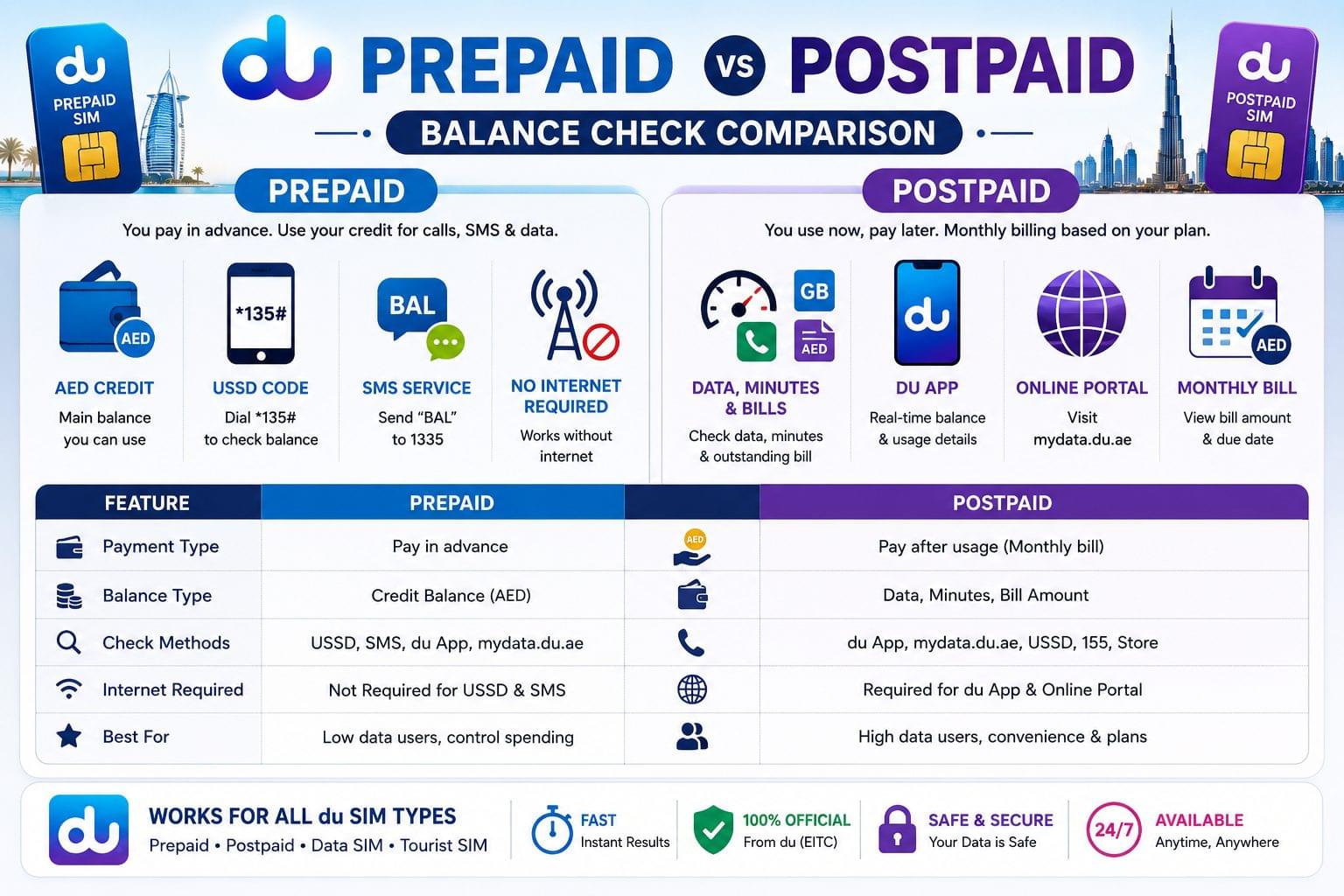
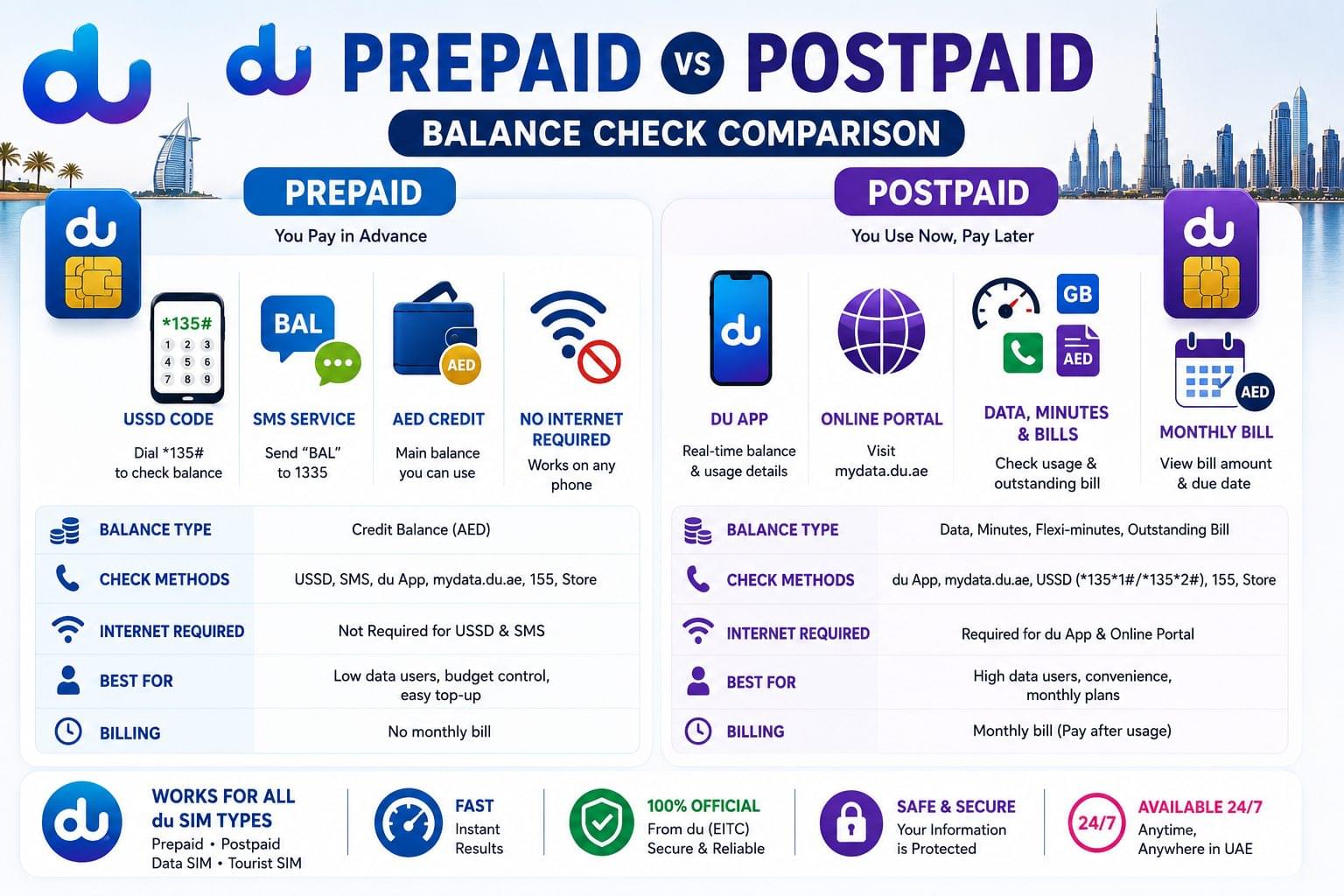
du prepaid and du postpaid balance check methods differ in the type of balance displayed and the primary tools used for each account type.
| Feature | du Prepaid | du Postpaid |
| Primary check method | USSD *135# | du App / mydata.du.ae |
| Balance type | Credit (AED) | Data (GB) + Minutes + Bill |
| SMS method | BAL to 1335 | DATA to 1335 |
| Internet required | No (USSD/SMS) | Yes (app/portal) |
| International check | du app only | du app / mydata.du.ae |
| Cost of check | Free | Free |
du prepaid accounts display a credit balance in AED, while du postpaid accounts display data usage, remaining minutes, and outstanding bill amount. Both account types access balance information through the du app free of charge.
Related Balance Checks in UAE
The complete UAE balance check guide covers all major entity types used by UAE residents and workers. Related balance check pages include:
- Etisalat Balance Check UAE prepaid and data balance check for e&, the UAE’s second telecom operator, via USSD *121#
- Emirates NBD Balance Check Dubai government-owned bank account balance check via the Emirates NBD app and UAE PASS login
- Nol Card Balance Check RTA Dubai transit smart card balance check via the RTA app and SMS to 5111
- FAB Bank Balance Check First Abu Dhabi Bank account balance check via the FAB Mobile app and ATM
- PPC Magnati Prepaid Card Inquiry prepaid salary card balance check via the Magnati portal at ppc.magnati.com
Frequently Asked Questions about du Balance Check
What is the du balance check code? The du balance check code is *135# for prepaid credit balance and *135*2# for data balance. Both USSD codes are dialled directly from the du SIM and display results within 3 seconds.
How to check du balance without internet? du balance check without internet is performed by dialling *135# (USSD) or sending “BAL” via SMS to 1335. Both methods operate on the du mobile network without a data connection.
What is the du balance check number? The du balance check number is 155, the du customer care helpline. Calling 155 from a du SIM connects to an automated IVR system that provides current balance information free of charge.
How to check du postpaid data balance? du postpaid data balance check is performed by logging into the du app under “Balance & Usage” or by visiting mydata.du.ae. Both platforms display the remaining GB from the active monthly plan and any additional data add-ons.
How to check du balance by SMS? du balance check by SMS is performed by sending “BAL” to 1335 for credit balance or “DATA” to 1335 for data balance from the du SIM. The reply arrives within 60 seconds from du’s automated system.
Does du charge for balance check via USSD? du does not charge for balance check via USSD code *135#. The USSD query is free of charge for all du prepaid and postpaid SIM users on the UAE network.
How to check du balance for tourist SIM? du tourist SIM balance check is performed by dialling *135# from the tourist SIM, which displays the remaining credit in AED. The du tourist SIM operates as a prepaid account with a fixed validity period of 30 days.
How to check du flexi-minutes balance? du flexi-minutes balance check is performed by dialling *135*1# and selecting the flexi-minutes option. The displayed value shows remaining rollover minutes available in the current billing cycle for du postpaid plan holders.