

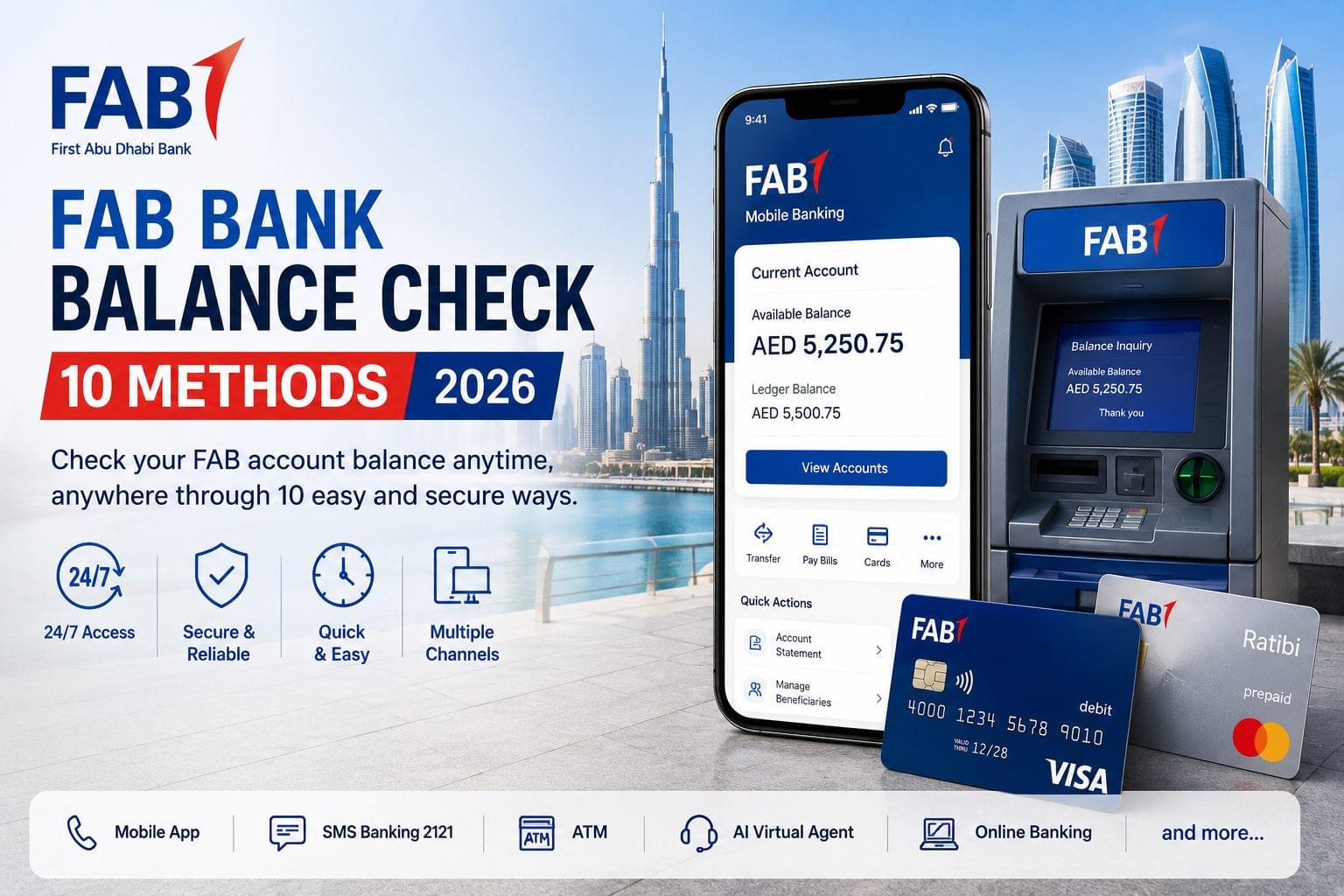
First Abu Dhabi Bank balance check is available through 10 verified channels including the FAB Mobile App, SMS shortcode 2121, and the Magnati PPC portal at ppc.magnati.com. First Abu Dhabi Bank (FAB), formed in 2017 by the merger of National Bank of Abu Dhabi (NBAD) and First Gulf Bank (FGB), is the largest bank in the UAE by total assets. FAB balance enquiry is accessible 24 hours a day, 7 days a week across all 10 channels without a branch visit.
FAB serves 4 primary customer segments: salaried residents holding current accounts, Ratibi cardholders earning AED 5,000 or below per month, Elite clients earning AED 50,000 or above per month, and SME owners using FAB Business accounts. The 2 balance types displayed across all channels are the available balance (funds cleared for immediate spending) and the ledger balance (total funds including pending transactions).
FAB Balance Check Methods Quick Summary Table
| Method | Time | Needs Internet | Needs Registration | Steps |
| FAB Mobile App | Under 10 seconds | Yes | Yes biometric login | 2 |
| SMS Banking 2121 | Under 30 seconds | No | Yes registered mobile | 1 |
| Magnati PPC Portal | Under 60 seconds | Yes | No | 2 |
| AI Virtual Agent 600 52 5500 | Under 90 seconds | No | No | 1 |
| FAB Online Banking Portal | Under 60 seconds | Yes | Yes | 2 |
| ATM Network | Under 60 seconds | No | No | 3 |
| Payit Digital Wallet | Under 10 seconds | Yes | Yes | 2 |
| Phone Banking IVR | Under 90 seconds | No | No | 2 |
| Branch Visit | 5–10 minutes | No | No | 1 |
| Exchange House Partners | 2–5 minutes | No | No | 2 |
How to Check FAB Bank Balance via FAB Mobile App
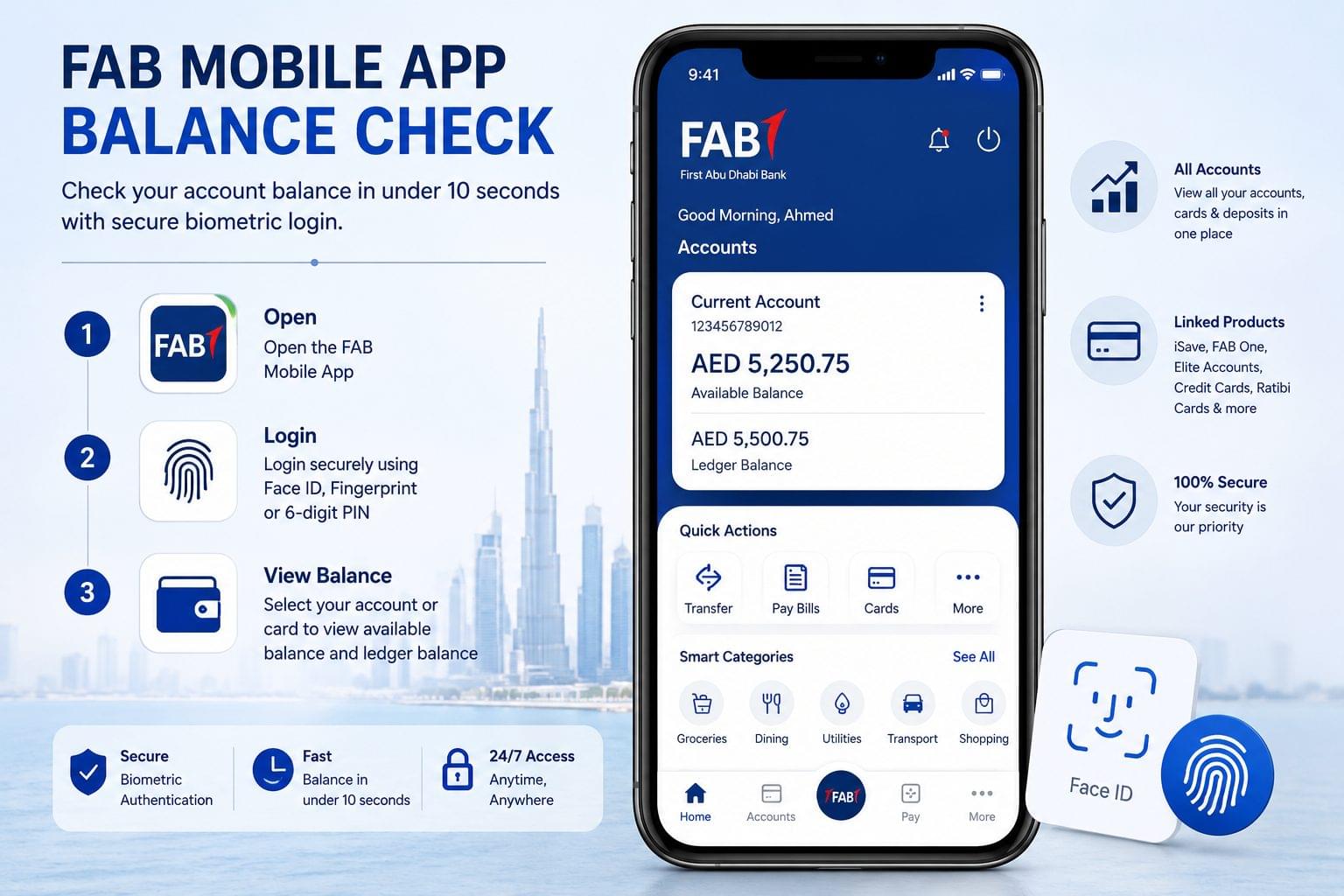
The FAB Mobile App displays available balance and ledger balance within 10 seconds of biometric login using Face ID or fingerprint authentication on iOS and Android devices. The app categorizes transactions into 23 smart filters including groceries, utilities, and dining alongside the current balance. Linked products including FAB iSave accounts, FAB One accounts, Elite accounts, credit cards, and Ratibi prepaid cards display in a single dashboard view.
Steps to check FAB balance via the mobile app:
- Open the FAB Mobile App on an iOS or Android device.
- Authenticate using Face ID, fingerprint, or a 6-digit PIN.
- Select the account or card from the dashboard to view the available balance and ledger balance.
How to check FAB credit card balance on the app:
Navigate to the Cards section of the FAB Mobile App dashboard and select the credit card to display the statement balance, outstanding balance, and minimum payment due on one screen.
How to check FAB iSave account balance on the app:
Select iSave from the Accounts section to display the available balance and accrued interest at the current annual rate of up to 4.25% on deposits as of June 2026.
How to Check FAB Balance via SMS Banking 2121
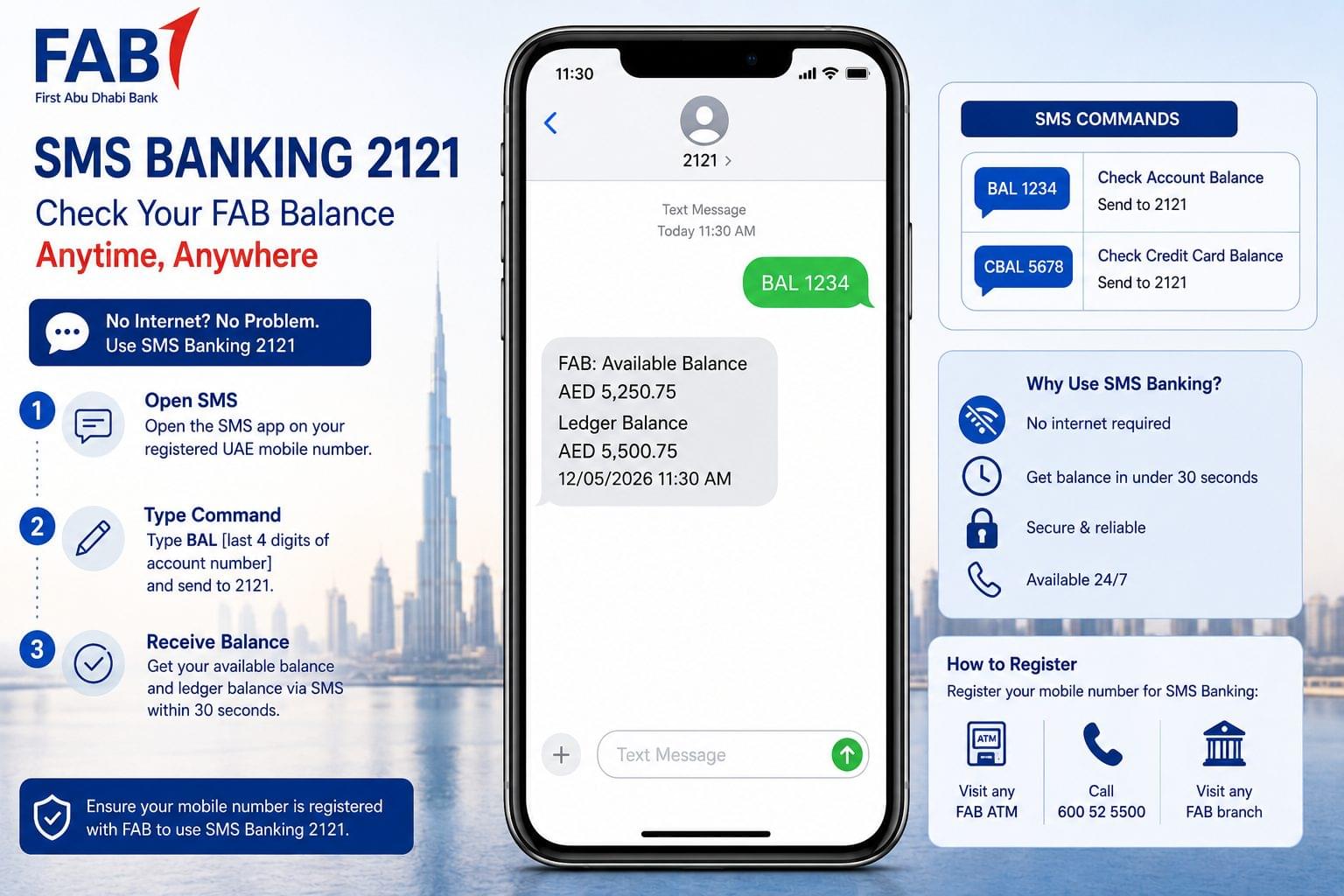
FAB SMS Banking delivers account balance by SMS within 30 seconds of sending the correct command to shortcode 2121 from a registered UAE mobile number. SMS Banking operates without internet access, making it the primary FAB balance enquiry channel for users without smartphone data access.
How to check FAB account balance by SMS:
- Open the SMS application on a registered UAE mobile number.
- Type BAL [last 4 digits of account number] and send to 2121.
- Receive the SMS reply containing available balance and ledger balance.
How to check FAB credit card balance by SMS:
- Open the SMS application on a registered UAE mobile number.
- Type CBAL [last 4 digits of card number] and send to 2121.
- Receive the SMS reply containing the statement balance and outstanding balance.
To register a mobile number for SMS Banking, visit any FAB ATM, call 600 52 5500, or visit one of FAB’s 65 branches across the UAE.
How to Check FAB Balance Without Internet
FAB balance check without internet access is available through 2 channels: SMS Banking 2121 using the BAL command on a registered UAE mobile number, and FAB-network ATMs using a debit card and 4-digit PIN. Both channels operate on GSM network infrastructure and do not require a Wi-Fi or mobile data connection.
Does FAB have a USSD code for balance check? FAB does not offer a USSD balance check code. Balance check without internet access is available exclusively through SMS Banking 2121 and FAB-network ATMs.
How to Check Ratibi Card Balance Online via Magnati PPC Portal
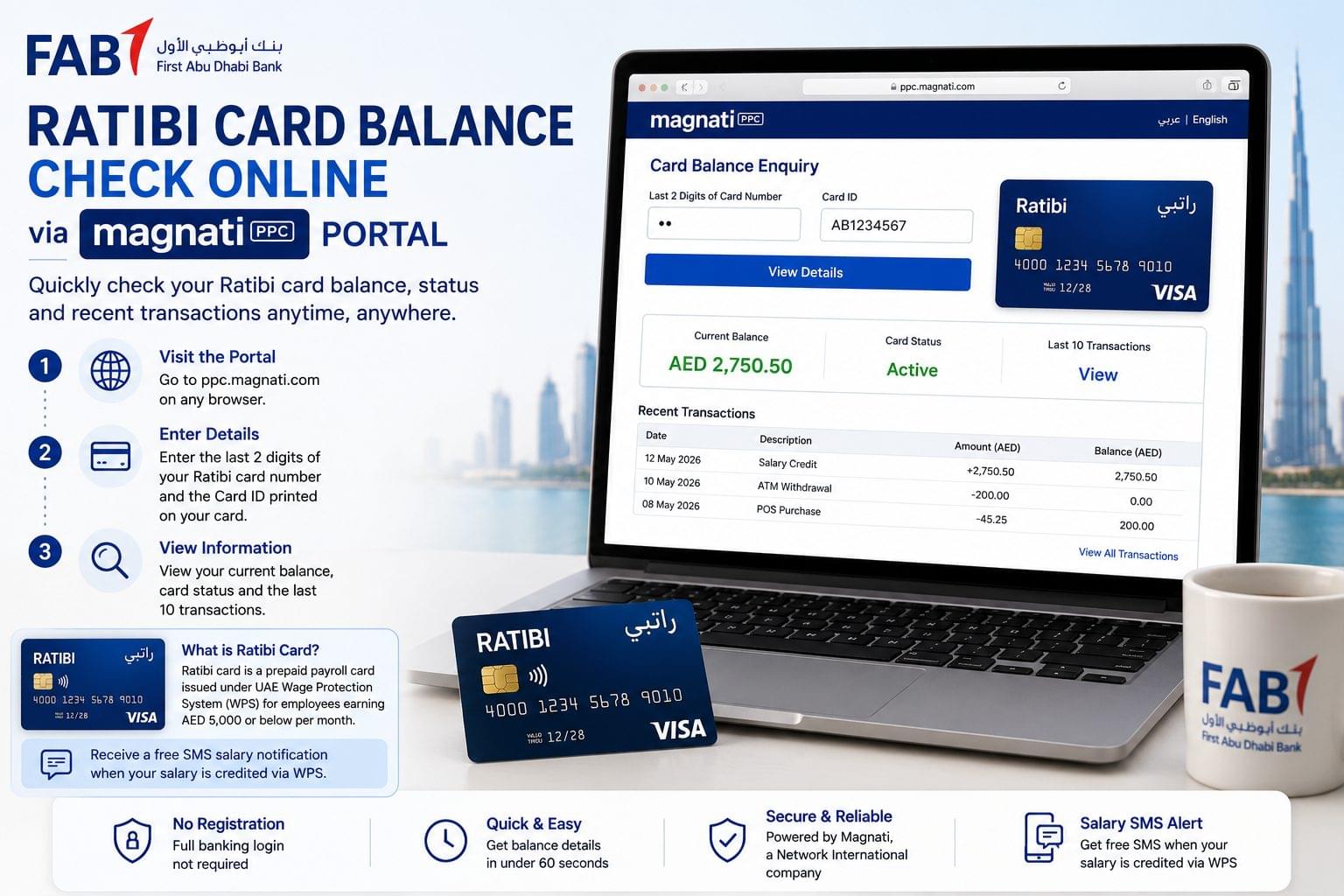
The Magnati PPC portal at ppc.magnati.com displays Ratibi card balance, card status, and the 10 most recent transactions without requiring full online banking credentials. Magnati, which acquired Network International in 2021, operates the prepaid card processing infrastructure for FAB’s Wage Protection System (WPS)-compliant payroll products, including the Ratibi card.
Steps to check Ratibi card balance online:
- Visit ppc.magnati.com on any browser.
- Enter the last 2 digits of the card number and the Card ID printed on the physical Ratibi card.
- View the current balance, card status (active or blocked), and 10 most recent transactions.
The Ratibi card is a Visa or Mastercard prepaid payroll card issued to workers earning AED 5,000 or below per month under the UAE Wage Protection System. Ratibi cardholders receive a free SMS salary credit notification at the moment the employer deposits wages via WPS.
How to Check FAB Balance via AI Virtual Agent
The FAB AI Virtual Agent at 600 52 5500 reads out account balance after identity verification through Emirates ID or account number using Natural Language Processing (NLP). The AI Virtual Agent processes natural speech commands including “I want to check my account balance” without requiring menu navigation.
Steps to check FAB balance via AI Virtual Agent:
- Call 600 52 5500 from a UAE number.
- State the balance enquiry request in natural speech.
- Provide the Emirates ID number or account number for identity verification.
- Receive the verbal balance confirmation.
International callers use +971 2 681 1511 to access the same AI Virtual Agent and IVR balance enquiry service.
How to Check FAB Balance via Online Banking Portal
The FAB Online Banking portal at bankfab.com displays all account balances, downloadable e-statements, and full transaction histories in a single dashboard. Login approval is completed via push notification on the registered FAB Mobile App rather than a traditional OTP. The portal supports balance enquiry for current accounts, iSave savings accounts, FAB One accounts, and credit cards.
Steps to check FAB balance online:
- Visit bankfab.com and enter the registered username and password.
- Approve the login via push notification on the FAB Mobile App.
- Select the account from the dashboard to view balance and download e-statements.
How to Check FAB Balance via ATM
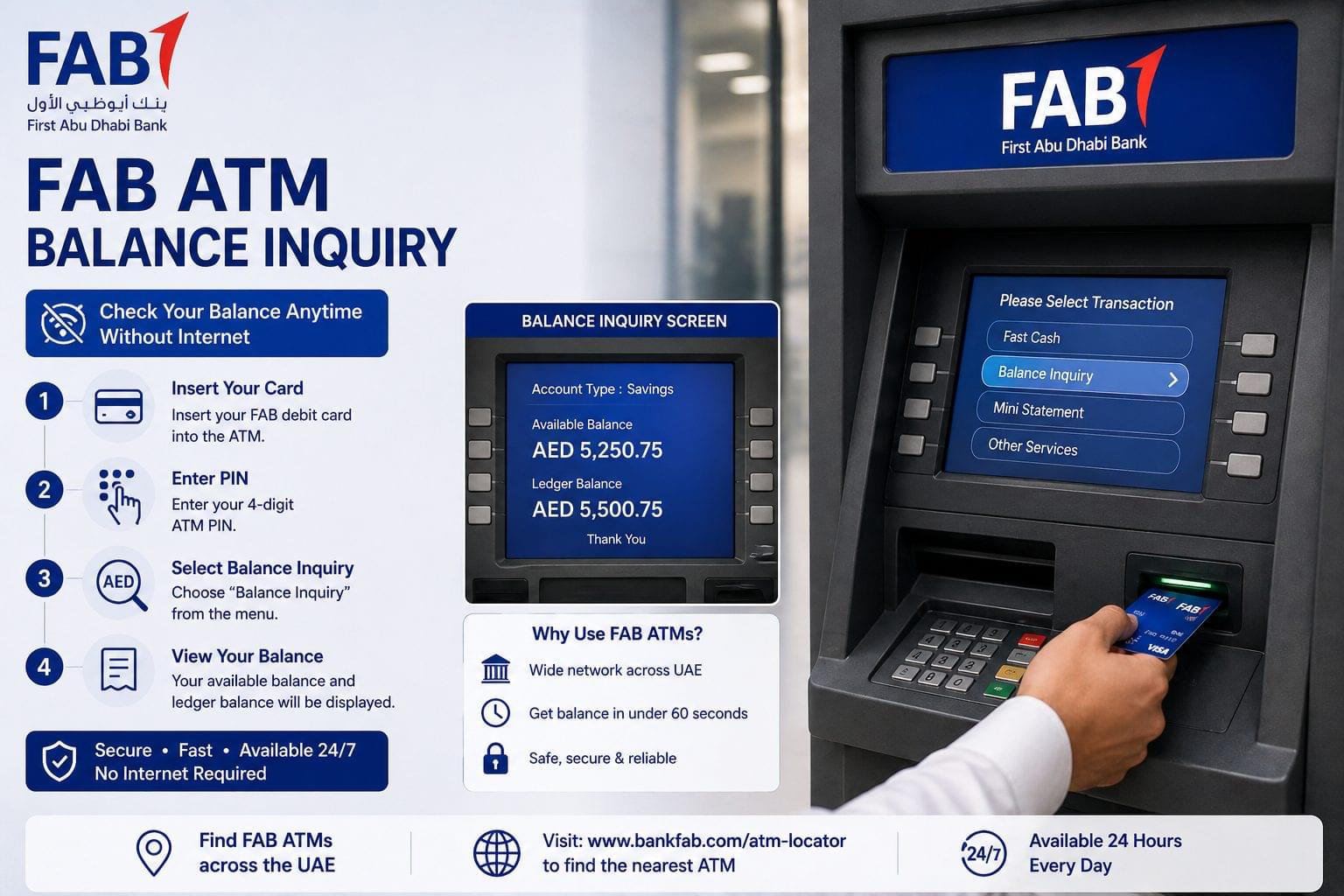
FAB’s 400 ATMs across the UAE display account balance at no charge for FAB cardholders using FAB-network ATMs. Balance enquiry at non-FAB UAE ATMs incurs a fee of approximately AED 1.00 per transaction.
Steps to check FAB balance at an ATM:
- Insert the FAB debit card or Ratibi card into the ATM.
- Enter the 4-digit PIN.
- Select Balance Inquiry from the main menu.
FAB-network ATMs are located across Abu Dhabi, Dubai, and Sharjah, with additional terminals in Ajman, Ras Al Khaimah, and Fujairah.
How to Check FAB Balance via Payit Digital Wallet
Payit displays FAB wallet balance within 10 seconds of login using a 6-digit passcode or biometric authentication on iOS and Android devices. Ratibi cardholders link their cards to Payit to access balance information and initiate peer-to-peer (P2P) transfers from a single interface.
Steps to check balance via Payit:
- Open the Payit app on an iOS or Android device.
- Log in using passcode or biometric authentication.
- Tap Wallet Balance on the home screen.
How to Check FAB Balance via Phone Banking IVR
The FAB IVR system at 600 52 5500 reads out account balance without requiring a live agent, using the registered mobile number for caller identification. The IVR balance enquiry operates 24 hours a day, 7 days a week.
Steps to check FAB balance via IVR:
- Call 600 52 5500 from the registered UAE mobile number.
- Select the balance enquiry option from the IVR menu.
- Listen to the available balance and ledger balance delivered by the automated system.
How to Check Ratibi Card Salary at Exchange House Partners
FAB’s 3 primary exchange house partners Lulu Exchange, Al Ansari Exchange, and Al Rostamani Exchange provide Ratibi card balance and salary credit enquiry at over 200 kiosk and counter locations across the UAE. Exchange house balance enquiry serves workers in industrial areas, labor camps, and locations with limited bank branch proximity.
Steps to check Ratibi salary at an exchange house:
- Visit a Lulu Exchange, Al Ansari Exchange, or Al Rostamani Exchange counter.
- Present the Ratibi card and a valid Emirates ID.
- Request a balance or salary credit confirmation from the counter agent.
Common FAB Balance Check Issues and Fixes
Why is the FAB balance not showing on the app?
The FAB balance does not display on the app when the cached session has expired or the app version is outdated. Clear the app cache via Settings > Apps > FAB Mobile > Clear Cache, then log in again. Update to the latest version from the App Store or Google Play, if the balance fails to display after clearing cache.
Why is the SMS balance reply not received from 2121?
The 2121 SMS balance reply is not received when the registered mobile number is inactive, ported to a different operator, or not linked to the account. Update the registered mobile number at any FAB branch, ATM, or by calling 600 52 5500 to restore SMS Banking access.
Why is the Ratibi card showing as blocked on the Magnati portal?
The Ratibi card shows a blocked status on ppc.magnati.com when 3 consecutive incorrect PIN entries are recorded or when the employer has placed a salary hold via the Wage Protection System. Call 600 52 5500 to unblock the card after identity verification.
Why is the ATM balance different from the app balance?
The ATM displays the ledger balance, which includes pending transactions not yet cleared. The FAB Mobile App displays both the available balance and ledger balance separately. The difference between the 2 figures is the total value of uncleared pending transactions.
Why is the FAB online banking login failing?
The FAB online banking login fails when the push notification approval on the FAB Mobile App is not completed within 60 seconds of the login attempt. Restart the login and approve the push notification immediately upon receipt on the registered device.
FAB Balance Check Frequently Asked Questions
What is the FAB balance check number?
The FAB balance check number is 600 52 5500 for UAE callers and +971 2 681 1511 for international callers. Both numbers provide access to the IVR balance enquiry system and the AI Virtual Agent.
What is an FAB balance enquiry?
An FAB balance enquiry is the process of retrieving the current available balance and ledger balance of a First Abu Dhabi Bank account or prepaid card through one of 10 verified digital, SMS, or physical channels. FAB balance enquiry is available 24 hours a day, 7 days a week at no charge via the FAB Mobile App, SMS shortcode 2121, and bankfab.com.
Is an FAB balance check free of charge?
FAB balance check is free of charge via the FAB Mobile App, bankfab.com, FAB-network ATMs, and SMS Banking 2121. Balance enquiry at non-FAB UAE ATMs costs approximately AED 1.00 per transaction.
What is the FAB SMS balance check command?
The FAB account balance SMS command is BAL [last 4 digits of account number] sent to 2121. The FAB credit card balance SMS command is CBAL [last 4 digits of card number] sent to 2121.
How do Ratibi cardholders check their salary credit online?
Ratibi cardholders check salary credit online via the Magnati PPC portal at ppc.magnati.com using the last 2 digits of the card number and the printed Card ID. Salary credit is also confirmed by a free SMS notification sent by FAB at the moment of Wage Protection System deposit by the employer.
Does FAB have a USSD code for balance check?
FAB does not offer a USSD balance check code. Balance check without internet access is available through SMS Banking 2121 using the BAL command and through FAB-network ATMs using a debit card and PIN.
What is the FAB SWIFT code?
The FAB SWIFT code is NBADAEAAXXX. This code is required for all incoming international wire transfers to First Abu Dhabi Bank accounts in the UAE.
What is the minimum balance for an FAB current account?
The FAB Personal Current Account requires a minimum monthly average balance of AED 3,000 to avoid a fall-below fee of approximately AED 25 per month. The FAB One Account requires a monthly salary of AED 10,000 with no minimum balance requirement.
How long does an FAB ATM balance enquiry take?
An FAB ATM balance enquiry takes under 60 seconds from card insertion to balance display across 3 steps: card insertion, PIN entry, and Balance Inquiry selection.
Can the FAB balance check be performed outside the UAE?
FAB balance check outside the UAE is available via the FAB Mobile App, bankfab.com, and the international phone banking number +971 2 681 1511. ATM balance enquiry outside the UAE is available on all Visa and Mastercard network ATMs, subject to the ATM operator’s fee schedule.
How do FAB Elite account holders check their balance?
FAB Elite account holders check balance via the FAB Mobile App, bankfab.com, and by calling the dedicated Elite banking line at 600 52 5500 and selecting the Elite service option. Elite accounts display multi-currency balances across all linked accounts in a single dashboard view.
What is the difference between available balance and ledger balance on FAB?
The available balance is the amount cleared for immediate spending, excluding any pending transactions. The ledger balance is the total account balance including all pending and uncleared transactions. Both figures display on the FAB Mobile App dashboard and on bankfab.com simultaneously.